ETJava Beta | Java
 注册
登录
注册
登录
注册
登录
注册
登录
<link rel="stylesheet" href="https://stackpath.bootstrapcdn.com/bootstrap/4.3.1/css/bootstrap.min.css">
<table class="table" id="editableTable">
  <tr>
    <td>单元格1</td>
    <td>单元格2</td>
  </tr>
  <tr>
    <td>单元格3</td>
    <td>单元格4</td>
  </tr>
</table>

<script>
document.getElementById('editableTable').addEventListener('dblclick', function(e) {
  var target = e.target;
  if (target.tagName.toLowerCase() === 'td') {
    var text = target.innerText;
    var input = document.createElement('input');
    input.type = 'text';
    input.value = text;
    input.addEventListener('blur', function() {
      target.innerText = input.value;
    });
    target.innerText = '';
    target.appendChild(input);
    input.focus();
  }
});
</script>

<!DOCTYPE html>
<html lang="en">
<head>
    <meta charset="UTF-8">
    <title>Double Click Editable Table</title>
    <link rel="stylesheet" href="https://stackpath.bootstrapcdn.com/bootstrap/4.3.1/css/bootstrap.min.css">
    <script src="https://code.jquery.com/jquery-3.3.1.slim.min.js"></script>
    <script src="https://cdnjs.cloudflare.com/ajax/libs/popper.js/1.14.7/umd/popper.min.js"></script>
    <script src="https://stackpath.bootstrapcdn.com/bootstrap/4.3.1/js/bootstrap.min.js"></script>
    <style>
        .editable {
            font-weight: bold;
            border: 1px solid #ccc;
            padding: 5px;
        }
    </style>
</head>
<body>

<div class="container">
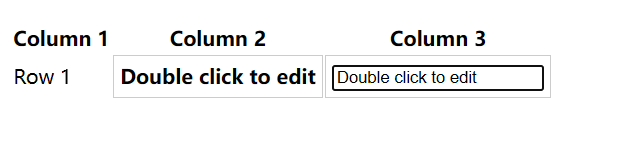
    <table class="table table-bordered">
        <thead>
            <tr>
                <th>Column 1</th>
                <th>Column 2</th>
                <th>Column 3</th>
            </tr>
        </thead>
        <tbody>
            <tr>
                <td>Row 1</td>
                <td class="editable">Double click to edit</td>
                <td class="editable">Double click to edit</td>
            </tr>
            <!-- Add more rows here as needed -->
        </tbody>
    </table>
</div>

<script>
    $(document).on('dblclick', '.editable', function() {
        var originalContent = $(this).html();
        $(this).html('<input type="text" class="form-control" value="' + originalContent + '" />');
        $(this).find('input').focus();
    });

    $(document).on('blur', '.editable input', function() {
        $(this).parent().html($(this).val());
    });
</script>

</body>
</html>
 官方公众号
官方公众号
