ETJava Beta | Java
 注册
登录
注册
登录
注册
登录
注册
登录
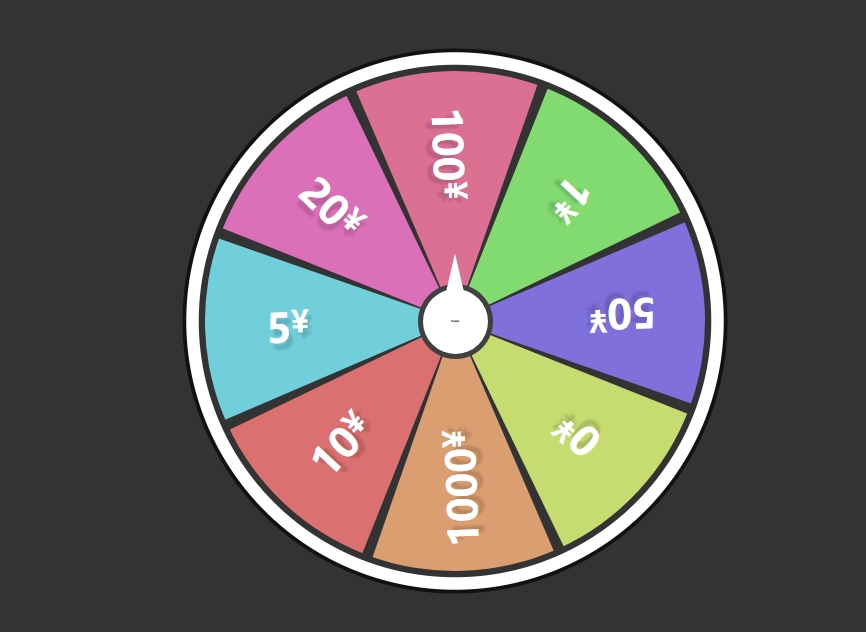
<!DOCTYPE html>
<html lang="en">
<head>
  <meta charset="UTF-8">
  <meta http-equiv="X-UA-Compatible" content="IE=edge">
  <meta name="viewport" content="width=device-width, initial-scale=1.0">
  <link rel="stylesheet" href="style.css">
  <title>Spin Wheel</title>
</head>
<body>
  <div class="container">
    <div class="spinBtn">开始抽奖</div>
    <div class="wheel">
      <div class="number" style="--i:1;--clr:#db7093;"><span>100</span></div>
      <div class="number" style="--i:2;--clr:#82db70;"><span>1</span></div>
      <div class="number" style="--i:3;--clr:#8070db;"><span>50</span></div>
      <div class="number" style="--i:4;--clr:#c6db70;"><span>0</span></div>
      <div class="number" style="--i:5;--clr:#db9e70;"><span>1000</span></div>
      <div class="number" style="--i:6;--clr:#db7070;"><span>10</span></div>
      <div class="number" style="--i:7;--clr:#70cfdb;"><span>5</span></div>
      <div class="number" style="--i:8;--clr:#db70b9;"><span>20</span></div>
    </div>
  </div>
  <script>
      const btn =  document.querySelector(".spinBtn");
      const wheel =  document.querySelector(".wheel");
      let value = Math.ceil(Math.random()*3600)
      btn.onclick= function(){
        wheel.style.transform = "rotate("+value+"deg)";
        value = Math.ceil(Math.random()*3600)

      }
  </script>
</body>
</html>
style.css
*{
  padding: 0px;
  margin: 0px;
  box-sizing: border-box;
}


body{
  display:  flex;
  align-items: center;
  justify-content: center;
  min-height: 100vh;
  background: #333;

}

.container{
  position: relative;
  width:400px;
  height: 400px;
  display: flex;
  align-items: center;
  justify-content: center;
}

.container .spinBtn{
  position: relative;
  background-color: #fff;
  width:60px;
  height:60px;
  background: #fff;
  border-radius: 50%;
  display: flex;
  align-items: center;
  justify-content: center;
  font-size: 0.1rem;
  font-weight: 600;
  border: 4px solid rgba(0,0,0,0.75);
  cursor: pointer;
  user-select: none;
  z-index: 2;
}

.container .spinBtn::before{
  content: '';
  position: absolute;
  top: -28px;
  width: 20px;
  height: 30px;
  background-color: #fff;
  clip-path: polygon(50% 0%,15% 100%,85% 100%)
}

.container .wheel{
  position: absolute;
  top:0;
  left:0;
  width: 100%;
  height: 100%;
  background: #333;
  border-radius: 50%;
  overflow: hidden;
  box-shadow:  0 0 0 5px #333,
  0 0 0 15px #fff,
  0 0 0 18px #111;
  transition: transform 5s ease-in-out;
}

.container .wheel .number {
  position: absolute;
  width: 50%;
  height: 50%;
  background:  var(--clr);
  transform-origin: bottom right;
  transform: rotate(calc(45deg * var(--i)));
  clip-path: polygon(0 0 ,56% 0, 100% 100% ,0 56%) ;
  display: flex;
  align-items: center;
  justify-content: center;
  cursor: pointer;
  user-select: none;
}

.container .wheel .number span{
  position: relative;
  transform: rotate(45deg);
  font-size: 2em;
  font-weight: 700;
  color: #fff;
  text-shadow:  3px 5px 2px rgba(0,0,0,0.15);
}

.container .wheel .number span::after{
  content: "¥";
  position: absolute;
  font-size: 0.75em;
  font-weight: 700;
}
 官方公众号
官方公众号
