ETJava Beta | Java
 注册
登录
注册
登录
注册
登录
注册
登录
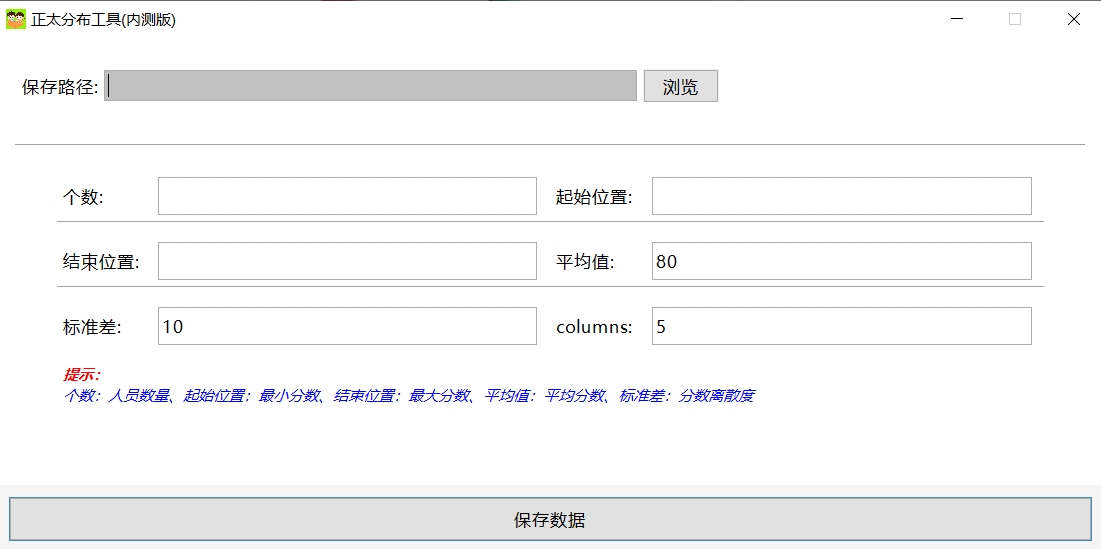
import org.apache.commons.math3.distribution.NormalDistribution;

import javax.swing.*;
import java.awt.*;
import java.awt.event.ActionEvent;
import java.awt.event.ActionListener;
import java.io.FileWriter;
import java.io.IOException;

/*

    author: ETJAVA
    time: 2025/06/25
*/

public class FileSaveApp {
    private JFrame frame;
    private JTextField inputField;
    private JTextField countField;
    private JTextField startField;
    private JTextField endField;
    private JTextField meanField;
    private JTextField stdField;
    private JTextField colField;

    private JLabel endFieldHint;

    private Image backgroundImage;


    public static void main(String[] args) {
        EventQueue.invokeLater(() -> {
            try {
                UIManager.setLookAndFeel(UIManager.getSystemLookAndFeelClassName());
                FileSaveApp window = new FileSaveApp();
                window.frame.setVisible(true);
            } catch (Exception e) {
                e.printStackTrace();
            }
        });
    }

    public FileSaveApp() {
        initialize();
    }

    private void initialize() {
        frame = new JFrame();
        // 设置窗口图标
        Image icon = Toolkit.getDefaultToolkit().getImage(getClass().getResource("12.jpg"));
        frame.setIconImage(icon);
        frame.setTitle("正太分布工具(内测版)");
        frame.setSize(900, 450);
        frame.setResizable(false);
        frame.setLocationRelativeTo(null);
        frame.setDefaultCloseOperation(JFrame.EXIT_ON_CLOSE);
        frame.getContentPane().setLayout(new BorderLayout(10, 10));
        frame.getContentPane().setBackground(Color.WHITE);


        // 创建主面板
        JPanel mainPanel = new JPanel();
        mainPanel.setLayout(new BoxLayout(mainPanel, BoxLayout.Y_AXIS));
        mainPanel.setBorder(BorderFactory.createEmptyBorder(15, 15, 15, 15));
        mainPanel.setBackground(Color.WHITE);
        frame.getContentPane().add(mainPanel, BorderLayout.CENTER);
        // 文件路径选择面板
        JPanel pathPanel = new JPanel(new FlowLayout(FlowLayout.LEFT, 5, 10));
        pathPanel.setBackground(Color.WHITE);
        mainPanel.add(pathPanel);

        JLabel pathLabel = new JLabel("保存路径:");
        pathLabel.setFont(new Font("微软雅黑", Font.PLAIN, 14));
        pathPanel.add(pathLabel);

        inputField = new JTextField();
        inputField.setEditable(false);
        inputField.setBackground(Color.LIGHT_GRAY);
        inputField.setFont(new Font("微软雅黑", Font.PLAIN, 14));
        inputField.setColumns(30);
        pathPanel.add(inputField);

        JButton browseButton = new JButton("浏览");
        browseButton.setFont(new Font("微软雅黑", Font.PLAIN, 14));
        browseButton.addActionListener(new ActionListener() {
            public void actionPerformed(ActionEvent e) {
                JFileChooser fileChooser = new JFileChooser();
                int result = fileChooser.showSaveDialog(frame);
                if (result == JFileChooser.APPROVE_OPTION) {
                    inputField.setText(fileChooser.getSelectedFile().getAbsolutePath());
                }
            }
        });
        pathPanel.add(browseButton);

        // 添加分隔线
        JSeparator separator = new JSeparator();
        mainPanel.add(separator);
        mainPanel.add(Box.createRigidArea(new Dimension(0, 10)));

        // 数据输入面板 - 居中显示
        JPanel centeredInputPanel = new JPanel(new FlowLayout(FlowLayout.CENTER));
        centeredInputPanel.setBackground(Color.WHITE);
        mainPanel.add(centeredInputPanel);

        // 数据输入网格
        JPanel inputFieldsPanel = new JPanel(new GridBagLayout());
        inputFieldsPanel.setBackground(Color.WHITE);
        inputFieldsPanel.setBorder(BorderFactory.createEmptyBorder(5, 10, 5, 10));
        centeredInputPanel.add(inputFieldsPanel);

        GridBagConstraints gbc = new GridBagConstraints();
        gbc.insets = new Insets(5, 5, 15, 5);
        gbc.fill = GridBagConstraints.HORIZONTAL;
        gbc.anchor = GridBagConstraints.WEST;

        // 配置标签和输入框的间距 - 紧挨着
        Insets labelInsets = new Insets(5, 5, 5, 0);  // 标签右侧无间距
        Insets fieldInsets = new Insets(5, -50, 5, 10); // 输入框左侧间距1px(非常接近)

        // 第一行:个数和起始位置
        gbc.gridx = 0;
        gbc.gridy = 0;
        gbc.weightx = 0.15;
        gbc.insets = labelInsets;
        JLabel countLabel = new JLabel("个数:");
        countLabel.setFont(new Font("微软雅黑", Font.PLAIN, 14));
        inputFieldsPanel.add(countLabel, gbc);

        gbc.gridx = 1;
        gbc.gridy = 0;
        gbc.weightx = 0.35;
        gbc.insets = fieldInsets;
        countField = new JTextField();
        countField.setFont(new Font("微软雅黑", Font.PLAIN, 14));
        countField.setPreferredSize(new Dimension(10, 30)); // 恢复为150px宽度
        inputFieldsPanel.add(countField, gbc);

        gbc.gridx = 2;
        gbc.gridy = 0;
        gbc.weightx = 0.15;
        gbc.insets = labelInsets;
        JLabel startLabel = new JLabel("起始位置:");
        startLabel.setFont(new Font("微软雅黑", Font.PLAIN, 14));
        inputFieldsPanel.add(startLabel, gbc);

        gbc.gridx = 3;
        gbc.gridy = 0;
        gbc.weightx = 0.35;
        gbc.insets = fieldInsets;
        startField = new JTextField();
        startField.setFont(new Font("微软雅黑", Font.PLAIN, 14));
        startField.setPreferredSize(new Dimension(10, 30)); // 恢复为150px宽度
        inputFieldsPanel.add(startField, gbc);

        // 分隔线
        gbc.gridx = 0;
        gbc.gridy = 1;
        gbc.gridwidth = 4;
        gbc.insets = new Insets(0, 0, 10, 0);
        JSeparator separator1 = new JSeparator();
        inputFieldsPanel.add(separator1, gbc);

        // 第二行:结束位置和平均值
        gbc.gridx = 0;
        gbc.gridy = 2;
        gbc.gridwidth = 1;
        gbc.weightx = 0.15;
        gbc.insets = labelInsets;
        JLabel endLabel = new JLabel("结束位置:");
        endLabel.setFont(new Font("微软雅黑", Font.PLAIN, 14));
        inputFieldsPanel.add(endLabel, gbc);

        gbc.gridx = 1;
        gbc.gridy = 2;
        gbc.weightx = 0.35;
        gbc.insets = fieldInsets;
        endField = new JTextField();
        endField.setFont(new Font("微软雅黑", Font.PLAIN, 14));
        endField.setPreferredSize(new Dimension(150, 30)); // 恢复为150px宽度
        inputFieldsPanel.add(endField, gbc);

        gbc.gridx = 2;
        gbc.gridy = 2;
        gbc.weightx = 0.15;
        gbc.insets = labelInsets;
        JLabel meanLabel = new JLabel("平均值:");
        meanLabel.setFont(new Font("微软雅黑", Font.PLAIN, 14));
        inputFieldsPanel.add(meanLabel, gbc);

        gbc.gridx = 3;
        gbc.gridy = 2;
        gbc.weightx = 0.35;
        gbc.insets = fieldInsets;
        meanField = new JTextField();
        meanField.setFont(new Font("微软雅黑", Font.PLAIN, 14));
        meanField.setPreferredSize(new Dimension(150, 30)); // 恢复为150px宽度
        meanField.setText("80");
        inputFieldsPanel.add(meanField, gbc);

        // 分隔线
        gbc.gridx = 0;
        gbc.gridy = 3;
        gbc.gridwidth = 4;
        gbc.insets = new Insets(0, 0, 10, 0);
        JSeparator separator2 = new JSeparator();
        inputFieldsPanel.add(separator2, gbc);

        // 第三行:标准差和columns
        gbc.gridx = 0;
        gbc.gridy = 4;
        gbc.gridwidth = 1;
        gbc.weightx = 0.15;
        gbc.insets = labelInsets;
        JLabel stdLabel = new JLabel("标准差:");
        stdLabel.setFont(new Font("微软雅黑", Font.PLAIN, 14));
        inputFieldsPanel.add(stdLabel, gbc);

        gbc.gridx = 1;
        gbc.gridy = 4;
        gbc.weightx = 0.35;
        gbc.insets = fieldInsets;
        stdField = new JTextField();
        stdField.setFont(new Font("微软雅黑", Font.PLAIN, 14));
        stdField.setPreferredSize(new Dimension(150, 30)); // 恢复为150px宽度
        stdField.setText("10");
        inputFieldsPanel.add(stdField, gbc);

        gbc.gridx = 2;
        gbc.gridy = 4;
        gbc.weightx = 0.15;
        gbc.insets = labelInsets;
        JLabel colLabel = new JLabel("columns:");
        colLabel.setFont(new Font("微软雅黑", Font.PLAIN, 14));
        inputFieldsPanel.add(colLabel, gbc);

        gbc.gridx = 3;
        gbc.gridy = 4;
        gbc.weightx = 0.35;
        gbc.insets = fieldInsets;
        colField = new JTextField();
        colField.setFont(new Font("微软雅黑", Font.PLAIN, 14));
        colField.setPreferredSize(new Dimension(150, 30)); // 恢复为150px宽度
        colField.setText("5");
        inputFieldsPanel.add(colField, gbc);

        // 提示信息 - 跨4列
        gbc.gridx = 0;
        gbc.gridy = 5;
        gbc.gridwidth = 4;
        gbc.insets = new Insets(10, 5, 5, 5);
        endFieldHint = new JLabel("<html><body style='width: 600px; text-align: left;'>" +
                "<div style='color:red'><b>提示:</b></div>" +
                "<div style='color:blue'>个数:人员数量、起始位置:最小分数、结束位置:最大分数、平均值:平均分数、标准差:分数离散度</div>" +
                "</body></html>");
        endFieldHint.setFont(new Font("微软雅黑", Font.ITALIC, 12));
        endFieldHint.setForeground(Color.GRAY);
        inputFieldsPanel.add(endFieldHint, gbc);

        // 底部面板
        JPanel bottomPanel = new JPanel(new BorderLayout());
        bottomPanel.setBackground(new Color(245, 245, 245));
        bottomPanel.setBorder(BorderFactory.createEmptyBorder(10, 10, 10, 10));
        frame.getContentPane().add(bottomPanel, BorderLayout.SOUTH);

        JButton saveButton = new JButton("保存数据");
        saveButton.setFont(new Font("微软雅黑", Font.PLAIN, 14));
        saveButton.setBackground(new Color(60, 141, 188));
        saveButton.setForeground(Color.BLACK);
        saveButton.setBorder(BorderFactory.createEmptyBorder(8, 25, 8, 25));
        saveButton.addActionListener(new ActionListener() {
            public void actionPerformed(ActionEvent e) {
                saveData();
            }
        });
        bottomPanel.add(saveButton, BorderLayout.CENTER);
    }

    // 优化的错误提示对话框方法
    private void showErrorDialog(String message) {
        JOptionPane.showMessageDialog(
                frame,
                message,
                "错误",
                JOptionPane.ERROR_MESSAGE,
                null  // 使用系统默认图标
        );
    }

    private void saveData() {
        String filePath = inputField.getText();
        String countStr = countField.getText();
        String startStr = startField.getText();
        String endStr = endField.getText();
        String meanStr = meanField.getText();
        String stdStr = stdField.getText();
        String colStr = colField.getText();

        if (filePath.isEmpty()) {
            showErrorDialog("请指定保存路径");
            return;
        }

        try {
            int count = Integer.parseInt(countStr);
            int start = Integer.parseInt(startStr);
            int end = Integer.parseInt(endStr);
            int mean = Integer.parseInt(meanStr);
            int std = Integer.parseInt(stdStr);
            int col = Integer.parseInt(colStr);

            if (count < 0 || start < 0 || end <= start || col<=1) {
                JOptionPane.showMessageDialog(frame, "请输入有效的数值(个数>0,起始位置<结束位置)", "错误", JOptionPane.ERROR_MESSAGE);
                return;
            }

            if(mean<=0 || std<=0){
                JOptionPane.showMessageDialog(frame, "平均值或标准差数值无效", "错误", JOptionPane.ERROR_MESSAGE);
                return;
            }
            try (FileWriter writer = new FileWriter(filePath)) {
                String randomNum = random(count, start, end,mean,std,col);
                writer.write(randomNum);
                JOptionPane.showMessageDialog(frame, "数据已成功保存到:\n" + filePath, "成功", JOptionPane.INFORMATION_MESSAGE);
            }
        } catch (NumberFormatException ex) {
            JOptionPane.showMessageDialog(frame, "请输入有效的整数", "错误", JOptionPane.ERROR_MESSAGE);
        } catch (IOException ex) {
            JOptionPane.showMessageDialog(frame, "保存文件时出错: " + ex.getMessage(), "错误", JOptionPane.ERROR_MESSAGE);
        }
    }

    private String random(int count,int start,int end,int mean,int std,int col){
        StringBuffer buf = new StringBuffer();
        for (int a=0;a<count;a++){
            NormalDistribution distribution = new NormalDistribution(mean, std); // 均值50,标准差10
            for (int i = 0; i < col; i++) {
                double score = distribution.sample();
                score = Math.max(start, Math.min(end, score));
                buf.append(Math.round(score)+"\t");
            }
            buf.append("\n");

        }
        return buf.toString();
    }
}
Manifest-Version: 1.0
Created-By: 1.8.0_221 (Oracle Corporation)
Main-Class: FileSaveApp
Class-Path: commons-math3-3.6.1.jar
编译
javac -encoding UTF-8 -classpath ./commons-math3-3.6.1.jar FileSaveApp.java

打包
jar cvf youname.jar MANIFEST.MF FileSaveApp.class
Manifest-Version: 1.0
Created-By: 1.8.0_221 (Oracle Corporation)
Main-Class: FileSaveApp
Class-Path: commons-math3-3.6.1.jar
 官方公众号
官方公众号
