ETJava Beta | Java
 注册
登录
注册
登录
注册
登录
注册
登录
package com.et.work;

import java.awt.*;
import java.awt.event.ActionEvent;
import java.awt.event.MouseAdapter;
import java.awt.event.MouseEvent;
import java.io.*;
import java.text.SimpleDateFormat;
import java.util.*;
import java.util.List;
import java.util.Timer;
import javax.swing.*;
import javax.swing.filechooser.FileNameExtensionFilter;

public class StudentSelectorWithFileChooser2 {
    private static final String RESULT_FILE_NAME = "抽取结果记录.txt";
    private static ParticleFrame particleFrame;

    public static void main(String[] args) {
        try {
            UIManager.put("OptionPane.messageFont", new Font("微软雅黑", Font.PLAIN, 16));
        } catch (Exception e) {
            e.printStackTrace();
        }

        JFrame frame = new JFrame("学生随机抽取系统");
        frame.setDefaultCloseOperation(JFrame.EXIT_ON_CLOSE);
        frame.setSize(600, 200);
        frame.setLocationRelativeTo(null);
        frame.setResizable(false);

        JPanel mainPanel = new JPanel(new BorderLayout(10, 20));
        mainPanel.setBorder(BorderFactory.createEmptyBorder(20, 20, 20, 20));

        JPanel filePathPanel = new JPanel(new FlowLayout(FlowLayout.LEFT, 10, 0));
        JTextField filePathField = new JTextField(25);
        filePathField.setPreferredSize(new Dimension(300, 30));

        JButton browseBtn = new JButton("浏览...");
        browseBtn.setPreferredSize(new Dimension(80, 30));
        browseBtn.addActionListener((e) -> {
            JFileChooser fileChooser = new JFileChooser();
            fileChooser.setDialogTitle("选择学生名单文件");
            fileChooser.setPreferredSize(new Dimension(800, 600));
            fileChooser.setCurrentDirectory(new File(System.getProperty("user.home") + "/Desktop"));
            fileChooser.setFileFilter(new FileNameExtensionFilter("文本文件 (*.txt)", "txt"));

            int result = fileChooser.showOpenDialog(frame);
            if (result == JFileChooser.APPROVE_OPTION) {
                filePathField.setText(fileChooser.getSelectedFile().getAbsolutePath());
            }
        });

        filePathPanel.add(new JLabel("学生名单文件:"));
        filePathPanel.add(filePathField);
        filePathPanel.add(browseBtn);

        JPanel buttonPanel = new JPanel(new FlowLayout(FlowLayout.CENTER));
        JButton selectBtn = new JButton("开始抽取");
        selectBtn.setPreferredSize(new Dimension(120, 40));
        selectBtn.setFont(new Font("微软雅黑", Font.BOLD, 14));
        selectBtn.addActionListener((e) -> {
            String filePath = filePathField.getText().trim();
            if (filePath.isEmpty()) {
                JOptionPane.showMessageDialog(frame, "请先选择学生名单文件", "提示", JOptionPane.WARNING_MESSAGE);
                return;
            }

            List<String> students = readStudentsFromFile(filePath);
            if (students.isEmpty()) {
                JOptionPane.showMessageDialog(frame, "未读取到学生信息,请检查文件", "错误", JOptionPane.ERROR_MESSAGE);
                return;
            }

            String selected = students.get(new Random().nextInt(students.size()));
            startParticleAnimation();
            showResultDialog(selected);
            stopParticleAnimation();
            boolean writeSuccess = writeResultToFile(selected, filePath);
            if (!writeSuccess) {
                JOptionPane.showMessageDialog(frame, "抽取结果已显示,但记录文件写入失败!", "警告", JOptionPane.WARNING_MESSAGE);
            }
        });

        buttonPanel.add(selectBtn);
        mainPanel.add(filePathPanel, BorderLayout.NORTH);
        mainPanel.add(buttonPanel, BorderLayout.CENTER);

        frame.getContentPane().add(mainPanel);
        frame.setVisible(true);
    }

    private static void startParticleAnimation() {
        if (particleFrame == null || !particleFrame.isVisible()) {
            particleFrame = new ParticleFrame();
            particleFrame.setVisible(true);
        }
    }

    private static void stopParticleAnimation() {
        if (particleFrame != null) {
            particleFrame.stopAnimation();
            particleFrame.dispose();
            particleFrame = null;
        }
    }

    private static void showResultDialog(String studentName) {
        JDialog dialog = new JDialog();
        dialog.setTitle("抽取结果");
        dialog.setModal(true);
        dialog.setSize(500, 300);
        dialog.setLocationRelativeTo(null);
        dialog.setResizable(false);
        dialog.setAlwaysOnTop(true);

        JPanel mainPanel = new JPanel();
        mainPanel.setLayout(new BoxLayout(mainPanel, BoxLayout.Y_AXIS));
        mainPanel.setBorder(BorderFactory.createEmptyBorder(30, 40, 20, 40));
        mainPanel.setBackground(Color.WHITE);

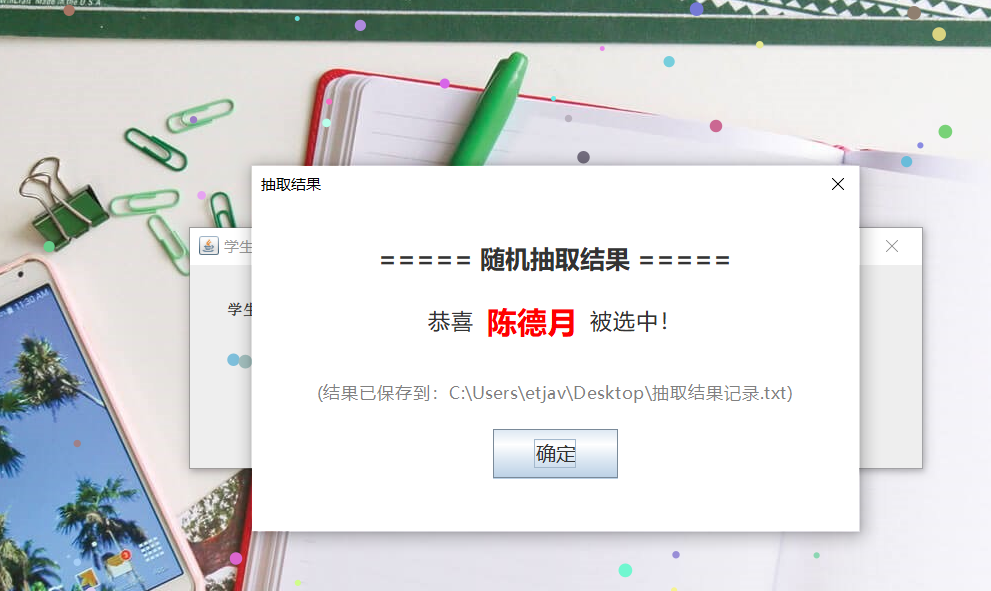
        JLabel titleLabel = new JLabel("===== 随机抽取结果 =====");
        titleLabel.setFont(new Font("微软雅黑", Font.BOLD, 20));
        titleLabel.setAlignmentX(Component.CENTER_ALIGNMENT);
        mainPanel.add(titleLabel);

        mainPanel.add(Box.createRigidArea(new Dimension(0, 20)));

        JPanel textPanel = new JPanel(new FlowLayout(FlowLayout.CENTER, 5, 0));
        textPanel.setBackground(Color.WHITE);

        JLabel msgLabel = new JLabel("恭喜 ");
        msgLabel.setFont(new Font("微软雅黑", Font.PLAIN, 18));

        JLabel nameLabel = new JLabel(studentName);
        nameLabel.setFont(new Font("微软雅黑", Font.BOLD, 24));
        nameLabel.setForeground(Color.RED);

        JLabel endLabel = new JLabel(" 被选中!");
        endLabel.setFont(new Font("微软雅黑", Font.PLAIN, 18));

        textPanel.add(msgLabel);
        textPanel.add(nameLabel);
        textPanel.add(endLabel);
        textPanel.setAlignmentX(Component.CENTER_ALIGNMENT);
        mainPanel.add(textPanel);

        String currentDir = System.getProperty("user.dir");
        JLabel saveLabel = new JLabel("(结果已保存到:" + currentDir + File.separator + RESULT_FILE_NAME + ")");
        saveLabel.setFont(new Font("微软雅黑", Font.PLAIN, 14));
        saveLabel.setForeground(Color.GRAY);
        saveLabel.setAlignmentX(Component.CENTER_ALIGNMENT);
        mainPanel.add(Box.createRigidArea(new Dimension(0, 15)));
        mainPanel.add(saveLabel);

        JPanel btnPanel = new JPanel(new FlowLayout(FlowLayout.CENTER));
        btnPanel.setBorder(BorderFactory.createEmptyBorder(15, 0, 0, 0));
        btnPanel.setBackground(Color.WHITE);

        JButton confirmBtn = new JButton("确定");
        confirmBtn.setPreferredSize(new Dimension(100, 40));
        confirmBtn.setFont(new Font("微软雅黑", Font.PLAIN, 16));
        confirmBtn.addActionListener((e) -> dialog.dispose());

        btnPanel.add(confirmBtn);
        mainPanel.add(btnPanel);

        dialog.getContentPane().add(mainPanel);
        dialog.setVisible(true);
    }

    static class ParticleFrame extends JFrame {
        private final List<Particle> particles = new ArrayList<>();
        private final Timer timer = new Timer();
        private boolean isStopped = false;

        public ParticleFrame() {
            setUndecorated(true);
            setExtendedState(JFrame.MAXIMIZED_BOTH);
            setBackground(new Color(0, 0, 0, 0));
            setAlwaysOnTop(true);

            Random random = new Random();
            Toolkit toolkit = Toolkit.getDefaultToolkit();
            Dimension screenSize = toolkit.getScreenSize();
            int screenWidth = screenSize.width;
            int screenHeight = screenSize.height;

            // 增加粒子数量到150个,增强视觉效果
            for (int i = 0; i < 150; i++) {
                int x = random.nextInt(screenWidth);
                int y = random.nextInt(screenHeight) - screenHeight;
                int size = random.nextInt(8) + 4;

                // 深色彩带设置
                // 1. 降低透明度(alpha值设为100-200,值越低越透明,但这里为了深色提高下限)
                // 2. 提高RGB颜色饱和度(限制在100-255,避免浅色)
                Color color = new Color(
                    random.nextInt(156) + 100,  // R: 100-255(确保红色足够鲜亮)
                    random.nextInt(156) + 100,  // G: 100-255(确保绿色足够鲜亮)
                    random.nextInt(156) + 100,  // B: 100-255(确保蓝色足够鲜亮)
                    255                         // 完全不透明(无透明度)
                );

                int speedY = random.nextInt(5) + 3;
                int speedX = random.nextInt(3) - 1;
                particles.add(new Particle(x, y, size, color, speedX, speedY));
            }

            timer.scheduleAtFixedRate(new TimerTask() {
                @Override
                public void run() {
                    if (!isStopped) {
                        updateParticles();
                        repaint();
                    }
                }
            }, 0, 30);

            addMouseListener(new MouseAdapter() {
                @Override
                public void mouseClicked(MouseEvent e) {
                    stopAnimation();
                }
            });
        }

        private void updateParticles() {
            Dimension screenSize = Toolkit.getDefaultToolkit().getScreenSize();
            int screenHeight = screenSize.height;

            for (Particle particle : particles) {
                particle.y += particle.speedY;
                particle.x += particle.speedX;
                if (particle.y > screenHeight + particle.size) {
                    particle.y = -particle.size;
                    particle.x = new Random().nextInt(screenSize.width);
                }
            }
        }

        @Override
        public void paint(Graphics g) {
            super.paint(g);
            Graphics2D g2d = (Graphics2D) g;
            g2d.setRenderingHint(RenderingHints.KEY_ANTIALIASING, RenderingHints.VALUE_ANTIALIAS_ON);

            for (Particle particle : particles) {
                g2d.setColor(particle.color);
                g2d.fillOval(particle.x, particle.y, particle.size, particle.size);
            }
        }

        public void stopAnimation() {
            if (!isStopped) {
                isStopped = true;
                timer.cancel();
            }
        }

        static class Particle {
            int x, y, size, speedX, speedY;
            Color color;

            public Particle(int x, int y, int size, Color color, int speedX, int speedY) {
                this.x = x;
                this.y = y;
                this.size = size;
                this.color = color;
                this.speedX = speedX;
                this.speedY = speedY;
            }
        }
    }

    private static boolean writeResultToFile(String studentName, String sourceFilePath) {
        String currentDir = System.getProperty("user.dir");
        File resultFile = new File(currentDir, RESULT_FILE_NAME);

        SimpleDateFormat sdf = new SimpleDateFormat("yyyy-MM-dd HH:mm:ss");
        String time = sdf.format(new Date());

        String content = String.format(
            "抽取时间:%s%n" +
            "选中学生:%s%n" +
            "名单来源:%s%n" +
            "-------------------------%n",
            time, studentName, sourceFilePath
        );

        try (BufferedWriter writer = new BufferedWriter(new FileWriter(resultFile, true))) {
            writer.write(content);
            return true;
        } catch (IOException e) {
            System.err.println("写入结果文件失败:" + e.getMessage());
            return false;
        }
    }

    private static List<String> readStudentsFromFile(String filePath) {
        List<String> students = new ArrayList<>();
        try (BufferedReader br = new BufferedReader(new FileReader(filePath))) {
            String line;
            while ((line = br.readLine()) != null) {
                String name = line.trim();
                if (!name.isEmpty()) {
                    students.add(name);
                }
            }
        } catch (IOException e) {
            JOptionPane.showMessageDialog(null, "文件读取错误:" + e.getMessage(), "错误", JOptionPane.ERROR_MESSAGE);
        }
        return students;
    }
}
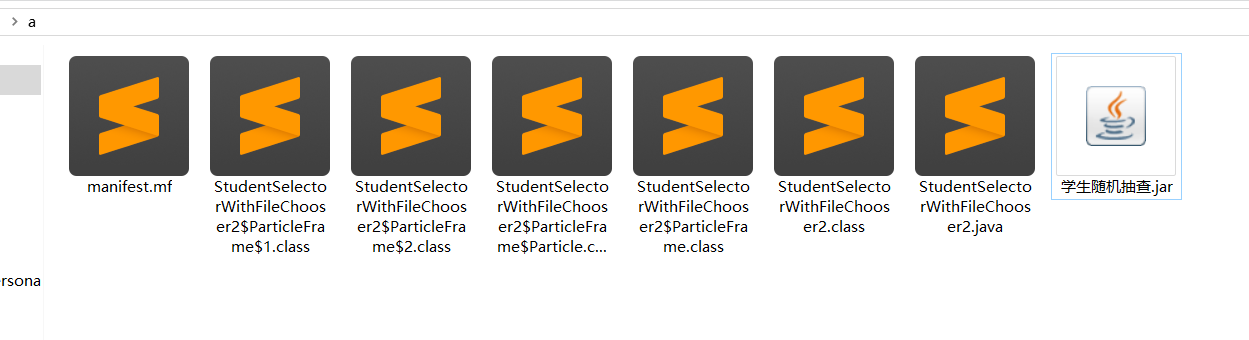
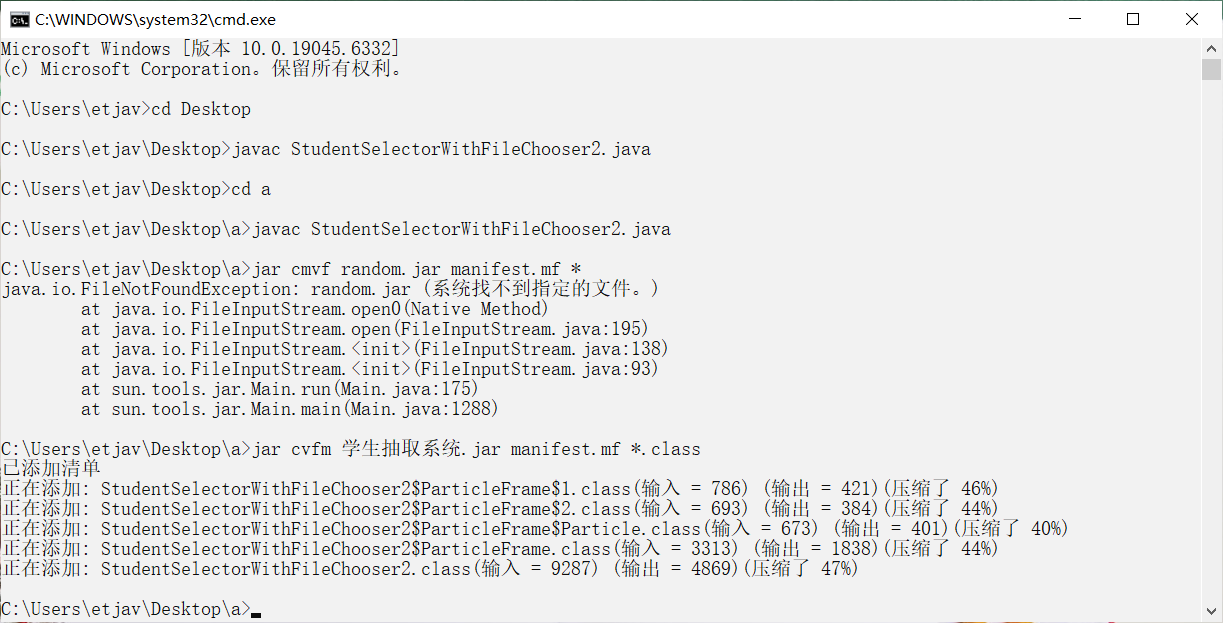
1 编译Java文件
javac StudentSelectorWithFileChooser.java

2 手动创建manifest.mf文件 添加如下内容 注意最后有一个空白行
Main-Class: StudentSelectorWithFileChooser
Class-Path: .

3 生成可执行jar
jar cvfm 学生随机检查.jar manifest.mf *.class
参数说明:
  c:创建新 JAR 包。
  v:显示打包过程(可选)。
  f:指定 JAR 文件名(这里是 学生随机检查.jar)。
  m:指定清单文件(这里是 manifest.mf)。
  *.class:打包当前目录下所有 .class 文件
 官方公众号
官方公众号
