ETJava Beta | Java
 注册
登录
注册
登录
注册
登录
注册
登录
#!/bin/bash
# Cross-compile environment for Android on ARM64 and x86
#
# Contents licensed under the terms of the OpenSSL license
# http://www.openssl.org/source/license.html
#
# See http://wiki.openssl.org/index.php/FIPS_Library_and_Android
#   and http://wiki.openssl.org/index.php/Android

#####################################################################

# Set ANDROID_NDK_ROOT to your NDK location. For example,
# /opt/android-ndk-r8e or /opt/android-ndk-r9. This can be done in a
# login script. If ANDROID_NDK_ROOT is not specified, the script will
# try to pick it up with the value of _ANDROID_NDK_ROOT below. If
# ANDROID_NDK_ROOT is set, then the value is ignored.
_ANDROID_NDK="android-ndk-r14b"
# _ANDROID_NDK="android-ndk-r10"

# Set _ANDROID_EABI to the EABI you want to use. You can find the
# list in $ANDROID_NDK_ROOT/toolchains. This value is always used.
_ANDROID_EABI="aarch64-linux-android-4.9"

# Set _ANDROID_ARCH to the architecture you are building for.
_ANDROID_ARCH=arch-arm64

# Set _ANDROID_API to the API you want to use. You should set it
# to one of: android-14, android-9, android-8, android-14, android-5
# android-4, or android-3. You can't set it to the latest (for
# example, API-17) because the NDK does not supply the platform.
_ANDROID_API="android-24"

#####################################################################

# If the user did not specify the NDK location, try and pick it up.
if [ -z "$ANDROID_NDK_ROOT" ]; then

  _ANDROID_NDK_ROOT=""
  if [ -d "/usr/local/$_ANDROID_NDK" ]; then
    _ANDROID_NDK_ROOT="/usr/local/$_ANDROID_NDK"
  fi

  if [ -d "/opt/$_ANDROID_NDK" ]; then
    _ANDROID_NDK_ROOT="/opt/$_ANDROID_NDK"
  fi

  if [ -d "$HOME/$_ANDROID_NDK" ]; then
    _ANDROID_NDK_ROOT="$HOME/$_ANDROID_NDK"
  fi

  if [ -d "$PWD/$_ANDROID_NDK" ]; then
    _ANDROID_NDK_ROOT="$PWD/$_ANDROID_NDK"
  fi

  # If a path was set, then export it
  if [ ! -z "$_ANDROID_NDK_ROOT" ] && [ -d "$_ANDROID_NDK_ROOT" ]; then
    export ANDROID_NDK_ROOT="$_ANDROID_NDK_ROOT"
  fi
fi

# Error checking
if [ -z "$ANDROID_NDK_ROOT" ] || [ ! -d "$ANDROID_NDK_ROOT" ]; then
  echo "Error: ANDROID_NDK_ROOT is not a valid path. Please edit this script."
  exit 1
fi

if [ ! -d "$ANDROID_NDK_ROOT/toolchains" ]; then
  echo "Error: ANDROID_NDK_ROOT/toolchains is not a valid path. Please edit this script."
  exit 1
fi

if [ ! -d "$ANDROID_NDK_ROOT/toolchains/$_ANDROID_EABI" ]; then
  echo "Error: ANDROID_EABI is not a valid path. Please edit this script."
  exit 1
fi

#####################################################################

# Based on ANDROID_NDK_ROOT, try and pick up the required toolchain.
ANDROID_TOOLCHAIN=""
for host in "linux-x86_64" "linux-x86" "darwin-x86_64" "darwin-x86"
do
  if [ -d "$ANDROID_NDK_ROOT/toolchains/$_ANDROID_EABI/prebuilt/$host/bin" ]; then
    ANDROID_TOOLCHAIN="$ANDROID_NDK_ROOT/toolchains/$_ANDROID_EABI/prebuilt/$host/bin"
    break
  fi
done

# Error checking
if [ -z "$ANDROID_TOOLCHAIN" ] || [ ! -d "$ANDROID_TOOLCHAIN" ]; then
  echo "Error: ANDROID_TOOLCHAIN is not valid. Please edit this script."
  exit 1
fi

case $_ANDROID_ARCH in
  arch-arm)
    ANDROID_TOOLS="arm-linux-androideabi-gcc arm-linux-androideabi-ranlib arm-linux-androideabi-ld"
    CROSS_COMPILE="arm-linux-androideabi-"
    ;;
  arch-arm64)
    ANDROID_TOOLS="aarch64-linux-android-gcc aarch64-linux-android-ranlib aarch64-linux-android-ld"
    CROSS_COMPILE="aarch64-linux-android-"
    ;;
  arch-x86)
    ANDROID_TOOLS="i686-linux-android-gcc i686-linux-android-ranlib i686-linux-android-ld"
    CROSS_COMPILE="i686-linux-android-"
    ;;
  *)
    echo "ERROR ERROR ERROR: Unknown architecture $_ANDROID_ARCH"
    exit 1
    ;;
esac

for tool in $ANDROID_TOOLS
do
  # Error checking
  if [ ! -e "$ANDROID_TOOLCHAIN/$tool" ]; then
    echo "Error: Failed to find $tool. Please edit this script."
    exit 1
  fi
done

# Only modify/export PATH if ANDROID_TOOLCHAIN is good
if [ ! -z "$ANDROID_TOOLCHAIN" ]; then
  export ANDROID_TOOLCHAIN="$ANDROID_TOOLCHAIN"
  export PATH="$ANDROID_TOOLCHAIN":"$PATH"
fi

#####################################################################

# For the Android SYSROOT. Can be used on the command line with --sysroot
export ANDROID_SYSROOT="$ANDROID_NDK_ROOT/platforms/$_ANDROID_API/$_ANDROID_ARCH"
export CROSS_SYSROOT="$ANDROID_SYSROOT"
export NDK_SYSROOT="$ANDROID_SYSROOT"

# Error checking
if [ -z "$ANDROID_SYSROOT" ] || [ ! -d "$ANDROID_SYSROOT" ]; then
  echo "Error: ANDROID_SYSROOT is not valid. Please edit this script."
  exit 1
fi

#####################################################################

# Set other environment variables for the build
export MACHINE=aarch64
export RELEASE=2.6.37
export SYSTEM=android
export ARCH=arm64
export CROSS_COMPILE="aarch64-linux-android-"

export ANDROID_DEV="$ANDROID_NDK_ROOT/platforms/$_ANDROID_API/$_ANDROID_ARCH/usr"
export HOSTCC=gcc

VERBOSE=1
if [ ! -z "$VERBOSE" ] && [ "$VERBOSE" != "0" ]; then
  echo "ANDROID_NDK_ROOT: $ANDROID_NDK_ROOT"
  echo "ANDROID_ARCH: $_ANDROID_ARCH"
  echo "ANDROID_EABI: $_ANDROID_EABI"
  echo "ANDROID_API: $ANDROID_API"
  echo "ANDROID_SYSROOT: $ANDROID_SYSROOT"
  echo "ANDROID_TOOLCHAIN: $ANDROID_TOOLCHAIN"
  echo "CROSS_COMPILE: $CROSS_COMPILE"
  echo "ANDROID_DEV: $ANDROID_DEV"
fi
上面的代码是 配置的OpenSSL 编译选项(shell 脚本)。复制代码后另存为Setenv-android.sh。
Openssl 源码库下载链接:
1、开始编译
终端设置ndk 路径: export ANDROID_NDK_ROOT=/home/lipan/androidsdk/android-ndk-r14b
2、执行shell 脚本:source 命令
将Setenv-android.sh 移动到 openssl 源代码文件夹终,然后在此处启动终端,输入:source ./Setenv-android.sh
3、创建输出静态库的文件夹 (桌面路径)
   mkdir /home/lipan/Desktop/output/

4、清理
make clean
5、配置openssl
./Configure android-arm64 \
    no-shared \
    no-ssl2 \
    no-ssl3 \
    no-comp \
    no-hw \
    no-engine \
    --openssldir=/home/lipan/Desktop/output/$ANDROID_API \
    --prefix=/home/lipan/Desktop/output/$ANDROID_API
6、编译(下面这2句代码都是对的)
make depend

make all -j$(nproc)
make all -j$(nproc) 命令用于在编译软件时启用并行化,以利用系统中的多个 CPU 核心
-j$(nproc):-j 标志用于指定同时运行的作业(或进程)数量。$(nproc) 是一个 shell 命令,它返回可用的处理单元数量(即 CPU 核心数量)
当你运行 make all -j$(nproc) 时,它会告知 make 使用与 CPU 核心数量相等的并行作业,这样可以显著加快构建过程。
7、最后一步:生成静态库
make install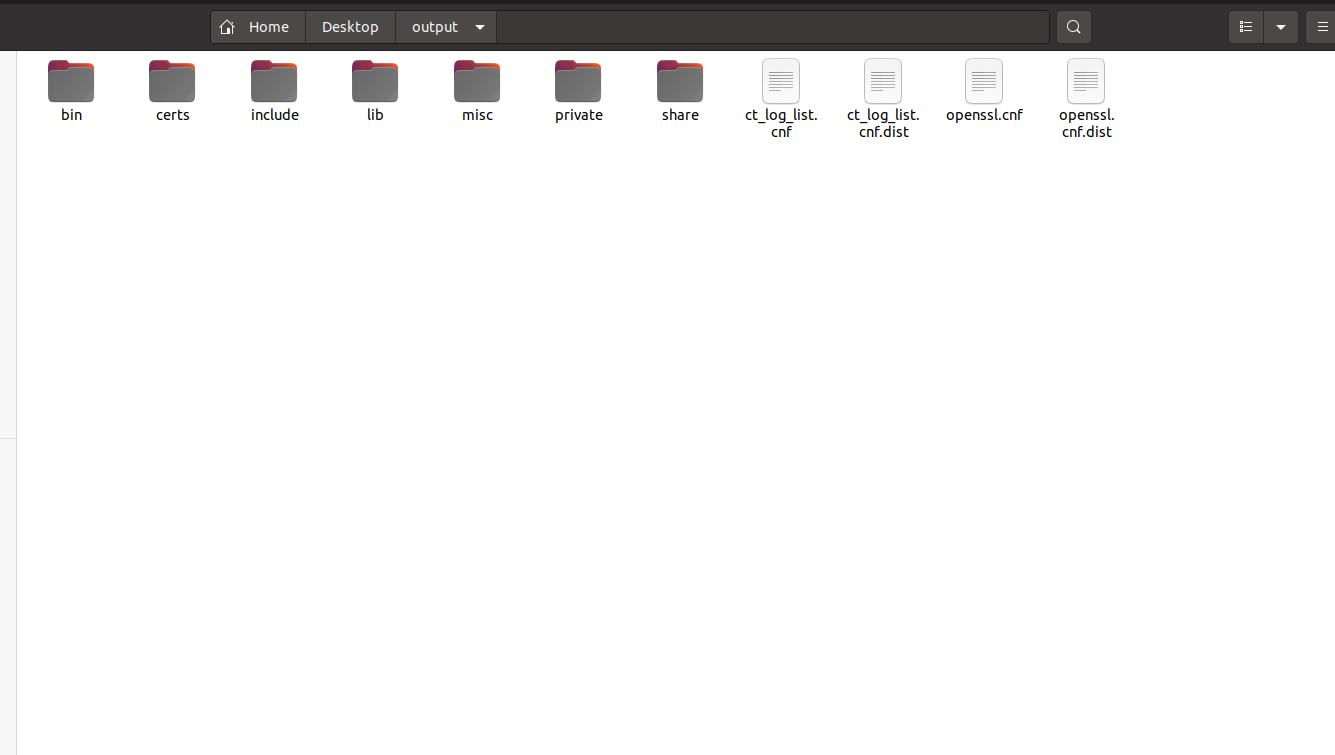
 官方公众号
官方公众号