ETJava Beta | Java
 注册
登录
注册
登录
注册
登录
注册
登录
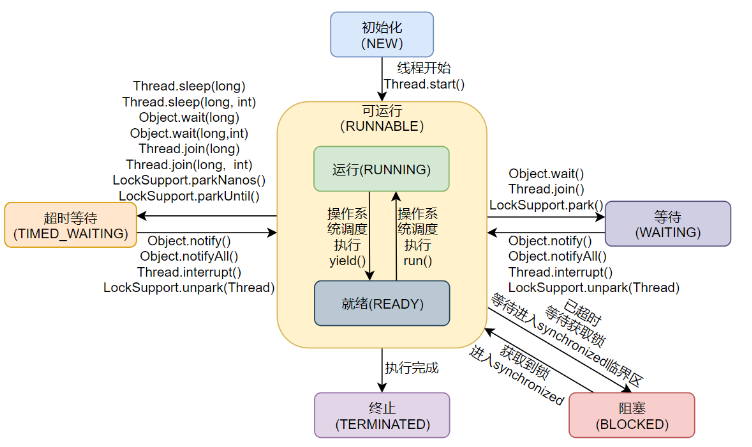
NEW:初始状态,线程被构建,但是还没有调用start()方法。
RUNNABLE:可运行状态,可运行状态可以包括:运行中状态和就绪状态。也就是 可能正在运行,也可能正在等待 CPU 时间片。
包含了操作系统线程状态中的 Running 和 Ready。
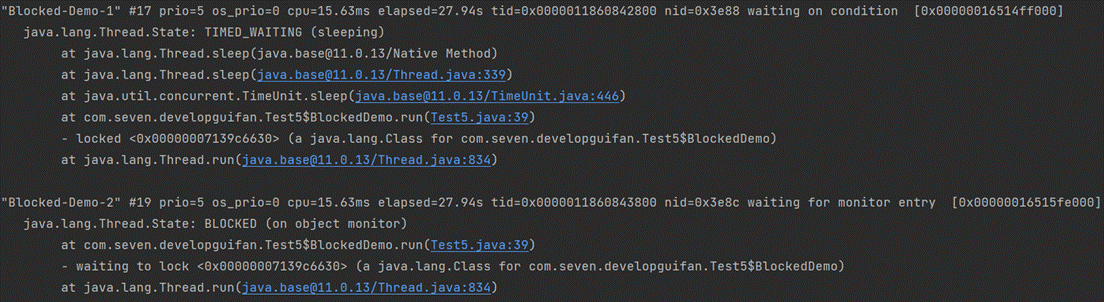
等待获取一个排它锁,如果其线程释放了锁就会结束此状态。
 new Thread(new BlockedDemo(),"Blocked-Demo-1").start();
 new Thread(new BlockedDemo(),"Blocked-Demo-2").start();

static class BlockedDemo extends Thread {
    @Override
    public void run() {
        while (true) {
            synchronized (BlockedDemo.class) {
                try {
                    TimeUnit.SECONDS.sleep(100);
                } catch (InterruptedException e) {
                    e.printStackTrace();
                }
            }
        }
    }
}
等待其它线程显式地唤醒,否则不会被分配 CPU 时间片。
| 进入方法 | 退出方法 |
|---|---|
| 没有设置 Timeout 参数的 Object.wait() 方法 | Object.notify() / Object.notifyAll() |
| 没有设置 Timeout 参数的 Thread.join() 方法 | 被调用的线程执行完毕 |
| LockSupport.park() 方法 | - |
new Thread(() -> {
    while (true) {
        synchronized (Test5.class) {
            try {
                Test5.class.wait();
            } catch (InterruptedException e) {
                e.printStackTrace();
            }
        }
    }
},"Waiting-Demo").start();

无需等待其它线程显式地唤醒,在一定时间之后会被系统自动唤醒。
调用 Thread.sleep() 方法使线程进入限期等待状态时,常常用“使一个线程睡眠”进行描述。
调用 Object.wait() 方法使线程进入限期等待或者无限期等待时,常常用“挂起一个线程”进行描述。
睡眠和挂起是用来描述行为,而阻塞和等待用来描述状态。
阻塞和等待的区别在于,阻塞是被动的,它是在等待获取一个排它锁。而等待是主动的,通过调用 Thread.sleep() 和 Object.wait() 等方法进入。
| 进入方法 | 退出方法 |
|---|---|
| Thread.sleep() 方法 | 时间结束 |
| 设置了 Timeout 参数的 Object.wait() 方法 | 时间结束 / Object.notify() / Object.notifyAll() |
| 设置了 Timeout 参数的 Thread.join() 方法 | 时间结束 / 被调用的线程执行完毕 |
| LockSupport.parkNanos() 方法 | - |
| LockSupport.parkUntil() 方法 | - |
new Thread(() -> {
    while (true) {
        try {
            TimeUnit.SECONDS.sleep(100);
        } catch (InterruptedException e) {
            e.printStackTrace();
        }
    }
}, "Time-Waiting-Demo").start();

可以是线程结束任务之后自己结束,或者产生了异常而结束。
有三种使用线程的方法:
实现 Runnable 接口;
实现 Callable 接口;
继承 Thread 类。
使用线程池
实现 Runnable 和 Callable 接口的类只能当做一个可以在线程中运行的任务,不是真正意义上的线程,因此最后还需要通过 Thread 来调用。可以说任务是通过线程驱动从而执行的。
同样也是需要实现 run() 方法,因为 Thread 类也实现了 Runable 接口。
当调用 start() 方法启动一个线程时,虚拟机会将该线程放入就绪队列中等待被调度,当一个线程被调度时会执行该线程的 run() 方法。
public class MyThread extends Thread {
    public void run() {
        // ...
    }
}
public static void main(String[] args) {
   MyThread mt = new MyThread();
   mt.start();
}
需要实现 run() 方法。
通过 Thread 调用 start() 方法来启动线程。
public class MyRunnable implements Runnable {
    public void run() {
        // ...
    }
}
public static void main(String[] args) {
    MyRunnable instance = new MyRunnable();
    Thread thread = new Thread(instance);
    thread.start();
}
与 Runnable 相比,Callable 可以有返回值,返回值通过 FutureTask 进行封装。
public class MyCallable implements Callable<Integer> {
    public Integer call() {
        return 123;
    }
}
public static void main(String[] args) throws ExecutionException, InterruptedException {
    MyCallable mc = new MyCallable();
    FutureTask<Integer> ft = new FutureTask<>(mc);
    Thread thread = new Thread(ft);
    thread.start();
    System.out.println(ft.get());
}
或者可以使用线程池进行执行
MyCallable myCallable = new MyCallable();
ExecutorService executorService = Executors.newFixedThreadPool(1);
Future<String> submit = executorService.submit(myCallable);
System.out.println(submit.get());
实现接口会更好一些,因为:
Java 不支持多重继承,因此继承了 Thread 类就无法继承其它类,但是可以实现多个接口;
类可能只要求可执行就行,继承整个 Thread 类开销过大。
守护线程是程序运行时在后台提供服务的线程,不属于程序中不可或缺的部分。
当所有非守护线程结束时,程序也就终止,同时会杀死所有守护线程。
main() 属于非守护线程。因此如果设置这个,可以让子线程随着主线程的退出而退出
使用 setDaemon() 方法将一个线程设置为守护线程。
public static void main(String[] args) {
    Thread thread = new Thread(new MyRunnable());
    thread.setDaemon(true);
}
Thread.sleep(millisec) 方法会休眠当前正在执行的线程,millisec 单位为毫秒。
sleep的工作流程:
sleep() 可能会抛出 InterruptedException,因为异常不能跨线程传播回 main() 中,因此必须在本地进行处理。线程中抛出的其它异常也同样需要在本地进行处理。
public void run() {
    try {
        Thread.sleep(3000);//并不意味着3秒后一定会执行,因为此时并不一定会将CPU资源分配给这个线程
    } catch (InterruptedException e) {
        e.printStackTrace();
    }
}
在线程中,调用sleep(0)可以释放cpu时间,让线程马上重新回到就绪队列而非等待队列,sleep(0)释放当前线程所剩余的时间片(如果有剩余的话),这样可以让操作系统切换其他线程来执行,提升效率。
Thread.Sleep(0) 并非是真的要线程挂起0毫秒,意义在于这次调用Thread.Sleep(0)的当前线程确实的被冻结了一下,让其他线程有机会优先执行。Thread.Sleep(0) 是你的线程暂时放弃cpu,也就是释放一些未用的时间片给其他线程或进程使用,就相当于一个让位动作。其实就等同于yield的用法
对静态方法 Thread.yield() 的调用声明了当前线程已经完成了生命周期中最重要的部分,可以切换给其它线程来执行。该方法只是对线程调度器的一个建议,而且也只是建议具有相同优先级的其它线程可以运行。
public void run() {
    Thread.yield();
}
stop 方法虽然可以停止线程,但它已经是不建议使用的废弃方法了,这一点可以通过 Thread 类中的源码发现,stop 源码如下:
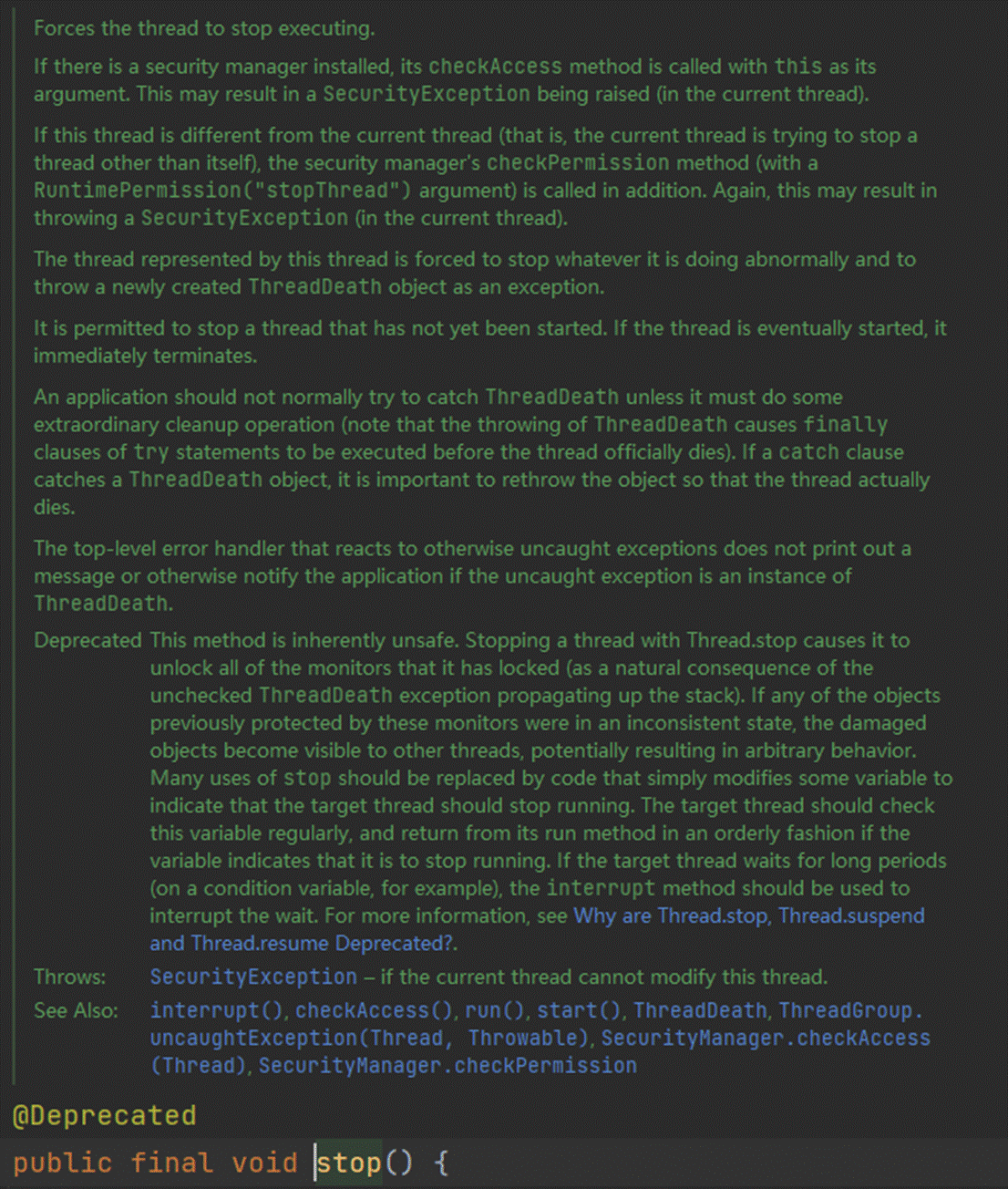
stop 方法是被 @Deprecated 修饰的不建议使用的过期方法,并且在注释的第一句话就说明了 stop 方法为非安全的方法。
原因在于它在终止一个线程时会强制中断线程的执行,不管run方法是否执行完了,并且还会释放这个线程所持有的所有的锁对象。这一现象会被其它因为请求锁而阻塞的线程看到,使他们继续向下执行。这就会造成数据的不一致。
比如银行转账,从A账户向B账户转账500元,这一过程分为三步,第一步是从A账户中减去500元,假如到这时线程就被stop了,那么这个线程就会释放它所取得锁,然后其他的线程继续执行,这样A账户就莫名其妙的少了500元而B账户也没有收到钱。这就是stop方法的不安全性。
如果线程的run方法中执行的是一个重复执行的循环,可以提供一个标记来控制循环是否继续
class FlagThread extends Thread {
    // 自定义中断标识符
    public volatile boolean isInterrupt = false;
    @Override
    public void run() {
        // 如果为 true -> 中断执行
        while (!isInterrupt) {
            // 业务逻辑处理
        }
    }
}
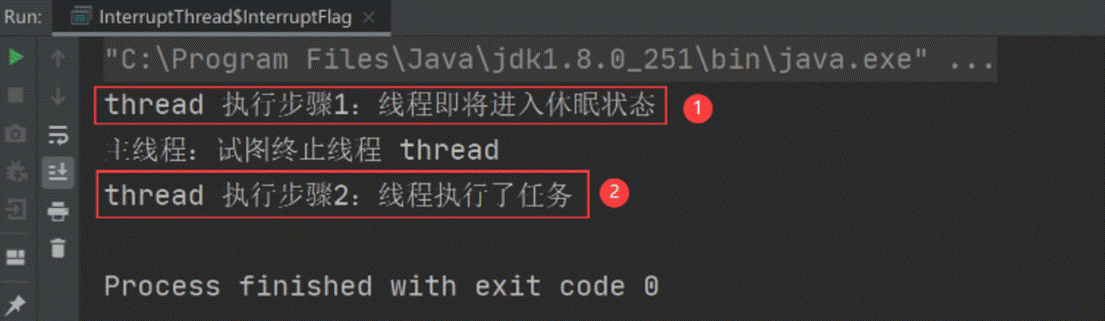
但自定义中断标识符的问题在于:线程中断的不够及时。因为线程在执行过程中,无法调用 while(!isInterrupt) 来判断线程是否为终止状态,它只能在下一轮运行时判断是否要终止当前线程,所以它中断线程不够及时,比如以下代码:
class InterruptFlag {
    // 自定义的中断标识符
    private static volatile boolean isInterrupt = false;

    public static void main(String[] args) throws InterruptedException {
        // 创建可中断的线程实例
        Thread thread = new Thread(() -> {
            while (!isInterrupt) { // 如果 isInterrupt=true 则停止线程
                System.out.println("thread 执行步骤1:线程即将进入休眠状态");
                try {
                    // 休眠 1s
                    Thread.sleep(1000);
                } catch (InterruptedException e) {
                    e.printStackTrace();
                }
                System.out.println("thread 执行步骤2:线程执行了任务");
            }
        });
        thread.start(); // 启动线程

        // 休眠 100ms,等待 thread 线程运行起来
        Thread.sleep(100);
        System.out.println("主线程:试图终止线程 thread");
        // 修改中断标识符,中断线程
        isInterrupt = true;
    }
}
输出:我们期望的是:线程执行了步骤 1 之后,收到中断线程的指令,然后就不要再执行步骤 2 了,但从上述执行结果可以看出,使用自定义中断标识符是没办法实现我们预期的结果的,这就是自定义中断标识符,响应不够及时的问题。
这种方式需要在while循环中判断使用
使用 interrupt 方法可以给执行任务的线程,发送一个中断线程的指令,它并不直接中断线程,而是发送一个中断线程的信号,把是否正在中断线程的主动权交给代码编写者。相比于自定义中断标识符而然,它能更及时的接收到中断指令,如下代码所示:
public static void main(String[] args) throws InterruptedException {
    // 创建可中断的线程实例
    Thread thread = new Thread(() -> {
        while (!Thread.currentThread().isInterrupted()) {
            System.out.println("thread 执行步骤1:线程即将进入休眠状态");
            try {
                // 休眠 1s
                Thread.sleep(1000);
            } catch (InterruptedException e) {
                System.out.println("thread 线程接收到中断指令,执行中断操作");
                // 中断当前线程的任务执行
                break;
            }
            System.out.println("thread 执行步骤2:线程执行了任务");
        }
    });
    thread.start(); // 启动线程

    // 休眠 100ms,等待 thread 线程运行起来
    Thread.sleep(100);
    System.out.println("主线程:试图终止线程 thread");
    // 修改中断标识符,中断线程
    thread.interrupt();
}
输出:
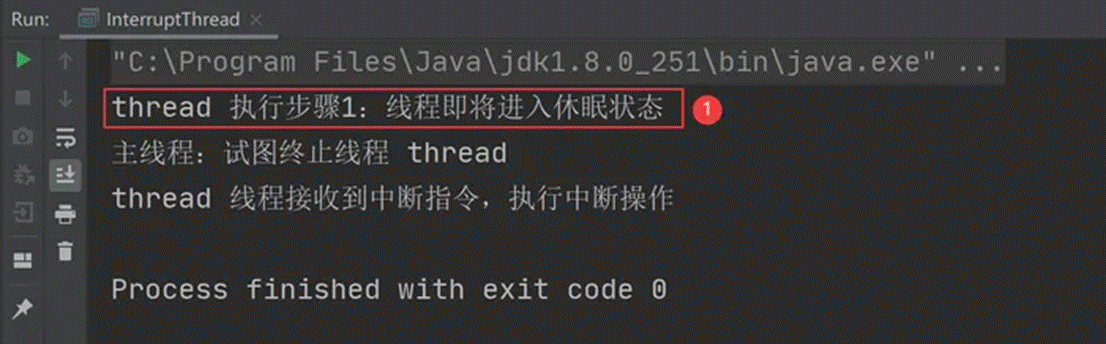
从上述结果可以看出,线程在接收到中断指令之后,立即中断了线程,相比于上一种自定义中断标识符的方法来说,它能更及时的响应中断线程指令。
这种方式 不 需要在while循环中判断使用
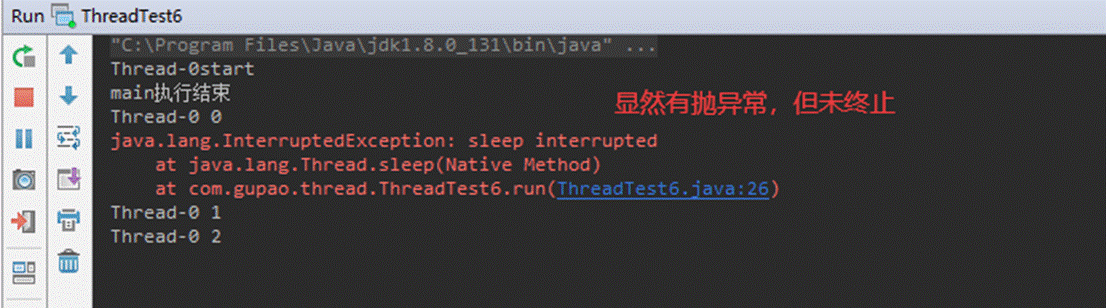
如果线程因为执行join(),sleep或者wait()而进入阻塞状态,此时想要停止它,可以调用interrupt(),程序会抛出interruptedException异常。可以利用这个异常终止线程
public void run() {
    System.out.println(this.getName() + "start");
    int i=0;
    //while (!Thread.interrupted()){
    while (!Thread.currentThread().isInterrupted()){
        try {
            Thread.sleep(10000);
        } catch (InterruptedException e) {
            //e.printStackTrace();
            System.out.println("中断线程");
            break;//通过识别到异常来中断
        }
        System.out.println(this.getName() + " "+ i);
        i++;
    }
    System.out.println(this.getName() + "end");
}
调用 Executor 的 shutdown() 方法会等待线程都执行完毕之后再关闭,但是如果调用的是 shutdownNow() 方法,则相当于调用每个线程的 interrupt() 方法。
以下使用 Lambda 创建线程,相当于创建了一个匿名内部线程。
public static void main(String[] args) {
    ExecutorService executorService = Executors.newCachedThreadPool();
    executorService.execute(() -> {
        try {
            Thread.sleep(2000);
            System.out.println("Thread run");
        } catch (InterruptedException e) {
            e.printStackTrace();
        }
    });
    executorService.shutdownNow();
    System.out.println("Main run");
}
Main run
java.lang.InterruptedException: sleep interrupted
    at java.lang.Thread.sleep(Native Method)
    at ExecutorInterruptExample.lambda$main$0(ExecutorInterruptExample.java:9)
    at ExecutorInterruptExample$$Lambda$1/1160460865.run(Unknown Source)
    at java.util.concurrent.ThreadPoolExecutor.runWorker(ThreadPoolExecutor.java:1142)
    at java.util.concurrent.ThreadPoolExecutor$Worker.run(ThreadPoolExecutor.java:617)
    at java.lang.Thread.run(Thread.java:745)
如果只想中断 Executor 中的一个线程,可以通过使用 submit() 方法来提交一个线程,它会返回一个 Future<?> 对象,通过调用该对象的 cancel(true) 方法就可以中断线程。
Future<?> future = executorService.submit(() -> {
    // ..
});
future.cancel(true);
当多个线程可以一起工作去解决某个问题时,如果某些部分必须在其它部分之前完成,那么就需要对线程进行协调。
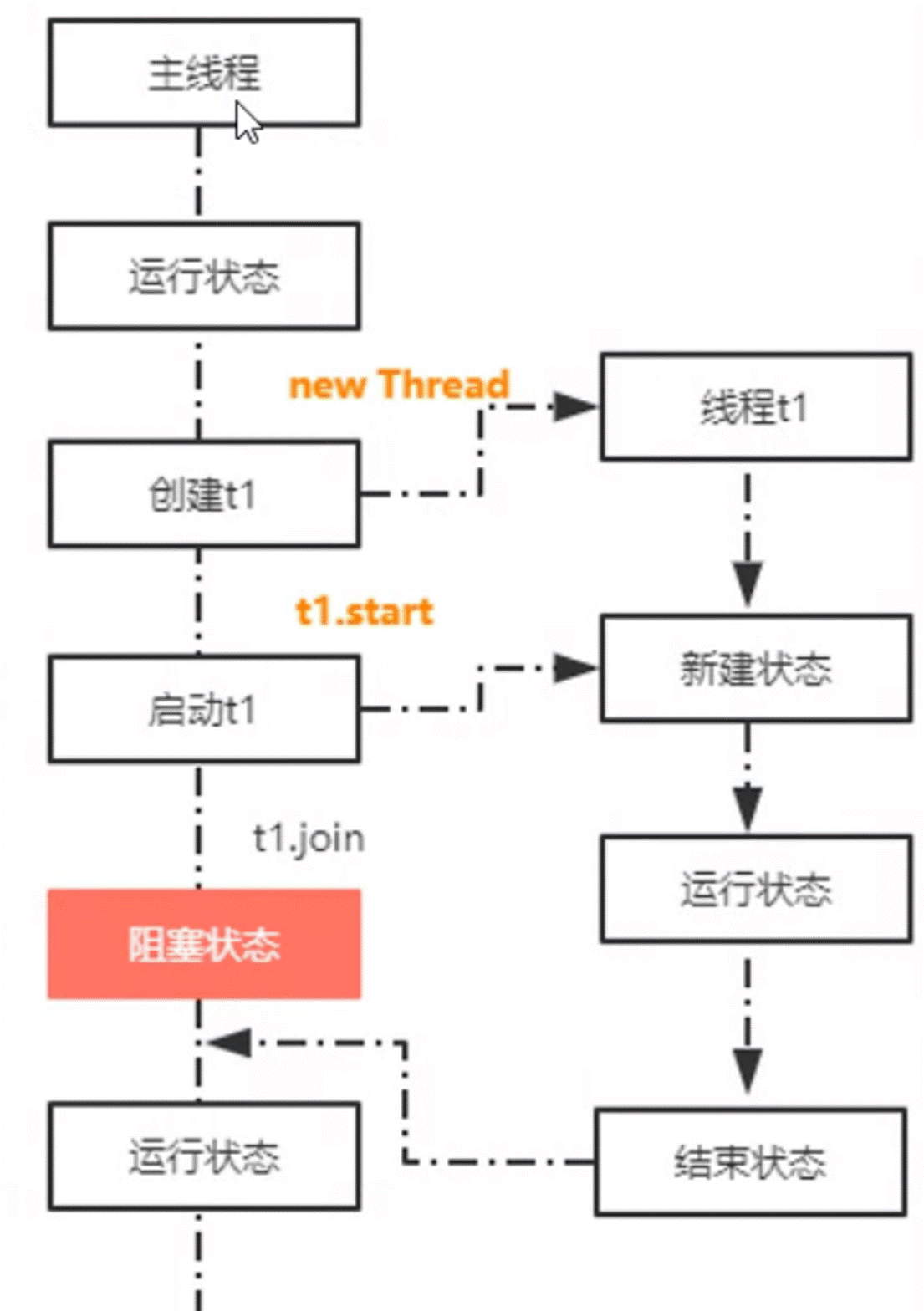
在线程中调用另一个线程的 join() 方法,会将当前线程挂起,而不是忙等待,直到目标线程结束。
对于以下代码,虽然 b 线程先启动,但是因为在 b 线程中调用了 a 线程的 join() 方法,b 线程会等待 a 线程结束才继续执行,因此最后能够保证 a 线程的输出先于 b 线程的输出。
public class JoinExample {

    private class A extends Thread {
        @Override
        public void run() {
            System.out.println("A");
        }
    }

    private class B extends Thread {

        private A a;

        B(A a) {
            this.a = a;
        }

        @Override
        public void run() {
            try {
                a.join();
            } catch (InterruptedException e) {
                e.printStackTrace();
            }
            System.out.println("B");
        }
    }

    public void test() {
        A a = new A();
        B b = new B(a);
        b.start();
        a.start();
    }
}
public static void main(String[] args) {
    JoinExample example = new JoinExample();
    example.test();
}
A
B
public final synchronized void join(long millis)
throws InterruptedException {
    long base = System.currentTimeMillis();
    long now = 0;

    if (millis < 0) {
        throw new IllegalArgumentException("timeout value is negative");
    }

    if (millis == 0) {
        while (isAlive()) {//检查线程是否存活,只要线程还没结束,主线程就会一直阻塞
            wait(0);//这里的wait调用的本地方法。
        }
    } else {//等待一段指定的时间
        while (isAlive()) {
            long delay = millis - now;
            if (delay <= 0) {
                break;
            }
            wait(delay);
            now = System.currentTimeMillis() - base;
        }
    }
}
从源码来看,实际上join方法就是调用了wait方法来使得线程阻塞,一直到线程结束运行。注意到,join方法前的synchronized修饰符,它相当于:
public final void join(long millis){
 synchronized(this){
        //代码块
    }
}
也就是说加锁的对象即调用这个锁的线程对象,在main()方法中即为t1,持有这个锁的是主线程即main()方法,也就是说代码相当于如下:
//t1.join()前的代码
synchronized (t1) {
 // 调用者线程进入 t1 的 waitSet 等待, 直到 t1 运行结束
 while (t1.isAlive()) {
  t1.wait(0);
 }
}
//t1.join()后的代码
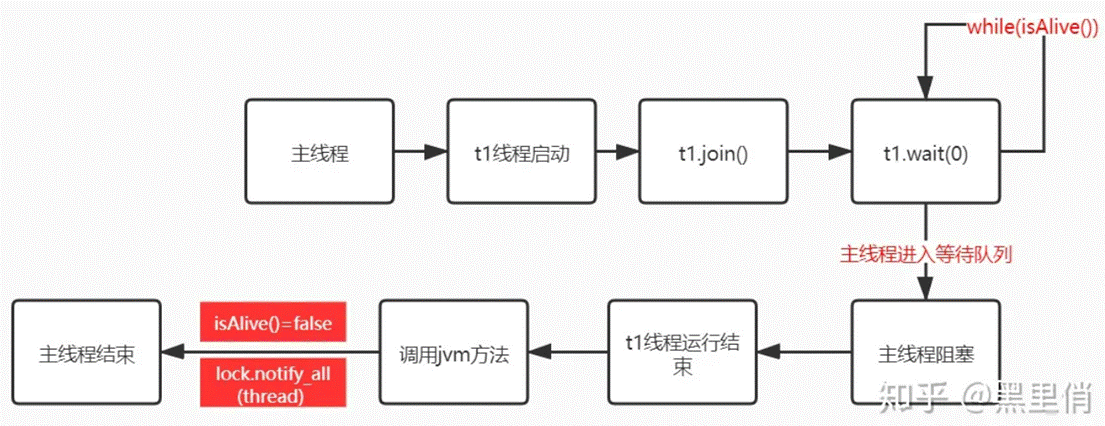
也因此主线程进入等待队列,直到 t1 线程结束。
这里可能会有很多人会有疑惑,为什么t1.wait了,阻塞的不是t1,而是主线程?
实际上,如果要阻塞t1,那么就应该在t1的run 方法里进行阻塞,如在run方法里写wait();(当然还有suspend方法,这属于非Java层面,另说)
而这里的 wait 方法被调用以后,是让持有锁的线程进入等待队列,即主线程调用,因此 t1 线程并不会被阻塞,阻塞的是主线程。
也就是说,join方法是一个同步方法,当主线程调用t1.join()方法时,主线程先获得了t1对象的锁,随后进入方法,调用了t1对象的wait()方法,使主线程进入了t1对象的等待池。
那么问题在于,这里只看到了wait方法,却并没有看到notify或者是notifyAll方法,那么主线程在那里被唤醒呢?
这里参考jvm的代码:
static void ensure_join(JavaThread* thread) {

 Handle threadObj(thread, thread->threadObj());

 ObjectLocker lock(threadObj, thread);

 hread->clear_pending_exception();

 //这一句中的TERMINATED表示这是线程结束以后运行的
 java_lang_Thread::set_thread_status(threadObj(), java_lang_Thread::TERMINATED);

    //这里会清楚native线程,isAlive()方法会返回false
    java_lang_Thread::set_thread(threadObj(), NULL);

 //thread就是当前线程,调用这个方法唤醒等待的线程。
 lock.notify_all(thread);

 hread->clear_pending_exception();

}
其实是jvm虚拟机中存在方法lock.notify_all(thread),在t1线程结束以后,会调用该方法,最后唤醒主线程。
所以简化一下,流程即:
调用 wait() 使得线程等待某个条件满足,线程在等待时会被挂起,当其他线程的运行使得这个条件满足时,其它线程会调用 notify() 或者 notifyAll() 来唤醒挂起的线程。
它们都属于 Object 的一部分,而不属于 Thread。
只能用在同步方法synchronized或者同步控制块中使用,否则会在运行时抛出 IllegalMonitorStateExeception。
使用 wait() 挂起期间,线程会释放锁。这是因为,如果没有释放锁,那么其它线程就无法进入对象的同步方法或者同步控制块中,那么就无法执行 notify() 或者 notifyAll() 来唤醒挂起的线程,造成死锁。
public class WaitNotifyExample {
    public synchronized void before() {
        System.out.println("before");
        notifyAll();
    }

    public synchronized void after() {
        try {
            wait();
        } catch (InterruptedException e) {
            e.printStackTrace();
        }
        System.out.println("after");
    }
}
public static void main(String[] args) {
    ExecutorService executorService = Executors.newCachedThreadPool();
    WaitNotifyExample example = new WaitNotifyExample();
    executorService.execute(() -> example.after());
    executorService.execute(() -> example.before());
}
before
after
wait() 和 sleep() 的区别
wait() 是 Object 的方法,而 sleep() 是 Thread 的静态方法;
wait() 会释放锁,sleep() 不会。
java.util.concurrent 类库中提供了 Condition 类来实现线程之间的协调,可以在 Condition 上调用 await() 方法使线程等待,其它线程调用 signal() 或 signalAll() 方法唤醒等待的线程。相比于 wait() 这种等待方式,await() 可以指定等待的条件,因此更加灵活。
使用 Lock 来获取一个 Condition 对象。
public class AwaitSignalExample {
    private Lock lock = new ReentrantLock();
    private Condition condition = lock.newCondition();

    public void before() {
        lock.lock();
        try {
            System.out.println("before");
            condition.signalAll();
        } finally {
            lock.unlock();
        }
    }

    public void after() {
        lock.lock();
        try {
            condition.await();
            System.out.println("after");
        } catch (InterruptedException e) {
            e.printStackTrace();
        } finally {
            lock.unlock();
        }
    }
}
public static void main(String[] args) {
    ExecutorService executorService = Executors.newCachedThreadPool();
    AwaitSignalExample example = new AwaitSignalExample();
    executorService.execute(() -> example.after());
    executorService.execute(() -> example.before());
}
before
after
Runnable 接口的 run() 方法不允许抛出任何被检查的异常(checked exceptions),只能处理或抛出运行时异常(unchecked exceptions)。当在 run() 方法内发生异常时,如果没有显式地捕获和处理这些异常,它们通常会在执行该 Runnable 的线程中被“吞掉”,即异常会导致线程终止,但不会影响其他线程的执行。
public void uncaughtException(Thread t, Throwable e) {
   if (parent != null) {
        parent.uncaughtException(t, e);
   } else {
        Thread.UncaughtExceptionHandler ueh =
            Thread.getDefaultUncaughtExceptionHandler();
        if (ueh != null) {
            ueh.uncaughtException(t, e);
        } else if (!(e instanceof ThreadDeath)) {
            System.err.print("Exception in thread \""
                             + t.getName() + "\" ");
            e.printStackTrace(System.err);
        }
    }
}
解决方案:
在run方法中显示的捕获异常
public void run() {
    try {
        // 可能抛出异常的代码
    } catch (Exception e) {
        // 记录日志或处理异常
        throw new RuntimeException(e);
    }
}
为创建的线程设置一个UncaughtExceptionHandler
Thread t = new Thread(() -> {
   int i = 1 / 0;
}, "t1");
t.setUncaughtExceptionHandler(new Thread.UncaughtExceptionHandler() {
   @Override
   public void uncaughtException(Thread t, Throwable e) {
        logger.error('---', e);
   }
});
使用Callable代替Runnable,Callable的call方法允许抛出异常,然后可以通过提交给ExecutorService返回的Future来捕获和处理这些异常
ExecutorService executor = Executors.newFixedThreadPool(1);
Future<?> future = executor.submit(() -> {
    // 可能抛出异常的代码
});

try {
    future.get(); // 这里会捕获到Callable中的异常
} catch (ExecutionException e) {
    Throwable cause = e.getCause(); // 获取原始异常
}
class MyCallable implements Callable<String> {
    @Override
    public String call() throws Exception {
        System.out.println("===> 开始执行callable");
        int i = 1 / 0; //异常的地方
        return "callable的结果";
    }
}

public class CallableAndRunnableTest {

    public static void main(String[] args) {
        System.out.println(" =========> main start ");
        ThreadPoolExecutor threadPoolExecutor = new ThreadPoolExecutor(3, 5, 1, TimeUnit.SECONDS, new ArrayBlockingQueue<>(100));
        Future<String> submit = threadPoolExecutor.submit(new MyCallable());
        try {
            TimeUnit.SECONDS.sleep(2);
        } catch (InterruptedException e) {
            e.printStackTrace();
        }
        System.out.println(" =========> main end ");
    }
}
运行结果
 =========> main start
 ===> 开始执行callable
 =========> main end
源码如下:
public <T> Future<T> submit(Callable<T> task) {
    if (task == null) throw new NullPointerException();
    RunnableFuture<T> ftask = newTaskFor(task);
    execute(ftask);
    return ftask;
}

protected <T> RunnableFuture<T> newTaskFor(Callable<T> callable) {
    return new FutureTask<T>(callable);
}
RunableFuture<T> 是个接口,但是它继承了Runnable 接口 , 实现类是 FutureTask ,因此就需要看下 FutureTask里的run方法 是不是和 构造时的Callable 有关系:
public void run() {
     // 状态不属于初始状态的情况下,不进行后续逻辑处理
     // 那也就是run 方法只能执行一次
     if (state != NEW ||
        !UNSAFE.compareAndSwapObject(this, runnerOffset,
                                   null, Thread.currentThread()))
        return;
    try {
        Callable<V> c = callable;
        if (c != null && state == NEW) {
            V result;
            //
            boolean ran;
            try {
                // 执行 Callable 里的 call 方法 ,将结果存入result变量中
                result = c.call();
                ran = true;
            } catch (Throwable ex) {
                result = null;
                ran = false;
                 // call 方法异常 , 记录下异常结果
                setException(ex);
            }
            // call 方法正常执行完毕 ,进行结果存储
            if (ran)
                set(result);
        }
    } finally {
        // runner must be non-null until state is settled to
        // prevent concurrent calls to run()
        runner = null;
        // state must be re-read after nulling runner to prevent
        // leaked interrupts
        int s = state;
        if (s >= INTERRUPTING)
            handlePossibleCancellationInterrupt(s);
    }
}
接下来就要看,如果存储正常结果的set(result)方法 和存储异常结果的 setException(ex) 方法
protected void setException(Throwable t) {
    if (UNSAFE.compareAndSwapInt(this, stateOffset, NEW, COMPLETING)) {
        outcome = t;
        UNSAFE.putOrderedInt(this, stateOffset, EXCEPTIONAL); // final state
        finishCompletion();
    }
}

protected void set(V v) {
    if (UNSAFE.compareAndSwapInt(this, stateOffset, NEW, COMPLETING)) {
        outcome = v;
        UNSAFE.putOrderedInt(this, stateOffset, NORMAL); // final state
        finishCompletion();
    }
}
这两个代码都做了一个操作,就是将正常结果result 和 异常结果 exception 都赋值给了 outcome 这个变量 。
接着再看下future的get方法
//这里有必须看下Task的结束时的状态,如果正常结束,状态为 NORMAL , 异常结果,状态为EXCEPTIONAL 。 看下几个状态的定义,如下:
private volatile int state;
private static final int NEW          = 0;
private static final int COMPLETING   = 1;
private static final int NORMAL       = 2;
private static final int EXCEPTIONAL  = 3;
private static final int CANCELLED    = 4;
private static final int INTERRUPTING = 5;
private static final int INTERRUPTED  = 6;

/**
* @throws CancellationException {@inheritDoc}
*/
public V get() throws InterruptedException, ExecutionException {
    int s = state;
    // NORMAL(2) 、EXCEPTIONAL(3) 都大于 COMPLETING(1),所以Task结束之后,不会走该if
    if (s <= COMPLETING)
         s = awaitDone(false, 0L);
    // 重点: 返回结果
    return report(s);
}

private V report(int s) throws ExecutionException {
    // 之前正常结果或者异常都存放在Object outcomme 中了
    Object x = outcome;
    // 正常返回
    if (s == NORMAL)
        return (V)x;
    // EXCEPTIONAL(3) 小于 CANCELLED(4) ,所以不会走该if分支,直接后续的throw 抛异常的逻辑
    if (s >= CANCELLED)
        throw new CancellationException();
    // 不等于NORMAL 且 大于等于 CANCELLED  ,  再结合 调用 report(int s ) 之前也做了state 的过滤
    //到这一步,那只能是EXCEPTIONAL(3)
    throw new ExecutionException((Throwable)x);
}
因此可以通过get方法获取到异常结果
来自一线程序员Seven的探索与实践,持续学习迭代中~
本文已收录于我的个人博客:https://www.seven97.top
公众号:seven97,欢迎关注~
 官方公众号
官方公众号