ETJava Beta | Java
 注册
登录
注册
登录
注册
登录
注册
登录
在上一篇博文《SpringBoot进阶教程(八十)Spring Security》中,已经介绍了在Spring Security中如何基于formLogin认证、基于HttpBasic认证和自定义用户名和密码。这篇文章,我们将介绍自定义登录界面的登录验证方式。
自定义认证的过程会用到Spring Security提供的UserDetail接口。源码如下:
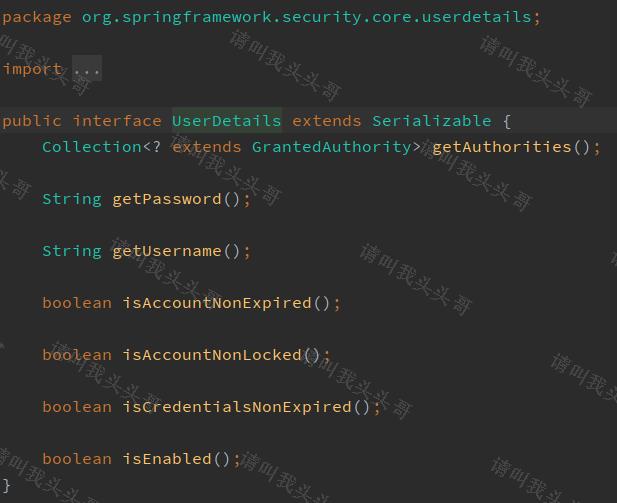
自定义认证的过程还会用到Spring Security提供的UserDetailService接口,接口只有一个抽象方法loadUserByUsername,loadUserByUsername方法返回一个UserDetail对象,包含一些用于描述用户信息的方法,源码如下:

在项目中可以自定义UserDetails接口的实现类,直接使用Spring Security提供的UserDetails接口实现类org.springframework.security.core.userdetails.User也是可以的。
/**
 * @Author chen bo
 * @Date 2023/12
 * @Des
 */
@Data
@AllArgsConstructor
@NoArgsConstructor
public class UserLogin implements UserDetails {
    private String username;
    private String password;

    /**
     * 获取用户包含的权限,返回权限集合,权限是一个继承了GrantedAuthority的对象;
     * @return
     */
    @Override
    public Collection<? extends GrantedAuthority> getAuthorities(){
        return AuthorityUtils.commaSeparatedStringToAuthorityList("admin");
    }

    /**
     * 判断账户是否未过期,未过期返回true反之返回false
     * @return
     */
    @Override
    public boolean isAccountNonExpired(){
        return true;
    }

    /**
     * 判断账户是否未锁定
     * @return
     */
    @Override
    public boolean isAccountNonLocked(){
        return true;
    }

    /**
     * 判断用户凭证是否没过期,即密码是否未过期
     * @return
     */
    @Override
    public boolean isCredentialsNonExpired(){
        return true;
    }

    /**
     * 判断用户是否可用
     * @return
     */
    @Override
    public boolean isEnabled(){
        return true;
    }
}
我们先创建一个service层的方法,用户模拟获取获取。实际中一般从数据库或者redis中获取。这里为了简化,我们直接将用户信息写在内存中。
创建模拟DB的PO实体UserPo
/**
 * @Author chen bo
 * @Date 2023/12
 * @Des
 */
@Data
public class UserPo {
    private String userName;
    private String pwd;
}
创建获取用户数据的service接口
/**
 * @Author chen bo
 * @Date 2023/12
 * @Des
 */
public interface UserService {
    /**
     * 根据用户名获取用户信息
     * @param userName
     * @return
     */
    UserPo getUserByUserName(String userName);
}
创建获取用户数据service接口的实现类。
/**
 * @Author chen bo
 * @Date 2023/12
 * @Des
 */
@Service
@Slf4j
public class UserServiceImpl implements UserService {
    @Override
    public UserPo getUserByUserName(String userName){
        List<UserPo> userPoList = userPoList();
        if(CollectionUtils.isEmpty(userPoList)){
            return null;
        }

        return userPoList.stream().filter(item -> userName.equals(item.getUserName())).findAny().orElse(null);
    }

    /**
     * 正常这一步应该是在DB或者redis中查询的,这里为了简化demo流程,直接在内存中写入固定用户集合
     * @return
     */
    private List<UserPo> userPoList(){
        List<UserPo> userPoList = new ArrayList<>();
        UserPo userPo = new UserPo();
        userPo.setUserName("zhangsan");
        userPo.setPwd("zs123456");
        userPoList.add(userPo);
        userPo = new UserPo();
        userPo.setUserName("lisi");
        userPo.setPwd("ls123456");
        userPoList.add(userPo);
        userPo = new UserPo();
        userPo.setUserName("wangwu");
        userPo.setPwd("ww123456");
        userPoList.add(userPo);
        return userPoList;
    }
}
下面我们来开始实现UserDetailService接口的loadUserByUsername方法。首先创建一个UserLogin(UserDetails接口的实现类)对象。接着创建UserDetailServiceImpl实现UserDetailService。
/**
 * @Author chen bo
 * @Date 2023/12
 * @Des
 */
@Configuration
@Slf4j
public class UserDetailServiceImpl implements UserDetailsService {

    @Autowired
    private PasswordEncoder passwordEncoder;

    @Autowired
    UserService userService;

    @Override
    public UserDetails loadUserByUsername(String userName) throws UsernameNotFoundException {
        UserPo userPo = userService.getUserByUserName(userName);
        if(userPo == null){
            throw new RuntimeException("用户名或密码错误");
        }

        UserLogin user = new UserLogin();
        user.setUsername(userPo.getUserName());
        user.setPassword(passwordEncoder.encode(userPo.getPwd()));

        log.info("password : " + user.getPassword());
        return user;
    }
}
由于权限参数不能为空,所以这里先使用AuthorityUtils.commaSeparatedStringToAuthorityList方法模拟一个admin的权限,该方法可以将逗号分隔的字符串转换为权限集合。
此外我们还注入了PasswordEncoder对象,该对象用于密码加密,注入前需要手动配置。我们在BrowserSecurityConfig中配置它:
@Configuration
public class SecurityConfig extends WebSecurityConfigurerAdapter {

    @Bean
    public PasswordEncoder passwordEncoder() {
        return new BCryptPasswordEncoder();
    }
    // ......
}
PasswordEncoder是一个密码加密接口,而BCryptPasswordEncoder是Spring Security提供的一个实现方法,我们也可以自己实现PasswordEncoder。不过Spring Security实现的BCryptPasswordEncoder已经足够强大,它对相同的密码进行加密后可以生成不同的结果。
这时候重启项目,访问http://localhost:9090/login,便可以使用user以及123456作为密码登录系统。
注意:BCryptPasswordEncoder对相同的密码生成的结果每次都是不一样的
默认的登录页面过于简陋,我们可以自己定义一个登录页面。为了方便起见,我们直接在src/main/resources/resources目录下定义一个login.html(不需要Controller跳转)。
<!DOCTYPE html>
<html lang="en">
<head>
    <meta charset="UTF-8">
    <title>登录</title>
    <link rel="stylesheet" href="css/login.css" type="text/css">
</head>
<body>
<form class="login-page" action="/login" method="post">
    <div class="form">
        <h3>请登录</h3>
        <input type="text" placeholder="请输入用户名" name="username" required="required" />
        <br/>
        <input type="password" placeholder="请输入密码" name="password" required="required" />
        <br/>
        <button type="submit">登录</button>
    </div>
</form>
</body>
</html>
要怎么做才能让Spring Security跳转到我们自己定义的登录页面呢?很简单,只需要在BrowserSecurityConfig的configure中添加一些配置:
    @Override
    protected void configure(HttpSecurity http) throws Exception {
        http.formLogin() // 表单登录
                .loginPage("/login.html")       // 登录跳转url
                .loginProcessingUrl("/login")   // 处理表单登录url
                .and()
                .authorizeRequests()            // 授权配置
                .antMatchers("/login.html", "/css/**").permitAll()  // 无需认证
                .anyRequest()                   // 所有请求
                .authenticated()                // 都需要认证
                .and().csrf().disable();
    }
在未登录的情况下,当用户访问html资源的时候跳转到登录页,否则返回JSON格式数据,状态码为401。要实现这个功能我们将loginPage的URL改为/authentication/require,并且在antMatchers方法中加入该URL,让其免拦截:
    @Override
    protected void configure(HttpSecurity http) throws Exception {
        http.formLogin() // 表单登录
 //             .loginPage("/login.html")       // 登录跳转url
                .loginPage("/authentication/require")
                .loginProcessingUrl("/login")   // 处理表单登录url
                .and()
                .authorizeRequests()            // 授权配置
                .antMatchers("/login.html", "/css/**", "/authentication/require").permitAll()  // 无需认证
                .anyRequest()                   // 所有请求
                .authenticated()                // 都需要认证
                .and().csrf().disable();
    }
/**
 * @Author chen bo
 * @Date 2023/12
 * @Des
 */
@RestController
public class DemoController {
    private RequestCache requestCache = new HttpSessionRequestCache();
    private RedirectStrategy redirectStrategy = new DefaultRedirectStrategy();

    @GetMapping("/authentication/require")
    @ResponseStatus(HttpStatus.UNAUTHORIZED)
    public String requireAuthentication(HttpServletRequest request, HttpServletResponse response) throws IOException {
        SavedRequest savedRequest = requestCache.getRequest(request, response);
        if (savedRequest != null) {
            String url = savedRequest.getRedirectUrl();
            // 为了方便测试,我们设置只有访问url中是以.html结尾时,才会跳转登录页,其它形式的全部返回提示语(访问资源需要身份认证)。具体业务中这里可以按需求设置。
            if (StringUtils.endsWithIgnoreCase(url, ".html")) {
                redirectStrategy.sendRedirect(request, response, "/login.html");
            }
        }

        return "访问资源需要身份认证";
    }
}
其中HttpSessionRequestCache为Spring Security提供的用于缓存请求的对象,通过调用它的getRequest方法可以获取到本次请求的HTTP信息。DefaultRedirectStrategy的sendRedirect为Spring Security提供的用于处理重定向的方法。
上面代码获取了引发跳转的请求,根据请求是否以.html为结尾来对应不同的处理方法。如果是以.html结尾,那么重定向到登录页面,否则返回”访问的资源需要身份认证!”信息,并且HTTP状态码为401(HttpStatus.UNAUTHORIZED)。
为了方便测试,添加hello.html
<!DOCTYPE html>
<html lang="en">
<head>
    <meta charset="UTF-8">
    <title>Title</title>
</head>
<body>
这是一个hello落地页
</body>
</html>
1.访问http://localhost:8080/hello的时候页面便会跳转到http://localhost:8080/authentication/require,并且输出”访问的资源需要身份认证!”
2.访问http://localhost:8090/hello.html的时候,页面将会跳转到登录页面。
要改变默认的处理成功逻辑很简单,只需要实现org.springframework.security.web.authentication.AuthenticationSuccessHandler接口的onAuthenticationSuccess方法即可:
/**
 * @Author chen bo
 * @Date 2023/12
 * @Des
 */
@Component
public class MyAuthenticationSuccessHandler implements AuthenticationSuccessHandler {

    private RequestCache requestCache = new HttpSessionRequestCache();
    private RedirectStrategy redirectStrategy = new DefaultRedirectStrategy();

    @Autowired
    private ObjectMapper objectMapper;

    @Override
    public void onAuthenticationSuccess(HttpServletRequest httpServletRequest, HttpServletResponse httpServletResponse, Authentication authentication) throws IOException, ServletException {
        // 默认打印出登陆信息
//        httpServletResponse.setContentType("application/json;charset=utf-8");
//        httpServletResponse.getWriter().write(objectMapper.writeValueAsString(authentication));
        // 跳转访问页面
//        SavedRequest savedRequest = requestCache.getRequest(httpServletRequest, httpServletResponse);
//        redirectStrategy.sendRedirect(httpServletRequest, httpServletResponse, savedRequest.getRedirectUrl());
        // 跳转制定页面
        SavedRequest savedRequest = requestCache.getRequest(httpServletRequest, httpServletResponse);
        redirectStrategy.sendRedirect(httpServletRequest, httpServletResponse, "hello.html");
    }
}
    @Override
    protected void configure(HttpSecurity http) throws Exception {
        http.formLogin() // 表单登录
                .loginPage("/login.html")       // 登录跳转url
//                .loginPage("/authentication/require")
                .loginProcessingUrl("/login")   // 处理表单登录url
                .successHandler(authenticationSuccessHandler)
                .and()
                .authorizeRequests()            // 授权配置
                .antMatchers("/login.html", "/css/**", "/authentication/require").permitAll()  // 无需认证
                .anyRequest()                   // 所有请求
                .authenticated()                // 都需要认证
                .and().csrf().disable();
    }
与自定义登录成功处理逻辑类似,自定义登录失败处理逻辑需要实现org.springframework.security.web.authentication.AuthenticationFailureHandler的onAuthenticationFailure方法:
/**
 * @Author chen bo
 * @Date 2023/12
 * @Des
 */
@Component
public class MyAuthenticationFailureHandler implements AuthenticationFailureHandler {

    @Autowired
    private ObjectMapper objectMapper;

    @Override
    public void onAuthenticationFailure(HttpServletRequest httpServletRequest, HttpServletResponse httpServletResponse, AuthenticationException e) throws IOException, ServletException {
        httpServletResponse.setStatus(HttpStatus.INTERNAL_SERVER_ERROR.value());
        httpServletResponse.setContentType("application/json;charset=utf-8");
        httpServletResponse.getWriter().write(objectMapper.writeValueAsString(e.getMessage()));
    }
}
    @Override
    protected void configure(HttpSecurity http) throws Exception {
        http.formLogin() // 表单登录
                .loginPage("/login.html")       // 登录跳转url
//                .loginPage("/authentication/require")
                .loginProcessingUrl("/login")   // 处理表单登录url
                .successHandler(authenticationSuccessHandler)
                .failureHandler(authenticationFailureHandler)
                .and()
                .authorizeRequests()            // 授权配置
                .antMatchers("/login.html", "/css/**", "/authentication/require").permitAll()  // 无需认证
                .anyRequest()                   // 所有请求
                .authenticated()                // 都需要认证
                .and().csrf().disable();
    }
其他参考/学习资料:
https://github.com/toutouge/javademosecond/tree/master/security-demo
作 者:请叫我头头哥
出 处:http://www.cnblogs.com/toutou/
关于作者:专注于基础平台的项目开发。如有问题或建议,请多多赐教!
版权声明:本文版权归作者和博客园共有,欢迎转载,但未经作者同意必须保留此段声明,且在文章页面明显位置给出原文链接。
特此声明:所有评论和私信都会在第一时间回复。也欢迎园子的大大们指正错误,共同进步。或者直接私信我
声援博主:如果您觉得文章对您有帮助,可以点击文章右下角【推荐】一下。您的鼓励是作者坚持原创和持续写作的最大动力!
 官方公众号
官方公众号