ETJava Beta | Java
 注册
登录
注册
登录
注册
登录
注册
登录
随着人工智能和大模型的快速发展,云上GPU资源共享变得必要,因为它可以降低硬件成本,提升资源利用效率,并满足模型训练和推理对大规模并行计算的需求。
在kubernetes内置的资源调度功能中,GPU调度只能根据“核数”进行调度,但是深度学习等算法程序执行过程中,资源占用比较高的是显存,这样就形成了很多的资源浪费。
目前的GPU资源共享方案有两种。一种是将一个真正的GPU分解为多个虚拟GPU,即vGPU,这样就可以基于vGPU的数量进行调度;另一种是根据GPU的显存进行调度。
本文将讲述如何安装kubernetes组件实现根据GPU显存调度资源。
系统:centos stream8
内核:4.18.0-490.el8.x86_64
驱动:NVIDIA-Linux-x86_64-470.182.03
docker:20.10.24
kubernetes版本:1.24.0
请登录nvida官网自行安装:https://www.nvidia.com/Download/index.aspx?lang=en-us
请自行安装docker或其他容器运行时,如果使用其他容器运行时,第三步配置请参考NVIDA官网 https://docs.nvidia.com/datacenter/cloud-native/container-toolkit/install-guide.html#installation-guide
注意:官方支持docker、containerd、podman,但本文档只验证过docker的使用,如果使用其他容器运行时,请注意差异性。
distribution=$(. /etc/os-release;echo $ID$VERSION_ID) \
   && curl -s -L https://nvidia.github.io/libnvidia-container/$distribution/libnvidia-container.repo | sudo tee /etc/yum.repos.d/nvidia-container-toolkit.repo
sudo dnf clean expire-cache --refresh
sudo dnf install -y nvidia-container-toolkit
sudo nvidia-ctk runtime configure --runtime=docker
{
    "default-runtime": "nvidia",
    "runtimes": {
        "nvidia": {
            "path": "/usr/bin/nvidia-container-runtime",
            "runtimeArgs": []
        }
    }
}
sudo systemctl restart docker
sudo docker run --rm --runtime=nvidia --gpus all nvidia/cuda:11.6.2-base-ubuntu20.04 nvidia-smi
如果返回如下数据,说明配置成功
+-----------------------------------------------------------------------------+
| NVIDIA-SMI 450.51.06 Driver Version: 450.51.06 CUDA Version: 11.0 |
|-------------------------------+----------------------+----------------------+
| GPU Name Persistence-M| Bus-Id Disp.A | Volatile Uncorr. ECC |
| Fan Temp Perf Pwr:Usage/Cap| Memory-Usage | GPU-Util Compute M. |
| | | MIG M. |
|===============================+======================+======================|
| 0 Tesla T4 On | 00000000:00:1E.0 Off | 0 |
| N/A 34C P8 9W / 70W | 0MiB / 15109MiB | 0% Default |
| | | N/A |
+-------------------------------+----------------------+----------------------+
+-----------------------------------------------------------------------------+
| Processes: |
| GPU GI CI PID Type Process name GPU Memory |
| ID ID Usage |
|=============================================================================|
| No running processes found |
+-----------------------------------------------------------------------------+
# rbac.yaml
---
kind: ClusterRole
apiVersion: rbac.authorization.k8s.io/v1
metadata:
name: gpushare-schd-extender
rules:
- apiGroups:
- ""
resources:
- nodes
verbs:
- get
- list
- watch
- apiGroups:
- ""
resources:
- events
verbs:
- create
- patch
- apiGroups:
- ""
resources:
- pods
verbs:
- update
- patch
- get
- list
- watch
- apiGroups:
- ""
resources:
- bindings
- pods/binding
verbs:
- create
- apiGroups:
- ""
resources:
- configmaps
verbs:
- get
- list
- watch
---
apiVersion: v1
kind: ServiceAccount
metadata:
name: gpushare-schd-extender
namespace: kube-system
---
kind: ClusterRoleBinding
apiVersion: rbac.authorization.k8s.io/v1
metadata:
name: gpushare-schd-extender
namespace: kube-system
roleRef:
apiGroup: rbac.authorization.k8s.io
kind: ClusterRole
name: gpushare-schd-extender
subjects:
- kind: ServiceAccount
name: gpushare-schd-extender
namespace: kube-system
# deployment yaml
---
kind: Deployment
apiVersion: apps/v1
metadata:
name: gpushare-schd-extender
namespace: kube-system
spec:
replicas: 1
strategy:
type: Recreate
selector:
matchLabels:
app: gpushare
component: gpushare-schd-extender
template:
metadata:
labels:
app: gpushare
component: gpushare-schd-extender
annotations:
scheduler.alpha.kubernetes.io/critical-pod: ''
spec:
hostNetwork: true
tolerations:
- effect: NoSchedule
operator: Exists
key: node-role.kubernetes.io/master
- effect: NoSchedule
key: node-role.kubernetes.io/control-plane
operator: Exists
- effect: NoSchedule
operator: Exists
key: node.cloudprovider.kubernetes.io/uninitialized
nodeSelector:
node-role.kubernetes.io/control-plane: ""
serviceAccount: gpushare-schd-extender
containers:
- name: gpushare-schd-extender
image: registry.cn-hangzhou.aliyuncs.com/acs/k8s-gpushare-schd-extender:1.11-d170d8a
env:
- name: LOG_LEVEL
value: debug
- name: PORT
value: "12345"
# service.yaml
---
apiVersion: v1
kind: Service
metadata:
name: gpushare-schd-extender
namespace: kube-system
labels:
app: gpushare
component: gpushare-schd-extender
spec:
type: NodePort
ports:
- port: 12345
name: http
targetPort: 12345
nodePort: 32766
selector:
# select app=ingress-nginx pods
app: gpushare
component: gpushare-schd-extender
#scheduler-policy-config.yaml
---
apiVersion: kubescheduler.config.k8s.io/v1beta2
kind: KubeSchedulerConfiguration
clientConnection:
  kubeconfig: /etc/kubernetes/scheduler.conf
extenders:
    # 不知道为什么不支持svc的方式调用,必须用nodeport
  - urlPrefix: "http://gpushare-schd-extender.kube-system:12345/gpushare-scheduler"
    filterVerb: filter
    bindVerb: bind
    enableHTTPS: false
    nodeCacheCapable: true
    managedResources:
      - name: aliyun.com/gpu-mem
        ignoredByScheduler: false
    ignorable: false
上面的 http://gpushare-schd-extender.kube-system:12345 注意要替换为你本地部署的{nodeIP}:{gpushare-schd-extender的nodeport端口},否则会访问不到
查询命令如下:
kubectl get service gpushare-schd-extender -n kube-system -o jsonpath='{.spec.ports[?(@.name=="http")].nodePort}'
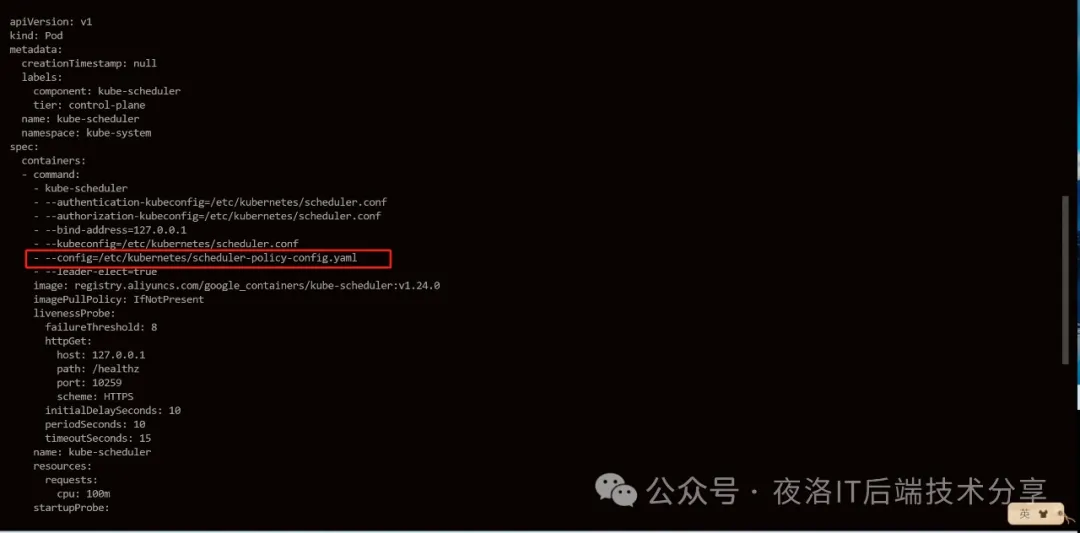
1. 在commond中添加
- --config=/etc/kubernetes/scheduler-policy-config.yaml
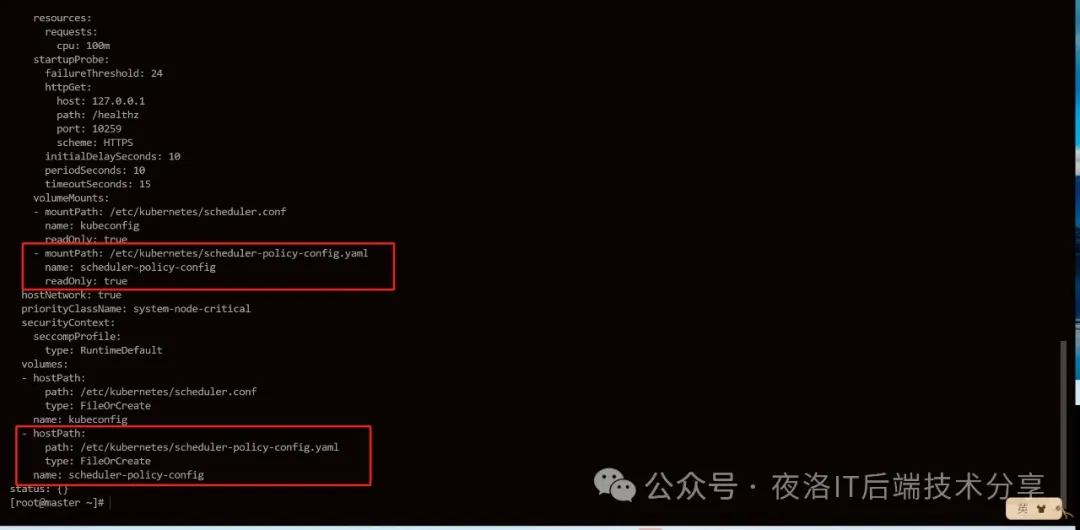
2. 添加pod挂载目录
在volumeMounts:中添加
- mountPath: /etc/kubernetes/scheduler-policy-config.yaml
name: scheduler-policy-config
readOnly: true
在volumes:中添加
- hostPath:
path: /etc/kubernetes/scheduler-policy-config.yaml
type: FileOrCreate
name: scheduler-policy-config
注意:这里千万不要改错,否则可能会出现莫名其妙的错误
示例如下:
kubectl create -f https://raw.githubusercontent.com/AliyunContainerService/gpushare-device-plugin/master/device-plugin-rbac.yaml
kubectl create -f https://raw.githubusercontent.com/AliyunContainerService/gpushare-device-plugin/master/device-plugin-ds.yaml
kubectl label node <target_node> gpushare=true
cd /usr/bin/
wget https://github.com/AliyunContainerService/gpushare-device-plugin/releases/download/v0.3.0/kubectl-inspect-gpushare
chmod u+x /usr/bin/kubectl-inspect-gpushare
# kubectl inspect gpushare
NAME                                IPADDRESS     GPU0(Allocated/Total)  GPU Memory(GiB)
cn-shanghai.i-uf61h64dz1tmlob9hmtb  192.168.0.71  6/15                   6/15
cn-shanghai.i-uf61h64dz1tmlob9hmtc  192.168.0.70  3/15                   3/15
------------------------------------------------------------------------------
Allocated/Total GPU Memory In Cluster:
9/30 (30%)
apiVersion: apps/v1
kind: Deployment
metadata:
  name: binpack-1
  labels:
    app: binpack-1
spec:
  replicas: 1
  selector: # define how the deployment finds the pods it manages
    matchLabels:
      app: binpack-1
  template: # define the pods specifications
    metadata:
      labels:
        app: binpack-1
    spec:
      tolerations:
        - effect: NoSchedule
          key: cloudClusterNo
          operator: Exists
      containers:
        - name: binpack-1
          image: cheyang/gpu-player:v2
          resources:
            limits:
              # 单位GiB
              aliyun.com/gpu-mem: 3
如果在安装过程中发现资源未安装成功,可以通过pod查看日志
kubectl get po -n kube-system -o=wide | grep gpushare-device
kubecl logs -n kube-system <pod_name>
参考地址:
NVIDA官网container-toolkit安装文档: https://docs.nvidia.com/datacenter/cloud-native/container-toolkit/install-guide.html#docker
阿里云GPU插件安装:https://github.com/AliyunContainerService/gpushare-scheduler-extender/blob/master/docs/install.md
 官方公众号
官方公众号