ETJava Beta | Java
 注册
登录
注册
登录
注册
登录
注册
登录
已经好久没有使用centos的镜像进行部署ansible了,上周一个偶然的机会让我在centos8.5上面进行部署ansible。我发现在以前的基础上ansible的源发生了点改变,于是就想着自己把它记录下来。红红火火恍恍惚惚!!!!!!
环境介绍
| 系统 | ip | 主机名 | 服务 |
|---|---|---|---|
| centos8.5 | 192.168.222.154 | wy-ansible | ansible |
| centos8.5 | 192.168.222.155 | wy-node1 | apache |
| centos8.5 | 192.168.222.156 | wy-node2 | apache |
使用镜像如下
CentOS 8.5.2111版本下载链接(清华源)
wy-ansible端操作
配置ansible需要的源
[root@wy-ansible ~]# cd /etc/yum.repos.d/
[root@wy-ansible yum.repos.d]# ls
CentOS-Linux-AppStream.repo          CentOS-Linux-FastTrack.repo
CentOS-Linux-BaseOS.repo             CentOS-Linux-HighAvailability.repo
CentOS-Linux-ContinuousRelease.repo  CentOS-Linux-Media.repo
CentOS-Linux-Debuginfo.repo          CentOS-Linux-Plus.repo
CentOS-Linux-Devel.repo              CentOS-Linux-PowerTools.repo
CentOS-Linux-Extras.repo             CentOS-Linux-Sources.repo
[root@wy-ansible yum.repos.d]# rm -rf *
[root@wy-ansible yum.repos.d]# ls
[root@wy-ansible yum.repos.d]#
[root@wy-ansible yum.repos.d]# curl -o /etc/yum.repos.d/CentOS-Base.repo https://mirrors.aliyun.com/repo/Centos-vault-8.5.2111.repo
  % Total    % Received % Xferd  Average Speed   Time    Time     Time  Current
                                 Dload  Upload   Total   Spent    Left  Speed
  0     0    0     0    0     0      0      0 --:--:-- --:--:-- --:--:--  100  2495  100  2495    0     0  15030      0 --:--:-- --:--:-- --:--:-- 15030
[root@wy-ansible yum.repos.d]#
[root@wy-ansible yum.repos.d]# dnf -y install epel-release
[root@wy-ansible yum.repos.d]# dnf -y install  python36
[root@wy-ansible yum.repos.d]# dnf -y install  python2
[root@wy-ansible yum.repos.d]# wget  https://dl.rockylinux.org/pub/rocky/8/extras/x86_64/os/Packages/c/centos-release-ansible-29-1-2.el8.noarch.rpm
[root@wy-ansible yum.repos.d]# dnf -y localinstall  centos-release-ansible-29-1-2.el8.noarch.rpm
[root@wy-ansible yum.repos.d]# ls
CentOS-Base.repo                              epel-playground.repo
centos-release-ansible-29-1-2.el8.noarch.rpm  epel.repo
CentOS-SIG-ansible-29.repo                    epel-testing-modular.repo
epel-modular.repo                             epel-testing.repo
[root@wy-ansible yum.repos.d]# sed -i -e "s|mirrorlist=|#mirrorlist=|g" /etc/yum.repos.d/CentOS-*
[root@wy-ansible yum.repos.d]# sed -i -e "s|#baseurl=http://mirror.centos.org|baseurl=http://vault.centos.org|g" /etc/yum.repos.d/CentOS-*
[root@wy-ansible yum.repos.d]# ls
CentOS-Base.repo                              epel-playground.repo
centos-release-ansible-29-1-2.el8.noarch.rpm  epel.repo
CentOS-SIG-ansible-29.repo                    epel-testing-modular.repo
epel-modular.repo                             epel-testing.repo
[root@wy-ansible yum.repos.d]#

查看CentOS-SIG-ansible-29.repo源
[root@wy-ansible yum.repos.d]# cat CentOS-SIG-ansible-29.repo
# CentOS-SIG-ansible-29.repo
#
# Please see https://wiki.centos.org/SpecialInterestGroup/ConfigManagementSIG/Ansible
# for more information

[centos-ansible-29]
name=CentOS Configmanagement SIG - ansible-29
#mirrorlist=http://mirrorlist.centos.org/?release=$releasever&arch=$basearch&repo=configmanagement-ansible-29
baseurl=http://vault.centos.org/$contentdir/$releasever/configmanagement/$basearch/ansible-29/
gpgcheck=1
enabled=1
gpgkey=file:///etc/pki/rpm-gpg/RPM-GPG-KEY-CentOS-SIG-ConfigManagement

[centos-ansible-29-testing]
name=CentOS Configmanagement SIG - ansible-29 Testing
baseurl=http://buildlogs.centos.org/centos/8/configmanagement/$basearch/ansible-29/
gpgcheck=0
enabled=0

[centos-ansible-29-debuginfo]
name=CentOS Configmanagement SIG - ansible-29 Debug
baseurl=http://debuginfo.centos.org/$contentdir/8/configmanagement/$basearch/
gpgcheck=1
enabled=0
gpgkey=file:///etc/pki/rpm-gpg/RPM-GPG-KEY-CentOS-SIG-ConfigManagement

[centos-ansible-29-source]
name=CentOS Configmanagement SIG - ansible-29 Source
baseurl=http://vault.centos.org/$contentdir/8/configmanagement/Source/ansible-29/
gpgcheck=1
enabled=0
gpgkey=file:///etc/pki/rpm-gpg/RPM-GPG-KEY-CentOS-SIG-ConfigManagement

[root@wy-ansible yum.repos.d]#
安装ansible
[root@wy-ansible yum.repos.d]# cd
[root@wy-ansible ~]# dnf   -y   install   ansible   --nobest
查看ansible的版本
[root@wy-ansible ~]# ansible --version
ansible 2.9.27
  config file = /etc/ansible/ansible.cfg
  configured module search path = ['/root/.ansible/plugins/modules', '/usr/share/ansible/plugins/modules']
  ansible python module location = /usr/lib/python3.6/site-packages/ansible
  executable location = /usr/bin/ansible
  python version = 3.6.8 (default, Sep 10 2021, 09:13:53) [GCC 8.5.0 20210514 (Red Hat 8.5.0-3)]
[root@wy-ansible ~]#
wy-node1端部分操作
[root@localhost ~]# hostnamectl set-hostname wy-node1
[root@localhost ~]# bash
[root@wy-node1 ~]# ip a
1: lo: <LOOPBACK,UP,LOWER_UP> mtu 65536 qdisc noqueue state UNKNOWN group default qlen 1000
    link/loopback 00:00:00:00:00:00 brd 00:00:00:00:00:00
    inet 127.0.0.1/8 scope host lo
       valid_lft forever preferred_lft forever
    inet6 ::1/128 scope host
       valid_lft forever preferred_lft forever
2: ens160: <BROADCAST,MULTICAST,UP,LOWER_UP> mtu 1500 qdisc mq state UP group default qlen 1000
    link/ether 00:0c:29:b0:cd:5e brd ff:ff:ff:ff:ff:ff
    inet 192.168.222.155/24 brd 192.168.222.255 scope global dynamic noprefixroute ens160
       valid_lft 1655sec preferred_lft 1655sec
    inet6 fe80::20c:29ff:feb0:cd5e/64 scope link noprefixroute
       valid_lft forever preferred_lft forever
3: virbr0: <NO-CARRIER,BROADCAST,MULTICAST,UP> mtu 1500 qdisc noqueue state DOWN group default qlen 1000
    link/ether 52:54:00:02:53:44 brd ff:ff:ff:ff:ff:ff
    inet 192.168.122.1/24 brd 192.168.122.255 scope global noprefixroute virbr0
       valid_lft forever preferred_lft forever
4: virbr0-nic: <BROADCAST,MULTICAST> mtu 1500 qdisc fq_codel state DOWN group default qlen 1000
    link/ether 52:54:00:02:53:44 brd ff:ff:ff:ff:ff:ff
[root@wy-node1 ~]#
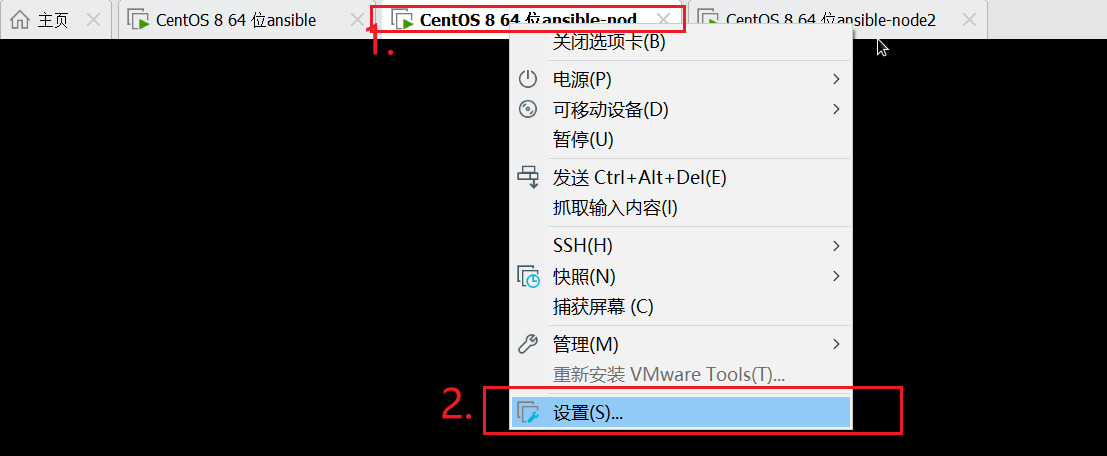
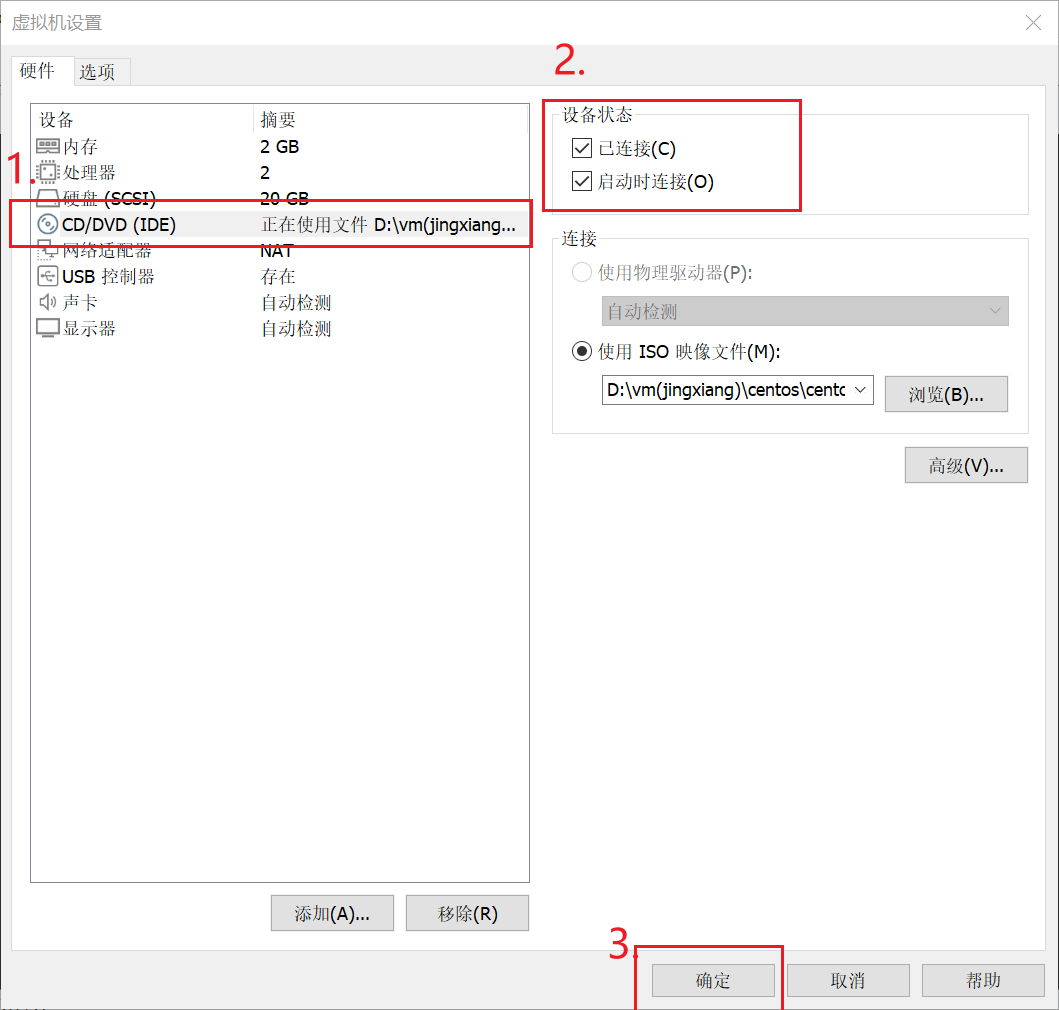
因为后面需要挂载本地磁盘所以需要做以下操作
wy-node2部分操作
[root@localhost ~]# hostnamectl set-hostname wy-node2
[root@localhost ~]# bash
[root@wy-node2 ~]# ip a
1: lo: <LOOPBACK,UP,LOWER_UP> mtu 65536 qdisc noqueue state UNKNOWN group default qlen 1000
    link/loopback 00:00:00:00:00:00 brd 00:00:00:00:00:00
    inet 127.0.0.1/8 scope host lo
       valid_lft forever preferred_lft forever
    inet6 ::1/128 scope host
       valid_lft forever preferred_lft forever
2: ens160: <BROADCAST,MULTICAST,UP,LOWER_UP> mtu 1500 qdisc mq state UP group default qlen 1000
    link/ether 00:0c:29:63:60:5f brd ff:ff:ff:ff:ff:ff
    inet 192.168.222.156/24 brd 192.168.222.255 scope global dynamic noprefixroute ens160
       valid_lft 1607sec preferred_lft 1607sec
    inet6 fe80::20c:29ff:fe63:605f/64 scope link noprefixroute
       valid_lft forever preferred_lft forever
3: virbr0: <NO-CARRIER,BROADCAST,MULTICAST,UP> mtu 1500 qdisc noqueue state DOWN group default qlen 1000
    link/ether 52:54:00:d1:d9:6b brd ff:ff:ff:ff:ff:ff
    inet 192.168.122.1/24 brd 192.168.122.255 scope global noprefixroute virbr0
       valid_lft forever preferred_lft forever
4: virbr0-nic: <BROADCAST,MULTICAST> mtu 1500 qdisc fq_codel state DOWN group default qlen 1000
    link/ether 52:54:00:d1:d9:6b brd ff:ff:ff:ff:ff:ff
[root@wy-node2 ~]#
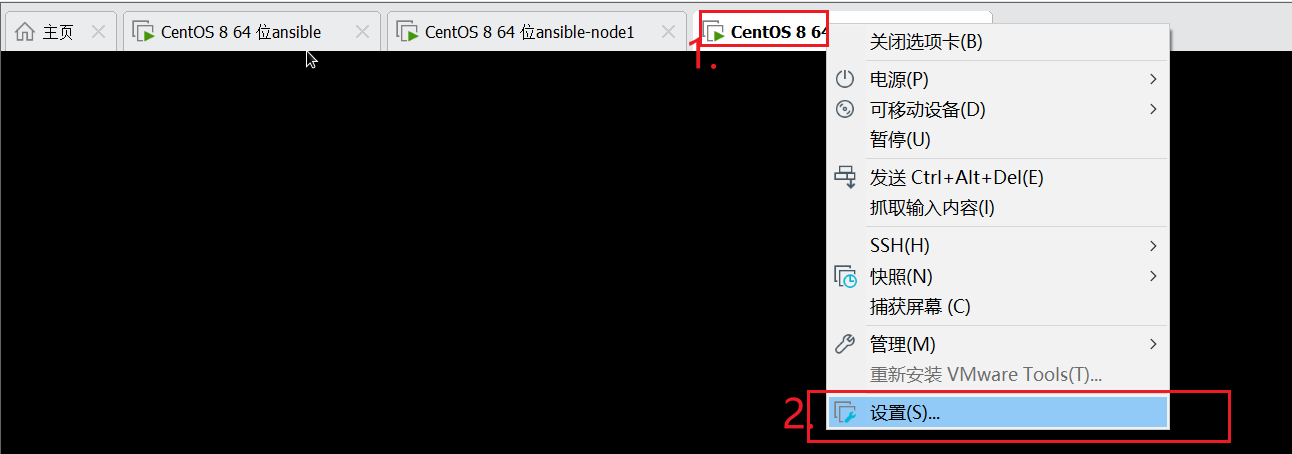
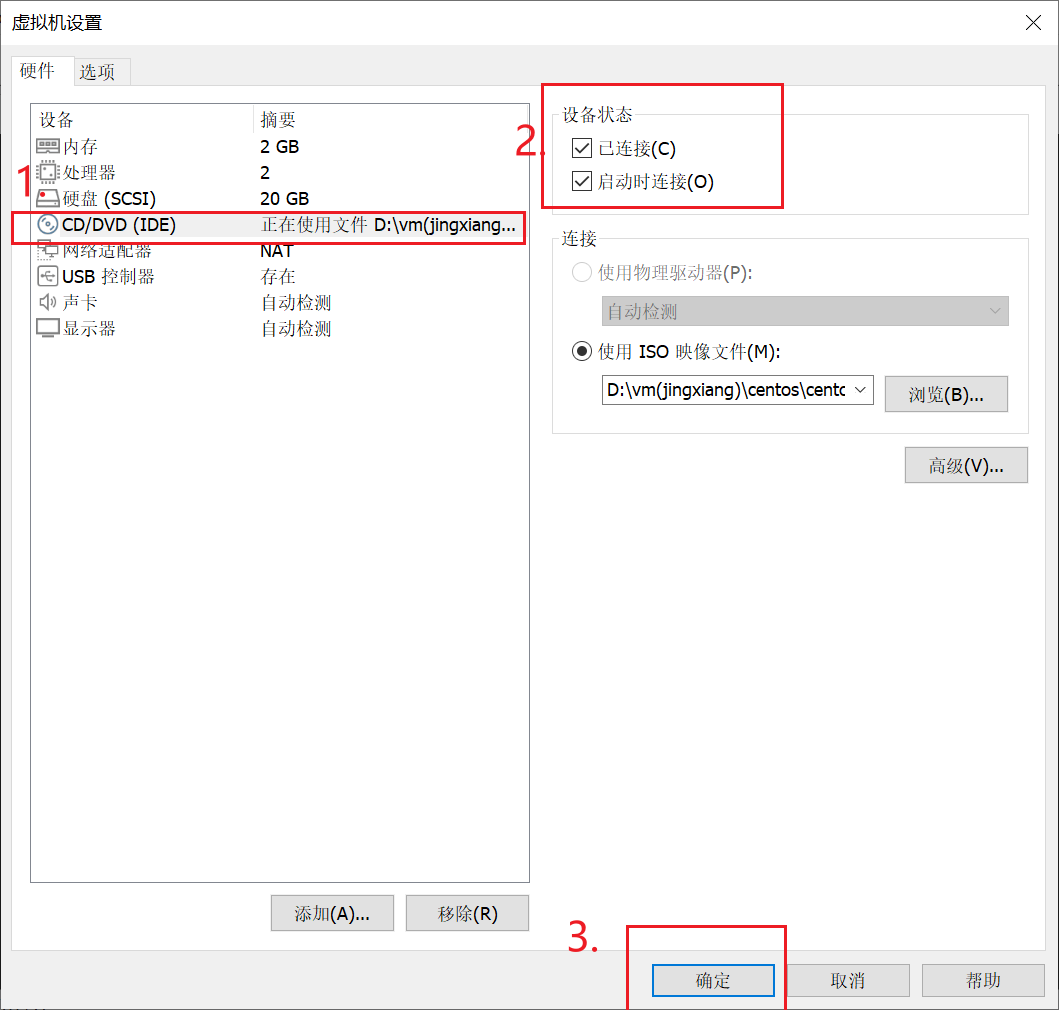
因为后面需要挂载本地磁盘所以需要做以下操作
wy-ansible端操作
做主控端和受控端的映射
[root@wy-ansible ~]# vim /etc/hosts
[root@wy-ansible ~]# cat /etc/hosts
127.0.0.1   localhost localhost.localdomain localhost4 localhost4.localdomain4
::1         localhost localhost.localdomain localhost6 localhost6.localdomain6
192.168.222.155 wy-node1
192.168.222.156 wy-node2
[root@wy-ansible ~]#
root@wy-ansible ~]# mkdir playdemo
[root@wy-ansible ~]# cd playdemo/
[root@wy-ansible playdemo]# ls
[root@wy-ansible playdemo]# cp /etc/ansible/ansible.cfg .
[root@wy-ansible playdemo]# ls
ansible.cfg
[root@wy-ansible playdemo]# vim ansible.cfg
#inventory      = /etc/ansible/hosts
inventory      = inventory
[root@wy-ansible playdemo]# vim inventory
查看受控端主机
[root@wy-ansible playdemo]# cat inventory
[apache]
192.168.222.155
192.168.222.156
[root@wy-ansible playdemo]# ls
ansible.cfg  inventory
[root@wy-ansible playdemo]#
实现免密登录受控主机
[root@wy-ansible playdemo]# ssh-keygen -t rsa
Generating public/private rsa key pair.
Enter file in which to save the key (/root/.ssh/id_rsa):
Created directory '/root/.ssh'.
Enter passphrase (empty for no passphrase):
Enter same passphrase again:
Your identification has been saved in /root/.ssh/id_rsa.
Your public key has been saved in /root/.ssh/id_rsa.pub.
The key fingerprint is:
SHA256:AkRmdCRTQ3SH7uRey7cqiZZ9ol6tvSBgJmSFgMe9Lc0 root@wy-ansible
The key's randomart image is:
+---[RSA 3072]----+
|oo =X=B ...      |
|. +=.+ o..       |
| .o .= .         |
| o  o.E o        |
|  . +..+S        |
|   + . .o..      |
|      .=o+..     |
|      +o*++ .    |
|     oo..+++..   |
+----[SHA256]-----+
[root@wy-ansible playdemo]#
[root@wy-ansible playdemo]# ssh-copy-id 192.168.222.155
/usr/bin/ssh-copy-id: INFO: Source of key(s) to be installed: "/root/.ssh/id_rsa.pub"
The authenticity of host '192.168.222.155 (192.168.222.155)' can't be established.
ECDSA key fingerprint is SHA256:JQ7UCwc6pwXDVYU92WwkCQLgB6qqiTbNLPDSZF8+us8.
Are you sure you want to continue connecting (yes/no/[fingerprint])? yes
/usr/bin/ssh-copy-id: INFO: attempting to log in with the new key(s), to filter out any that are already installed
/usr/bin/ssh-copy-id: INFO: 1 key(s) remain to be installed -- if you are prompted now it is to install the new keys
root@192.168.222.155's password:

Number of key(s) added: 1

Now try logging into the machine, with:   "ssh '192.168.222.155'"
and check to make sure that only the key(s) you wanted were added.

[root@wy-ansible playdemo]# ssh-copy-id 192.168.222.156
/usr/bin/ssh-copy-id: INFO: Source of key(s) to be installed: "/root/.ssh/id_rsa.pub"
The authenticity of host '192.168.222.156 (192.168.222.156)' can't be established.
ECDSA key fingerprint is SHA256:BsGn0HnCG5xb7gspwLlfgHIbDS6iX9XRwbJvlSChjYc.
Are you sure you want to continue connecting (yes/no/[fingerprint])? yes
/usr/bin/ssh-copy-id: INFO: attempting to log in with the new key(s), to filter out any that are already installed
/usr/bin/ssh-copy-id: INFO: 1 key(s) remain to be installed -- if you are prompted now it is to install the new keys
root@192.168.222.156's password:

Number of key(s) added: 1

Now try logging into the machine, with:   "ssh '192.168.222.156'"
and check to make sure that only the key(s) you wanted were added.

[root@wy-ansible playdemo]#
检查机器节点是否连通
[root@wy-ansible playdemo]# ansible all -m ping
192.168.222.155 | SUCCESS => {
    "ansible_facts": {
        "discovered_interpreter_python": "/usr/libexec/platform-python"
    },
    "changed": false,
    "ping": "pong"
}
192.168.222.156 | SUCCESS => {
    "ansible_facts": {
        "discovered_interpreter_python": "/usr/libexec/platform-python"
    },
    "changed": false,
    "ping": "pong"
}
[root@wy-ansible playdemo]# ansible apache -m ping
192.168.222.156 | SUCCESS => {
    "ansible_facts": {
        "discovered_interpreter_python": "/usr/libexec/platform-python"
    },
    "changed": false,
    "ping": "pong"
}
192.168.222.155 | SUCCESS => {
    "ansible_facts": {
        "discovered_interpreter_python": "/usr/libexec/platform-python"
    },
    "changed": false,
    "ping": "pong"
}
[root@wy-ansible playdemo]#
wy-ansible端操作
[root@wy-ansible playdemo]# ansible apache -m mount -a 'src=/dev/sr0 path=/media state=mounted fstype=iso9660'
192.168.222.156 | CHANGED => {
    "ansible_facts": {
        "discovered_interpreter_python": "/usr/libexec/platform-python"
    },
    "changed": true,
    "dump": "0",
    "fstab": "/etc/fstab",
    "fstype": "iso9660",
    "name": "/media",
    "opts": "defaults",
    "passno": "0",
    "src": "/dev/sr0"
}
192.168.222.155 | CHANGED => {
    "ansible_facts": {
        "discovered_interpreter_python": "/usr/libexec/platform-python"
    },
    "changed": true,
    "dump": "0",
    "fstab": "/etc/fstab",
    "fstype": "iso9660",
    "name": "/media",
    "opts": "defaults",
    "passno": "0",
    "src": "/dev/sr0"
}
[root@wy-ansible playdemo]#
[root@wy-ansible playdemo]# ansible apache -m shell -a 'rm -rf /etc/yum.repos.d/C*'
[WARNING]: Consider using the file module with state=absent rather than running
'rm'.  If you need to use command because file is insufficient you can add
'warn: false' to this command task or set 'command_warnings=False' in
ansible.cfg to get rid of this message.
192.168.222.155 | CHANGED | rc=0 >>

192.168.222.156 | CHANGED | rc=0 >>

[root@wy-ansible playdemo]# ansible apache -m yum_repository -a 'file=wy name=AppStream description=AppStream baseurl=file:///media/AppStream enabled=yes gpgcheck=no'
192.168.222.155 | CHANGED => {
    "ansible_facts": {
        "discovered_interpreter_python": "/usr/libexec/platform-python"
    },
    "changed": true,
    "repo": "AppStream",
    "state": "present"
}
192.168.222.156 | CHANGED => {
    "ansible_facts": {
        "discovered_interpreter_python": "/usr/libexec/platform-python"
    },
    "changed": true,
    "repo": "AppStream",
    "state": "present"
}
[root@wy-ansible playdemo]# ansible apache -m yum_repository -a 'file=wy name=BaseOS description=BaseOS baseurl=file:///media/BaseOS enabled=yes gpgcheck=no'
192.168.222.155 | CHANGED => {
    "ansible_facts": {
        "discovered_interpreter_python": "/usr/libexec/platform-python"
    },
    "changed": true,
    "repo": "BaseOS",
    "state": "present"
}
192.168.222.156 | CHANGED => {
    "ansible_facts": {
        "discovered_interpreter_python": "/usr/libexec/platform-python"
    },
    "changed": true,
    "repo": "BaseOS",
    "state": "present"
}
[root@wy-ansible playdemo]#
wy-node1端检查
[root@wy-node1 ~]# df -Th
文件系统            类型      容量  已用  可用 已用% 挂载点
devtmpfs            devtmpfs  867M     0  867M    0% /dev
tmpfs               tmpfs     896M     0  896M    0% /dev/shm
tmpfs               tmpfs     896M   11M  885M    2% /run
tmpfs               tmpfs     896M     0  896M    0% /sys/fs/cgroup
/dev/mapper/cl-root xfs        17G  4.6G   13G   27% /
/dev/sda1           xfs      1014M  259M  756M   26% /boot
tmpfs               tmpfs     179M   40K  179M    1% /run/user/1000
/dev/sr0            iso9660    11G   11G     0  100% /media
[root@wy-node1 ~]# cd /etc/yum.repos.d/
[root@wy-node1 yum.repos.d]# ls
wy.repo
[root@wy-node1 yum.repos.d]# cat wy.repo
[AppStream]
baseurl = file:///media/AppStream
enabled = 1
gpgcheck = 0
name = AppStream

[BaseOS]
baseurl = file:///media/BaseOS
enabled = 1
gpgcheck = 0
name = BaseOS

[root@wy-node1 yum.repos.d]#
wy-node2端检查
[root@wy-node2 ~]# df -Th
文件系统            类型      容量  已用  可用 已用% 挂载点
devtmpfs            devtmpfs  867M     0  867M    0% /dev
tmpfs               tmpfs     896M     0  896M    0% /dev/shm
tmpfs               tmpfs     896M   11M  885M    2% /run
tmpfs               tmpfs     896M     0  896M    0% /sys/fs/cgroup
/dev/mapper/cl-root xfs        17G  4.6G   13G   27% /
/dev/sda1           xfs      1014M  259M  756M   26% /boot
tmpfs               tmpfs     179M   44K  179M    1% /run/user/1000
/dev/sr0            iso9660    11G   11G     0  100% /media
[root@wy-node2 ~]# cd /etc/yum.repos.d/
[root@wy-node2 yum.repos.d]# ls
wy.repo
[root@wy-node2 yum.repos.d]# cat wy.repo
[AppStream]
baseurl = file:///media/AppStream
enabled = 1
gpgcheck = 0
name = AppStream

[BaseOS]
baseurl = file:///media/BaseOS
enabled = 1
gpgcheck = 0
name = BaseOS

[root@wy-node2 yum.repos.d]#
wy-ansible端操作
[root@wy-ansible playdemo]# ansible apache -m yum -a 'name=httpd state=latest'
192.168.222.156 | CHANGED => {
    "ansible_facts": {
        "discovered_interpreter_python": "/usr/libexec/platform-python"
    },
    "changed": true,
    "msg": "",
    "rc": 0,
    "results": [
        "Installed: apr-util-openssl-1.6.1-6.el8.x86_64",
        "Installed: centos-logos-httpd-85.8-2.el8.noarch",
        "Installed: mod_http2-1.15.7-3.module_el8.4.0+778+c970deab.x86_64",
        "Installed: httpd-2.4.37-41.module_el8.5.0+977+5653bbea.x86_64",
        "Installed: apr-1.6.3-12.el8.x86_64",
        "Installed: httpd-filesystem-2.4.37-41.module_el8.5.0+977+5653bbea.noarch",
        "Installed: httpd-tools-2.4.37-41.module_el8.5.0+977+5653bbea.x86_64",
        "Installed: apr-util-1.6.1-6.el8.x86_64",
        "Installed: apr-util-bdb-1.6.1-6.el8.x86_64"
    ]
}
192.168.222.155 | CHANGED => {
    "ansible_facts": {
        "discovered_interpreter_python": "/usr/libexec/platform-python"
    },
    "changed": true,
    "msg": "",
    "rc": 0,
    "results": [
        "Installed: apr-util-openssl-1.6.1-6.el8.x86_64",
        "Installed: centos-logos-httpd-85.8-2.el8.noarch",
        "Installed: mod_http2-1.15.7-3.module_el8.4.0+778+c970deab.x86_64",
        "Installed: httpd-2.4.37-41.module_el8.5.0+977+5653bbea.x86_64",
        "Installed: apr-1.6.3-12.el8.x86_64",
        "Installed: httpd-filesystem-2.4.37-41.module_el8.5.0+977+5653bbea.noarch",
        "Installed: httpd-tools-2.4.37-41.module_el8.5.0+977+5653bbea.x86_64",
        "Installed: apr-util-1.6.1-6.el8.x86_64",
        "Installed: apr-util-bdb-1.6.1-6.el8.x86_64"
    ]
}
wy-ansible端操作
[root@wy-ansible playdemo]# ansible apache -m service -a 'name=httpd state=started enabled=yes'
192.168.222.155 | CHANGED => {
    "ansible_facts": {
        "discovered_interpreter_python": "/usr/libexec/platform-python"
    },
    "changed": true,
    "enabled": true,
    "name": "httpd",
    "state": "started",
    "status": {
        "ActiveEnterTimestampMonotonic": "0",
        "ActiveExitTimestampMonotonic": "0",
        "ActiveState": "inactive",
        "After": "network.target httpd-init.service systemd-journald.socket sysinit.target remote-fs.target system.slice basic.target systemd-tmpfiles-setup.service -.mount tmp.mount nss-lookup.target",
        "AllowIsolate": "no",
        "AllowedCPUs": "",
        "AllowedMemoryNodes": "",
        "AmbientCapabilities": "",
        "AssertResult": "no",
        "AssertTimestampMonotonic": "0",
        "Before": "shutdown.target",
        "BlockIOAccounting": "no",
        "BlockIOWeight": "[not set]",
        "CPUAccounting": "no",
        "CPUAffinity": "",
......
192.168.222.156 | CHANGED => {
    "ansible_facts": {
        "discovered_interpreter_python": "/usr/libexec/platform-python"
    },
    "changed": true,
    "enabled": true,
    "name": "httpd",
    "state": "started",
    "status": {
        "ActiveEnterTimestampMonotonic": "0",
        "ActiveExitTimestampMonotonic": "0",
        "ActiveState": "inactive",
        "After": "system.slice basic.target nss-lookup.target -.mount sysinit.target remote-fs.target systemd-journald.socket httpd-init.service network.target tmp.mount systemd-tmpfiles-setup.service",
        "AllowIsolate": "no",
        "AllowedCPUs": "",
        "AllowedMemoryNodes": "",
        "AmbientCapabilities": "",
        "AssertResult": "no",
        "AssertTimestampMonotonic": "0",
.......
 "Transient": "no",
        "Type": "notify",
        "UID": "[not set]",
        "UMask": "0022",
        "UnitFilePreset": "disabled",
        "UnitFileState": "disabled",
        "UtmpMode": "init",
        "Wants": "httpd-init.service",
        "WatchdogTimestampMonotonic": "0",
        "WatchdogUSec": "0"
    }
}
[root@wy-ansible playdemo]#
wy-ansible端操作
[root@wy-ansible playdemo]# ansible apache -m firewalld -a 'zone=public service=http permanent=yes state=enabled immediate=yes'
192.168.222.155 | CHANGED => {
    "ansible_facts": {
        "discovered_interpreter_python": "/usr/libexec/platform-python"
    },
    "changed": true,
    "msg": "Permanent and Non-Permanent(immediate) operation, Changed service http to enabled"
}
192.168.222.156 | CHANGED => {
    "ansible_facts": {
        "discovered_interpreter_python": "/usr/libexec/platform-python"
    },
    "changed": true,
    "msg": "Permanent and Non-Permanent(immediate) operation, Changed service http to enabled"
}
[root@wy-ansible playdemo]#
wy-ansible端操作
[root@wy-ansible playdemo]# ansible apache -m copy -a 'dest=/var/www/html/index.html content="wy-12345678的网站"'
192.168.222.155 | CHANGED => {
    "ansible_facts": {
        "discovered_interpreter_python": "/usr/libexec/platform-python"
    },
    "changed": true,
    "checksum": "c2d3a833b1925aa171b555b98e3619f62ca531cc",
    "dest": "/var/www/html/index.html",
    "gid": 0,
    "group": "root",
    "md5sum": "bc55adb5abb3add29a34f0f7cc0563e0",
    "mode": "0644",
    "owner": "root",
    "secontext": "system_u:object_r:httpd_sys_content_t:s0",
    "size": 20,
    "src": "/root/.ansible/tmp/ansible-tmp-1729763913.270614-351975-35211884046076/source",
    "state": "file",
    "uid": 0
}
192.168.222.156 | CHANGED => {
    "ansible_facts": {
        "discovered_interpreter_python": "/usr/libexec/platform-python"
    },
    "changed": true,
    "checksum": "c2d3a833b1925aa171b555b98e3619f62ca531cc",
    "dest": "/var/www/html/index.html",
    "gid": 0,
    "group": "root",
    "md5sum": "bc55adb5abb3add29a34f0f7cc0563e0",
    "mode": "0644",
    "owner": "root",
    "secontext": "system_u:object_r:httpd_sys_content_t:s0",
    "size": 20,
    "src": "/root/.ansible/tmp/ansible-tmp-1729763913.2374783-351977-264864621390314/source",
    "state": "file",
    "uid": 0
}
[root@wy-ansible playdemo]#
(可以用浏览器或curl IP命令测试)
wy-ansible端操作
[root@wy-ansible playdemo]# curl 192.168.222.155
wy-12345678的网站[root@wy-ansible playdemo]# curl 192.168.222.156
wy-12345678的网站[root@wy-ansible playdemo]# curl 192.168.222.155
wy-12345678的网站[root@wy-ansible playdemo]# curl 192.168.222.156
wy-12345678的网站[root@wy-ansible playdemo]#
主控端浏览器查看


 官方公众号
官方公众号