ETJava Beta | Java
 注册
登录
注册
登录
注册
登录
注册
登录
使用Python编写了ChatBot,在部署到App Service,却无法启动。 通过高级工具(Kudu站点:https://<your site name>.scm.chinacloudsites.cn/newui)查看日志显示:Failed to find attribute 'app' in 'app'.
2024-10-25T02:43:29.242073529Z    _____
2024-10-25T02:43:29.242126029Z   /  _  \ __________ _________   ____
2024-10-25T02:43:29.242132529Z  /  /_\  \\___   /  |  \_  __ \_/ __ \
2024-10-25T02:43:29.242136329Z /    |    \/    /|  |  /|  | \/\  ___/
2024-10-25T02:43:29.242139929Z \____|__  /_____ \____/ |__|    \___  >
2024-10-25T02:43:29.242144329Z         \/      \/                  \/
2024-10-25T02:43:29.242147829Z A P P   S E R V I C E   O N   L I N U X
2024-10-25T02:43:29.242151329Z
2024-10-25T02:43:29.242154629Z Documentation: http://aka.ms/webapp-linux
2024-10-25T02:43:29.242157929Z Python 3.9.19
2024-10-25T02:43:29.242161329Z Note: Any data outside '/home' is not persisted
2024-10-25T02:43:30.929950845Z Starting OpenBSD Secure Shell server: sshd.
2024-10-25T02:43:30.957953290Z WEBSITES_INCLUDE_CLOUD_CERTS is not set to true.
2024-10-25T02:43:31.046614933Z Updating certificates in /etc/ssl/certs...
2024-10-25T02:43:47.356555353Z 1 added, 0 removed; done.
2024-10-25T02:43:47.363583943Z Running hooks in /etc/ca-certificates/update.d...
2024-10-25T02:43:47.381370217Z done.
2024-10-25T02:43:47.458519508Z CA certificates copied and updated successfully.
2024-10-25T02:43:47.764113974Z App Command Line not configured, will attempt auto-detect
2024-10-25T02:43:47.766294671Z Launching oryx with: create-script -appPath /home/site/wwwroot -output /opt/startup/startup.sh -virtualEnvName antenv -defaultApp /opt/defaultsite
2024-10-25T02:43:48.070131739Z Found build manifest file at '/home/site/wwwroot/oryx-manifest.toml'. Deserializing it...
2024-10-25T02:43:48.117325272Z Build Operation ID: 1a78e454a2c951e6
2024-10-25T02:43:48.219390927Z Output is compressed. Extracting it...
2024-10-25T02:43:48.219435627Z Extracting '/home/site/wwwroot/output.tar.gz' to directory '/tmp/8dcf49cf7434c99'...
2024-10-25T02:43:48.221347324Z Oryx Version: 0.2.20240619.2, Commit: cf006407a02b225f59dccd677986973c7889aa50, ReleaseTagName: 20240619.2
2024-10-25T02:43:58.209300259Z App path is set to '/tmp/8dcf49cf7434c99'
2024-10-25T02:44:00.187313274Z Detected an app based on Flask
2024-10-25T02:44:00.187408174Z Generating `gunicorn` command for 'app:app'
2024-10-25T02:44:00.433932149Z Writing output script to '/opt/startup/startup.sh'
2024-10-25T02:44:00.699343416Z Using packages from virtual environment antenv located at /tmp/8dcf49cf7434c99/antenv.
2024-10-25T02:44:00.706651312Z Updated PYTHONPATH to '/opt/startup/app_logs:/tmp/8dcf49cf7434c99/antenv/lib/python3.9/site-packages'
2024-10-25T02:44:03.601118861Z [2024-10-25 02:44:03 +0000] [1064] [INFO] Starting gunicorn 22.0.0
2024-10-25T02:44:03.744989087Z [2024-10-25 02:44:03 +0000] [1064] [INFO] Listening at: http://0.0.0.0:8000 (1064)
2024-10-25T02:44:03.746948887Z [2024-10-25 02:44:03 +0000] [1064] [INFO] Using worker: sync
2024-10-25T02:44:03.849806606Z [2024-10-25 02:44:03 +0000] [1067] [INFO] Booting worker with pid: 1067
2024-10-25T02:44:10.688674133Z Failed to find attribute 'app' in 'app'.
2024-10-25T02:44:10.696985330Z [2024-10-25 02:44:10 +0000] [1067] [INFO] Worker exiting (pid: 1067)
2024-10-25T02:44:11.222634199Z [2024-10-25 02:44:11 +0000] [1064] [ERROR] Worker (pid:1067) exited with code 4
2024-10-25T02:44:11.222689699Z [2024-10-25 02:44:11 +0000] [1064] [ERROR] Shutting down: Master
2024-10-25T02:44:11.222696699Z [2024-10-25 02:44:11 +0000] [1064] [ERROR] Reason: App failed to load.
根据下面的步骤修改app.py代码并设置App Service的启动命令。
Python ChatBot的实例代码下载地址(创建机器人Python版:https://docs.azure.cn/zh-cn/bot-service/bot-service-quickstart-create-bot?view=azure-bot-service-4.0&tabs=python%2Cvs#create-a-bot)
app.py
# Create the Bot
BOT = EchoBot()


# Listen for incoming requests on /api/messages
async def messages(req: Request) -> Response:
    return await ADAPTER.process(req, BOT)

## 从这里开始修改,添加 init_func 启动函数

def init_func(argv):
    APP = web.Application(middlewares=[aiohttp_error_middleware])
    APP.router.add_post("/api/messages", messages)
    return APP

# APP = web.Application(middlewares=[aiohttp_error_middleware])
# APP.router.add_post("/api/messages", messages)

if __name__ == "__main__":
    APP = init_func(None)
    try:
        web.run_app(APP, host="0.0.0.0", port=CONFIG.PORT)
    except Exception as error:
        raise error
添加的配置项是与中国区Azure Bot Service进行认证的配置项,说明需要参考如下两部分内容:
2: 机器人在中国区的身份验证设置 : https://docs.azure.cn/zh-cn/bot-service/how-to-deploy-china-cloud?view=azure-bot-service-4.0&tabs=javascript#configure-userassignedmsisingletenant-bot
config.py
#!/usr/bin/env python3
# Copyright (c) Microsoft Corporation. All rights reserved.
# Licensed under the MIT License.

import os

""" Bot Configuration """

class DefaultConfig:
    """ Bot Configuration """
    PORT = 3978
    APP_ID = os.environ.get("MicrosoftAppId", "app id")
    APP_PASSWORD = os.environ.get("MicrosoftAppPassword", "secret")
    APP_TYPE = os.environ.get("MicrosoftAppType", "SingleTenant")
    APP_TENANTID = os.environ.get("MicrosoftAppTenantId", "tenant id")

    OAUTH_URL = os.environ.get("OAuthUrl", "https://token.botframework.azure.cn/")
    TO_BOT_FROM_CHANNEL_TOKEN_ISSUER = os.environ.get("ToBotFromChannelTokenIssuer", "https://api.botframework.azure.cn")

    TO_BOT_FROM_CHANNEL_OPENID_METADATA_URL = os.environ.get("ToBotFromChannelOpenIdMetadataUrl", "https://login.botframework.azure.cn/v1/.well-known/openidconfiguration")
    TO_BOT_FROM_EMULATOR_OPENID_METADATA_URL = os.environ.get("ToBotFromEmulatorOpenIdMetadataUrl", "https://login.partner.microsoftonline.cn/a55a4d5b-9241-49b1-b4ff-befa8db00269/v2.0/.well-known/openid-configuration")
    VALIDATE_AUTHORITY = os.environ.get("ValidateAuthority", "true")
    TO_CHANNEL_FROM_BOT_LOGIN_URL = os.environ.get("ToChannelFromBotLoginUrl","https://login.partner.microsoftonline.cn/<tenant id>")
    TO_CHANNEL_FROM_BOT_OAUTH_SCOPE = os.environ.get("ToChannelFromBotOAuthScope", "https://api.botframework.azure.cn")
requirements.txt:
botbuilder-integration-aiohttp>=4.15.0
aiohttp
botbuilder-core
botbuilder-schema
修改完成后,部署Python应用到App Service。
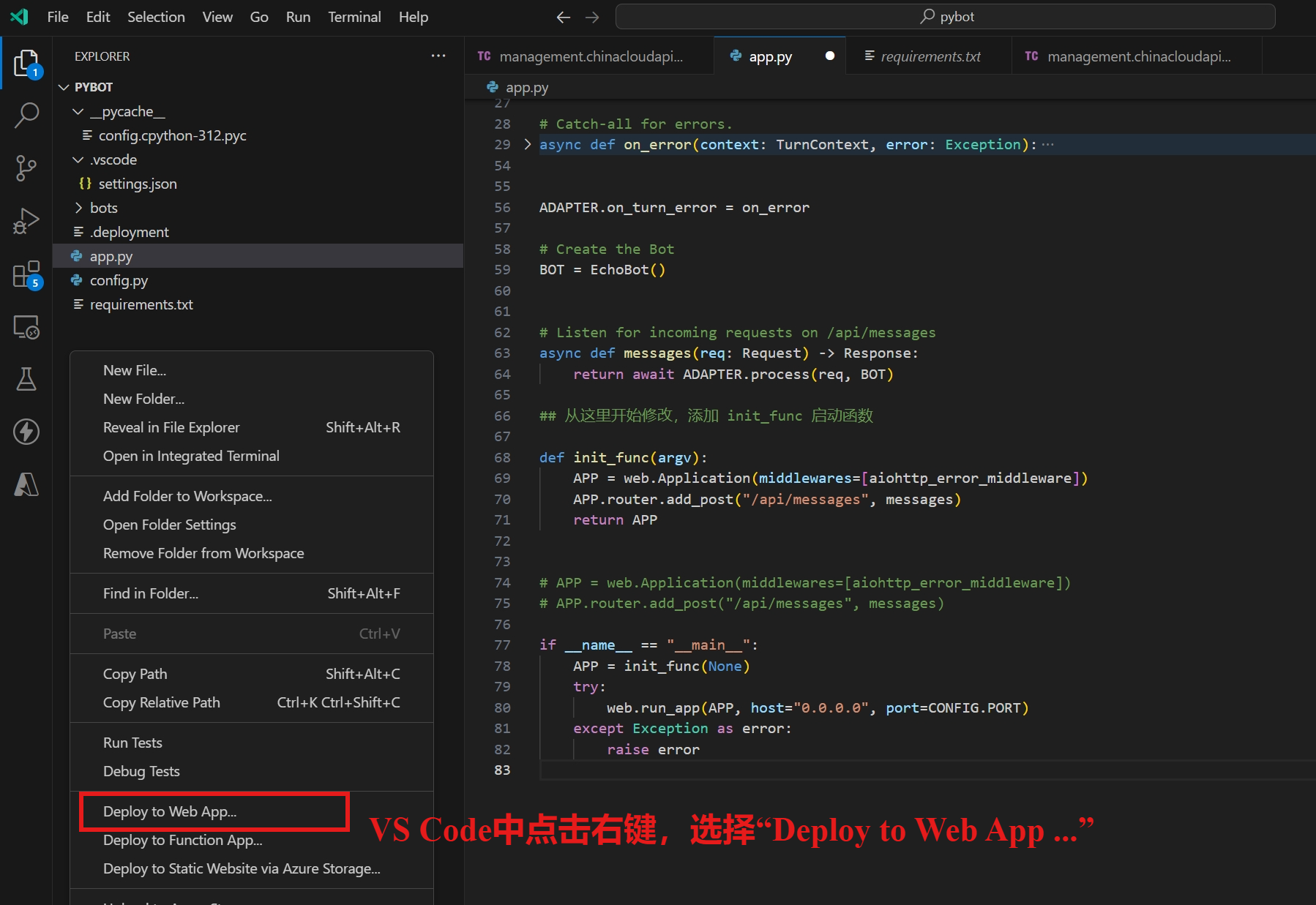
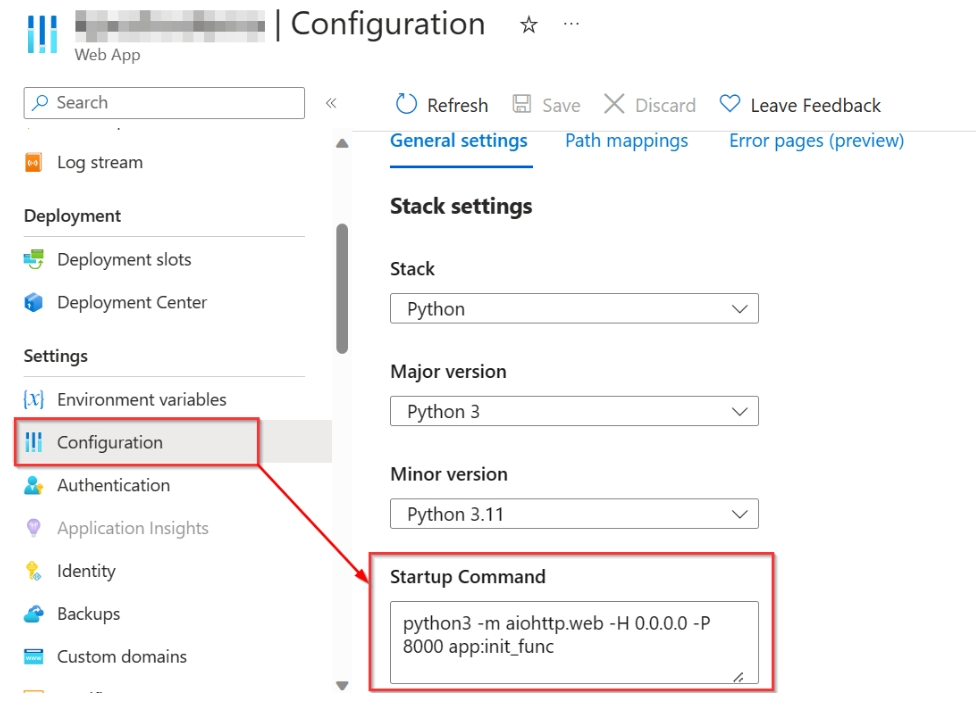
进入App Service配置页面,设置启动命令。
python3 -m aiohttp.web -H 0.0.0.0 -P 8000 app:init_func
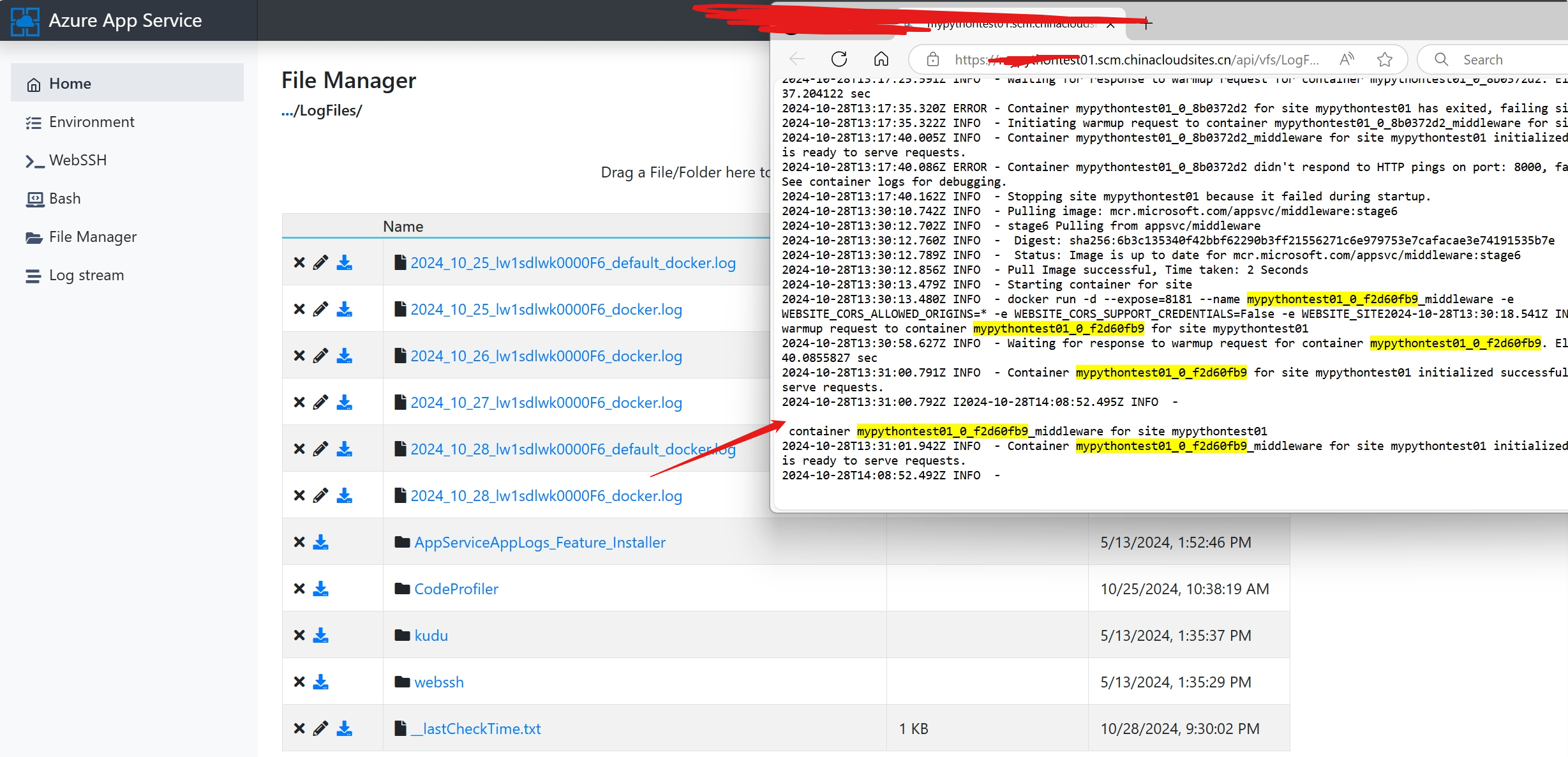
修改后,查看日志,应用启动成功!
Azure ChatBot Running With Python on an Azure WebApp Not Working : https://stackoverflow.com/questions/77781014/azure-chatbot-running-with-python-on-an-azure-webapp-not-working
 官方公众号
官方公众号