ETJava Beta | Java
 注册
登录
注册
登录
注册
登录
注册
登录
先展示下最终效果:
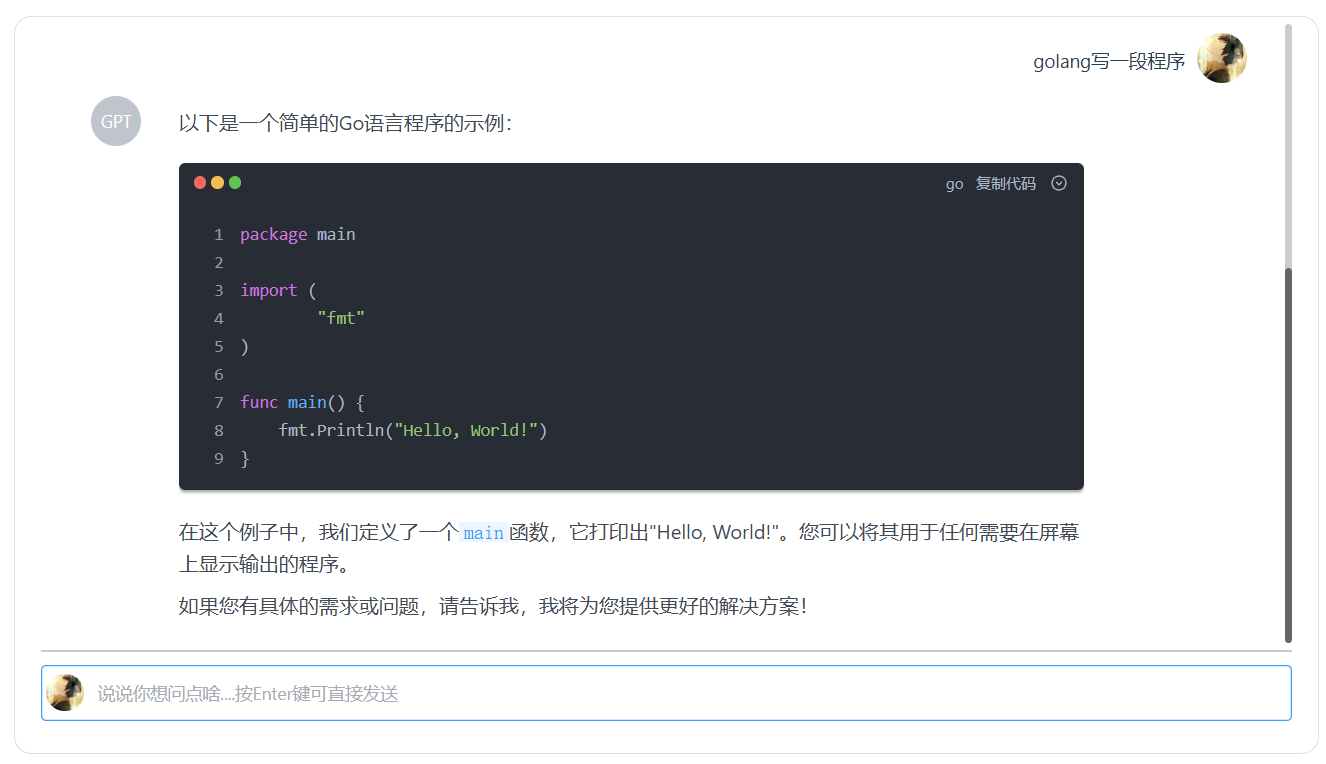
第一步:先安装ollama,并配置对应的开源大模型。
安装步骤可以查看上一篇博客:
async startStreaming(e) {
      if(e.ctrkey&&e.keyCode==13){
        this.form.desc+='\n';
      }
      document.getElementById("txt_suiwen").disabled="true";
      // 如果已经有一个正在进行的流式请求,则中止它
      if (this.controller) {
        this.controller.abort();
      }

      setTimeout(()=>{
        this.scrollToBottom();
       },50);
        var mymsg=this.form.desc.trim();
        if(mymsg.length>0){
               this.form.desc='';
               this.message.push({
                   user:this.username,
                   msg:mymsg
               })
               this.message.push({
                       user:'GPT',
                       msg:'',
                       dot:''
               });

             // 创建一个新的 AbortController 实例
             this.controller = new AbortController();
             const signal = this.controller.signal;
             this.arequestData.messages.push({role:"user",content:mymsg});

             try {
               const response = await fetch('http://127.0.0.1:11434/api/chat', {
                 method: 'POST',
                 headers: {
                   'Content-Type': 'application/json'
                 },
                 body:JSON.stringify(this.arequestData),
                 signal
               });

               if (!response.body) {
                 this.message[this.message.length-1].msg='ReadableStream not yet supported in this browser.';
                 throw new Error('ReadableStream not yet supported in this browser.');
               }

               const reader = response.body.getReader();
               const decoder = new TextDecoder();
               let result = '';
               this.message[this.message.length-1].dot='';
               while (true) {
                 const { done, value } = await reader.read();
                 if (done) {
                   break;
                 }
                 result += decoder.decode(value, { stream: true });

                 // 处理流中的每一块数据,这里假设每块数据都是完整的 JSON 对象
                 const jsonChunks = result.split('\n').filter(line => line.trim());
                 //console.log(result)
                 for (const chunk of jsonChunks) {
                   try {
                     const data = JSON.parse(chunk);
                     //console.log(data.message.content)
                     this.message[this.message.length-1].msg+=data.message.content;
                     setTimeout(()=>{
                       this.scrollToBottom();
                      },50);
                   } catch (e) {
                     //this.message[this.message.length-1].msg=e;
                     // 处理 JSON 解析错误
                     //console.error('Failed to parse JSON:', e);
                   }
                 }

                 // 清空 result 以便处理下一块数据
                 result = '';
               }
             } catch (error) {
               if (error.name === 'AbortError') {
                 console.log('Stream aborted');
                 this.message[this.message.length-1].msg='Stream aborted';
               } else {
                 console.error('Streaming error:', error);
                 this.message[this.message.length-1].msg='Stream error'+error;
               }
             }
             this.message[this.message.length-1].dot='';
             this.arequestData.messages.push({
                     role: 'assistant',//this.message[this.message.length-1].user,//"GPT",
                     content: this.message[this.message.length-1].msg
                   })
             setTimeout(()=>{
                this.scrollToBottom();
               },50);

    }else{
          this.form.desc='';
        }
        document.getElementById("txt_suiwen").disabled="";
        document.getElementById("txt_suiwen").focus();
    }
  }
<template>
  <el-row :gutter="12" class="demo-radius">
    <div
        class="radius"
        :style="{
          borderRadius: 'base'
        }">
        <div class="messge" id="messgebox"  ref="scrollDiv">
            <ul>
  <li v-for="(item, index) in message" :key="index" style="list-style-type:none;">
    <div v-if="item.user == username" class="mymsginfo" style="float:right">
        <div>
          <el-avatar style="float: right;margin-right: 30px;background: #01bd7e;">
            <!-- {{ item.user.substring(0, 2) }}   -->
            <img :alt="item.user.substring(0, 2)" :src=userphoto />
          </el-avatar>
    </div><div style="float: right;margin-right: 10px;margin-top:10px;width:80%;text-align: right;"> {{ item.msg }} </div>
     </div>
     <div v-else class="chatmsginfo" >
        <div>
        <el-avatar style="float: left;margin-right: 10px;">  {{ item.user }}  </el-avatar>
    </div>
      <div style="float: left;margin-top:10px;width:80%;">
        <img alt="loading" v-if="item.msg == ''" class="loading" src="../../assets/loading.gif"/>
        <MdPreview style="margin-top:-20px;"  :autoFoldThreshold="9999" :editorId="id" :modelValue=" item.msg + item.dot  " />
        <!-- {{ item.msg }} -->
        </div>
      </div>
  </li>
</ul>
        </div>
        <div class="inputmsg">
            <el-form :model="form" >
                <el-form-item >
                   <el-avatar style="float: left;background: #01bd7e;margin-bottom: -44px;margin-left: 4px;z-index: 999;width: 30px;height: 30px;">
                     <img alt="jin" :src=userphoto />
                    </el-avatar>
                    <el-input id="txt_suiwen" :prefix-icon="userphoto" resize="none"  autofocus="true"  :autosize="{ minRows: 1, maxRows: 2 }" v-model="form.desc"  placeholder="说说你想问点啥....按Enter键可直接发送" @keydown.enter.native.prevent="startStreaming($event)" type="textarea" />
                </el-form-item>
            </el-form>
        </div>
      </div>
  </el-row>

</template>
<script setup>
import { MdPreview, MdCatalog } from 'md-editor-v3';
import 'md-editor-v3/lib/preview.css';

const id = 'preview-only';
</script>
<script>
export default {
  data() {
    return {
      form: {
        desc: ''
      },
      message:[],
      username:sessionStorage.name,
      userphoto:sessionStorage.photo,
      loadingtype:false,
      controller: null,
      arequestData : {
          model: "qwen2",//"llama3.1",
          messages: []
      }
    }
  },
  mounted() {
  },
  methods: {
    scrollToBottom() {
        let elscroll=this.$refs["scrollDiv"];
        elscroll.scrollTop = elscroll.scrollHeight+30

    },
    clearForm(formName){
      this.form.desc='';
    },
    async startStreaming(e) {
      if(e.ctrkey&&e.keyCode==13){
        this.form.desc+='\n';
      }
      document.getElementById("txt_suiwen").disabled="true";
      // 如果已经有一个正在进行的流式请求,则中止它
      if (this.controller) {
        this.controller.abort();
      }

      setTimeout(()=>{
        this.scrollToBottom();
       },50);
        var mymsg=this.form.desc.trim();
        if(mymsg.length>0){
               this.form.desc='';
               this.message.push({
                   user:this.username,
                   msg:mymsg
               })
               this.message.push({
                       user:'GPT',
                       msg:'',
                       dot:''
               });

             // 创建一个新的 AbortController 实例
             this.controller = new AbortController();
             const signal = this.controller.signal;
             this.arequestData.messages.push({role:"user",content:mymsg});

             try {
               const response = await fetch('http://127.0.0.1:11434/api/chat', {
                 method: 'POST',
                 headers: {
                   'Content-Type': 'application/json'
                 },
                 body:JSON.stringify(this.arequestData),
                 signal
               });

               if (!response.body) {
                 this.message[this.message.length-1].msg='ReadableStream not yet supported in this browser.';
                 throw new Error('ReadableStream not yet supported in this browser.');
               }

               const reader = response.body.getReader();
               const decoder = new TextDecoder();
               let result = '';
               this.message[this.message.length-1].dot='';
               while (true) {
                 const { done, value } = await reader.read();
                 if (done) {
                   break;
                 }
                 result += decoder.decode(value, { stream: true });
                 // 处理流中的每一块数据,这里假设每块数据都是完整的 JSON 对象
                 const jsonChunks = result.split('\n').filter(line => line.trim());
                 //console.log(result)
                 for (const chunk of jsonChunks) {
                   try {
                     const data = JSON.parse(chunk);
                     //console.log(data.message.content)
                     this.message[this.message.length-1].msg+=data.message.content;
                     setTimeout(()=>{
                       this.scrollToBottom();
                      },50);
                   } catch (e) {
                     //this.message[this.message.length-1].msg=e;
                     // 处理 JSON 解析错误
                     //console.error('Failed to parse JSON:', e);
                   }
                 }
                 // 清空 result 以便处理下一块数据
                 result = '';
               }
             } catch (error) {
               if (error.name === 'AbortError') {
                 console.log('Stream aborted');
                 this.message[this.message.length-1].msg='Stream aborted';
               } else {
                 console.error('Streaming error:', error);
                 this.message[this.message.length-1].msg='Stream error'+error;
               }
             }
             this.message[this.message.length-1].dot='';
             this.arequestData.messages.push({
                     role: 'assistant',//this.message[this.message.length-1].user,//"GPT",
                     content: this.message[this.message.length-1].msg
                   })
             setTimeout(()=>{
                this.scrollToBottom();
               },50);

    }else{
          this.form.desc='';
        }
        document.getElementById("txt_suiwen").disabled="";
        document.getElementById("txt_suiwen").focus();
    }
  },
  beforeDestroy() {
    // 组件销毁时中止流式请求
    if (this.controller) {
      this.controller.abort();
    }
  }
}
</script>
<style scoped>
.radius{
  margin:0 auto;
}
.demo-radius .title {
  color: var(--el-text-color-regular);
  font-size: 18px;
  margin: 10px 0;
}
.demo-radius .value {
  color: var(--el-text-color-primary);
  font-size: 16px;
  margin: 10px 0;
}
.demo-radius .radius {
  min-height: 580px;
  height: 85vh;
  width: 70%;
  border: 1px solid var(--el-border-color);
  border-radius: 14px;
  margin-top: 10px;
}
.messge{
    width:96%;
    height:84%;
    /* border:1px solid red; */
    margin: 6px auto;
    overflow: hidden;
    overflow-y: auto;
}
.inputmsg{
    width:96%;
    height:12%;
    /* border:1px solid blue; */
    border-top:2px solid #ccc;
    margin: 4px auto;
    padding-top: 10px;
}
.mymsginfo{
    width:100%;
    height:auto;
    min-height:50px;
}


::-webkit-scrollbar {width: 6px;height: 5px;
}
::-webkit-scrollbar-track {background-color: rgba(0, 0, 0, 0.2);border-radius: 10px;
}
::-webkit-scrollbar-thumb {background-color: rgba(0, 0, 0, 0.5);border-radius: 10px;
}
::-webkit-scrollbar-button {background-color: #7c2929;height: 0;width: 0px;
}
::-webkit-scrollbar-corner {background-color: black;
}

</style>
<style>
.el-textarea__inner{
  padding-left: 45px;
  padding-top: .75rem;
  padding-bottom: .75rem;
}
</style>
 官方公众号
官方公众号