ETJava Beta | Java
 注册
登录
注册
登录
注册
登录
注册
登录
Nginx与Apache一样,都是web服务器,但是Nginx比Apache多一些功能,比如Nginx可以做代理,可以做负载均衡……
[root@ceph conf.d]# grep -Ev "^#|^$|#" /etc/nginx/nginx.conf |cat -n
     1	user nginx;
     2	worker_processes auto;
     3	error_log /var/log/nginx/error.log;
     4	pid /run/nginx.pid;
     5	include /usr/share/nginx/modules/*.conf;
     6	events {
     7	    worker_connections 1024;
     8	}
     9	http {
    10	    log_format  main  '$remote_addr - $remote_user [$time_local] "$request" '
    11	                      '$status $body_bytes_sent "$http_referer" '
    12	                      '"$http_user_agent" "$http_x_forwarded_for"';
    13	    access_log  /var/log/nginx/access.log  main;
    14	    sendfile            on;
    15	    tcp_nopush          on;
    16	    tcp_nodelay         on;
    17	    keepalive_timeout   65;
    18	    types_hash_max_size 4096;
    19	    include             /etc/nginx/mime.types;
    20	    default_type        application/octet-stream;
    21	    include /etc/nginx/conf.d/*.conf;
    22	    server {
    23	        listen       80;
    24	        listen       [::]:80;
    25	        server_name  _;
    26	        root         /usr/share/nginx/html;
    27	        include /etc/nginx/default.d/*.conf;
    28	        error_page 404 /404.html;
    29	            location = /40x.html {
    30	        }
    31	        error_page 500 502 503 504 /50x.html;
    32	            location = /50x.html {
    33	        }
    34	    }
    35	}
由于之前很详细的写过Apache的配置了,这里就说一下这俩服务之间的差异,nginx的配置文件每行配置结束必须以分号;结尾
这两个都是Apache服务里面也有的,这里就简答说一下
第六行event这个是指定nginx的工作模式,默认的,Apache也有这个模式,这个段落里面的内容
events {
worker_connections 1024; 指定单个进程的连接数
}
这个段落里面就是一些http的配置
首先就是定义日志的格式log_format,然后就是access.log这个就不细写
sendfile on;这个代表高效传输,也就是可以将文件直接从磁盘传输到网络中,而不先读到内存
tcp_nopush on 立刻回应tcp的请求
tcp_nodelay on 对于小数据包直接回应
keepalive_timeout 65,这个通过名字就可以知道,是长连接的超时时间
我跳过了types_hash_max_size,这个是hash散列表,我也不知道是干嘛的
include /etc/nginx/mime.types; 这里是载入nginx能够识别的类型,你可以打开这个文件去看这里面都定义了什么,打开就一目了然了
default_type application/octet-stream; 二进制的文件可以直接下载
server {
listen 80;
listen [::]:80;
server_name _;
root /usr/share/nginx/html;
include /etc/nginx/default.d/*.conf;
error_page 404 /404.html;
location = /40x.html {
}
error_page 500 502 503 504 /50x.html;
location = /50x.html {
}
}
}
这里的server对应的就是Apache的虚拟主机
listen 监听的端口,他这里默认监听了2个,一个是IPv4,另一个是IPv6
server_name:对外提供的服务名,也就是域名
root:网站根目录
include: 定义虚拟主机的特性,可以将一些其他的特性卸载conf.d/下之后他会自动加载配置
error_page 404 :这个是错误页,当404出现的时候,nginx会返回网站根目录下的404.html
locatioin: 这个是nginx的重头戏,叫做路由规则,你可以将路由策略写在这,他就会根据你的策略来处理流量,这个我们稍后细讲
error_page 500当服务发生500以上的错误的时候,nginx返回网站根目录下的50x.html
Nginx也支持3种虚拟主机,与Apache一样
虚拟主机我们可以在conf.d下进行配置
[root@ceph conf.d]# vim virthost.conf
server {
  listen 81;
  root /web1;
}

server {
  listen 82;
  root /web2;
}
[root@ceph conf.d]# echo 81 > /web1/index.html
[root@ceph conf.d]# echo 82 > /web2/index.html
[root@ceph conf.d]# systemctl restart nginx
[root@ceph conf.d]# curl localhost:82
82
[root@ceph conf.d]# curl localhost:81
81
基于端口的虚拟主机这样就配好了
首先配置一个临时IP
[root@ceph conf.d]# sudo ip addr add 192.168.1.100/24 dev ens33
[root@ceph conf.d]# ip a |grep 192.168.1.100
    inet 192.168.1.100/24 scope global ens33
虚拟的IP就配置好了,接下来配置nginx
[root@ceph conf.d]# vim virthost.conf
server {
  listen 81;
  root /web1;
}

server {
  listen 82;
  root /web2;
}

server {
  listen 192.168.200.210:80;
  root /web3;
}

server {
  listen 192.168.1.100:80;
  root /web4;
}
然后我们创建对应的网站根目录以及index.html
[root@ceph conf.d]# echo 192.168.200.210 > /web3/index.html
[root@ceph conf.d]# echo 192.168.1.100 > /web4/index.html
[root@ceph conf.d]# systemctl restart nginx
[root@ceph conf.d]# curl 192.168.200.210
192.168.200.210
[root@ceph conf.d]# curl 192.168.1.100
192.168.1.100
可以看到,通过不同的ip访问回显是不同的内容
[root@ceph conf.d]# vim virthost.conf
server {
  listen 80;
  server_name test.com;
  root /web5;
}

server {
  listen 80;
  server_name example.com;
  root /web6;
}
创建根目录以及重启服务,还需要做hosts解析
[root@ceph conf.d]# echo web5 > /web5/index.html
[root@ceph conf.d]# echo web6 > /web6/index.html
[root@ceph conf.d]# systemctl restart nginx
[root@ceph conf.d]# vim /etc/hosts
192.168.200.210 test.com
192.168.200.210 example.com
[root@ceph conf.d]# curl test.com
web5
[root@ceph conf.d]# curl example.com
web6
这样也是可以访问到对应的文件的
这个是nginx最重要的配置了,在Apache里面访问控制是用Directory和Files来做的,那么在nginx里面的做法就是location了
我不想你访问网站根目录下的/test.html,那么我的路由规则就应该这样写,还是在虚拟主机里定义
[root@ceph conf.d]# vim virthost.conf
server {
  listen 80;
  server_name test.com;
  root /web5;
  location /test.html {
    return 403;
  }
}
我们来创建这个test.html文件,并尝试访问
[root@ceph conf.d]# echo "test file" > /web5/test.html
[root@ceph conf.d]# systemctl restart nginx
[root@ceph conf.d]# curl 192.168.200.210/test.html
<html>
<head><title>403 Forbidden</title></head>
<body>
<center><h1>403 Forbidden</h1></center>
<hr><center>nginx</center>
</body>
</html>
看到了吗?他就返回的是403,这样做之后,访问test.html的请求就被拒绝掉了,但是如果我们需要拒绝掉所有以test开头的文件呢?也是跟Apache一样使用 * 号吗?不,Nginx是另外的做法
[root@ceph conf.d]# vim virthost.conf
server {
  listen 80;
  server_name test.com;
  root /web5;
  location ^~ /test {
    return 403;
  }
}
[root@ceph conf.d]# echo test > /web5/test.1
[root@ceph conf.d]# echo test > /web5/test.2
[root@ceph conf.d]# systemctl restart nginx
我们在/web5下创建了test.1和test.2包括之前创建的test.html一共有3个test开头的文件,那我们现在来尝试访问一下
[root@ceph conf.d]# curl 192.168.200.210/test.html -I
HTTP/1.1 403 Forbidden
Server: nginx
Date: Tue, 02 Jul 2024 09:09:49 GMT
Content-Type: text/html
Content-Length: 146
Connection: keep-alive

[root@ceph conf.d]# curl 192.168.200.210/test.1 -I
HTTP/1.1 403 Forbidden
Server: nginx
Date: Tue, 02 Jul 2024 09:09:56 GMT
Content-Type: text/html
Content-Length: 146
Connection: keep-alive
[root@ceph conf.d]# curl 192.168.200.210/test.xxx -I
HTTP/1.1 403 Forbidden
Server: nginx
Date: Tue, 02 Jul 2024 09:10:12 GMT
Content-Type: text/html
Content-Length: 146
Connection: keep-alive
看到了吧,尽管我们访问一个不存在的文件,按道理应该是返回404,但是这个文件是以test开头,那么他会被拒绝访问,不管这个文件存不存在
但是这样配置,只能拒绝掉以test开头的,我如果访问的是Test,那么他就不会被拒绝了
[root@ceph conf.d]# curl 192.168.200.210/Test -I
HTTP/1.1 404 Not Found
Server: nginx
Date: Tue, 02 Jul 2024 09:12:57 GMT
Content-Type: text/html
Content-Length: 146
Connection: keep-alive
对吧,因为我们没有这个资源,所以他返回了404,而不是403,说明没有被拒绝,如果想忽略大小写,可以这样做
[root@ceph conf.d]# vim virthost.conf
server {
  listen 80;
  server_name test.com;
  root /web5;
  location ~* /test {
    return 403;
  }
}
只需要将^~这个地方改为~*,我们来访问一下看看
[root@ceph conf.d]# curl -I 192.168.200.210/test
HTTP/1.1 403 Forbidden
Server: nginx
Date: Tue, 02 Jul 2024 09:15:17 GMT
Content-Type: text/html
Content-Length: 146
Connection: keep-alive

[root@ceph conf.d]# curl -I 192.168.200.210/Test
HTTP/1.1 403 Forbidden
Server: nginx
Date: Tue, 02 Jul 2024 09:15:21 GMT
Content-Type: text/html
Content-Length: 146
Connection: keep-alive

[root@ceph conf.d]# curl -I 192.168.200.210/TEst
HTTP/1.1 403 Forbidden
Server: nginx
Date: Tue, 02 Jul 2024 09:15:23 GMT
Content-Type: text/html
Content-Length: 146
Connection: keep-alive
现在的配置,不管你的大写的TEST还是小写的test,亦或者是大小写都有的,一律都会被拒绝访问
我们还可以通过location来做反向代理,比如你现在访问我网站下的/那我就直接给你代理到baidu.com去,你要搜索啥你自己去搜吧,你以为这个百度是我给你提供的,其实不然,我是把你的请求给到百度了
[root@ceph conf.d]# vim virthost.conf
server {
  listen 80;
  server_name test.com;
  root /web5;
  location  / {
    proxy_pass https://www.baidu.com;
  }
}
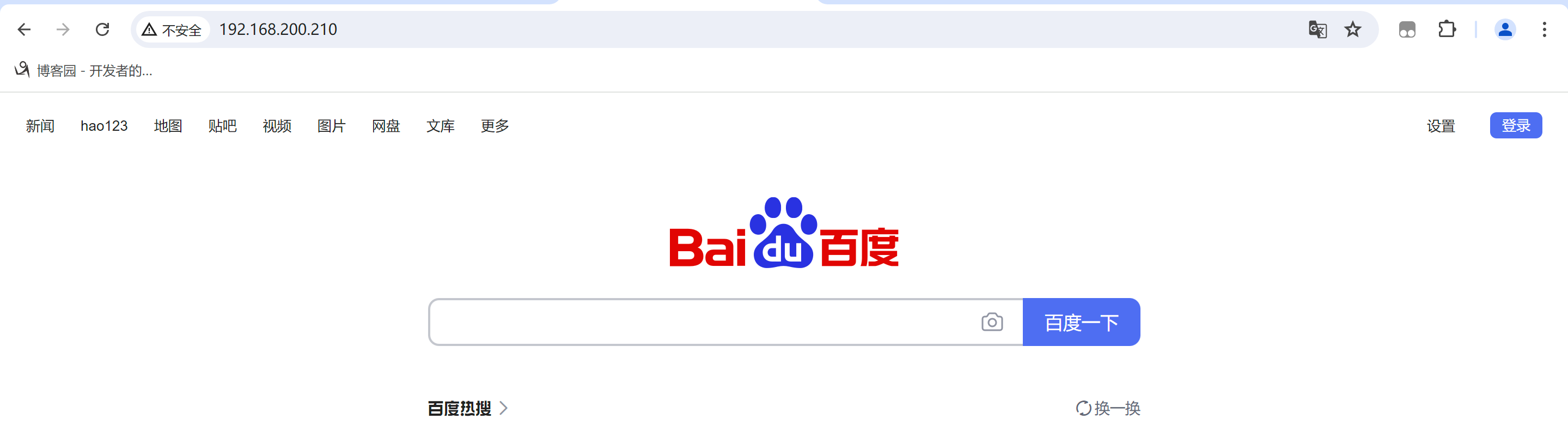
看到了吗?这是货真价实的百度哦,可以搜索内容的
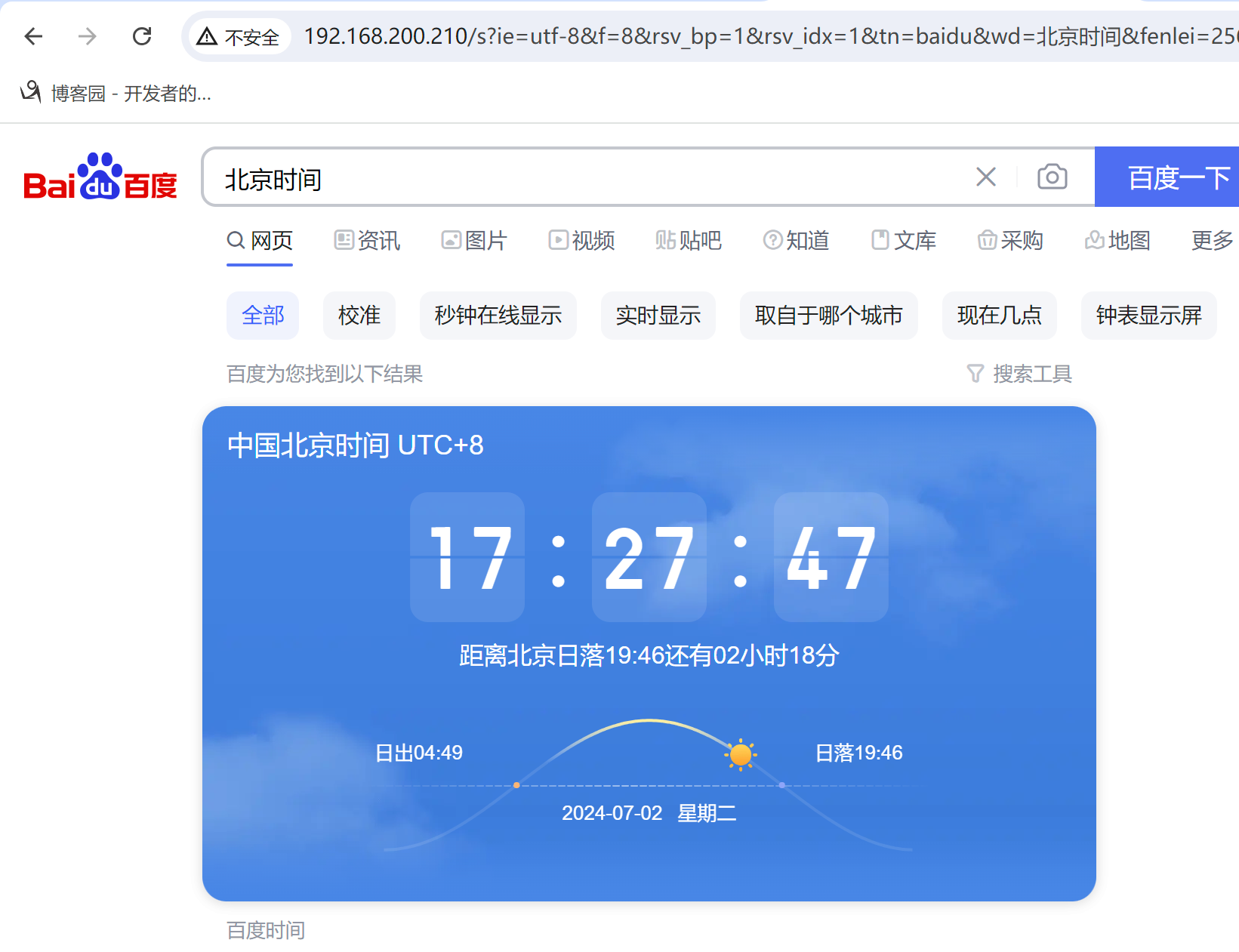
怎么样,你现在就搭建了一个反向代理,客户端只知道他访问的是192.168.200.210这个IP,他并不知道你把他的请求给了百度,所以客户端会以为你就是百度
nginx配置https的方式其实跟Apache是差不多的,直接告诉他你的密钥文件放在哪,有2种方式可以配置https,第一种是直接改主配置文件,主配置文件里是有https段落的,只不过默认被注释了。
第二种方式就是自己写一个虚拟主机,我这里直接修改主配置文件
[root@ceph nginx]# vim nginx.conf
    server {
        listen       443 ssl http2;
        listen       [::]:443 ssl http2;
        server_name  _;
        root         /usr/share/nginx/html;

        ssl_certificate "/etc/nginx/server.crt";
        ssl_certificate_key "/etc/nginx/server.key";

        # Load configuration files for the default server block.
        include /etc/nginx/default.d/*.conf;

        error_page 404 /404.html;
            location = /40x.html {
        }

        error_page 500 502 503 504 /50x.html;
            location = /50x.html {
        }
    }
将这一段的注释全部给放开,ssl只保留需要的这2行内容,然后将证书地址改为你的证书的实际目录就可以了,然后重启nginx服务
Nginx热升级是指可以做到不停机升级Nginx的版本,yum安装的Nginx是不支持热升级的,如果想要热升级Nginx,那么你的Nginx必须是源码编译安装的
编译安装流程:
- 下载源码包
- 解压源码包
- 执行预编译 ./configure
- 编译 make
- 编译安装 make install
这是编译安装的流程
在执行到第5步的时候,他就会将编译好的二进制文件放在objs目录下,就是依赖于这个目录下的二进制文件我们才可以做到版本共存
nginx的热升级原理主要依赖于以下几个关键步骤:
如果你已经使用yum安装了,先卸载nginx
[root@ceph ~]# yum remove -y nginx
在这里面找一个相对旧一点的版本,我这里下载一个1.26.1,然后将1.26.1升级到1.27.0
[root@ceph ~]# cd /opt/
[root@ceph opt]# wget https://nginx.org/download/nginx-1.26.1.tar.gz
[root@ceph opt]# tar -zxf nginx-1.26.1.tar.gz
[root@ceph opt]# cd nginx-1.26.1/
[root@ceph nginx-1.26.1]# ls
auto     CHANGES.ru  configure  html     man     src
CHANGES  conf        contrib    LICENSE  README
[root@ceph nginx-1.26.1]# ./configure --prefix=/usr/local/nginx
在这里执行的时候他可能会报错,根据他的报错你安装相对应的软件包就好了
Configuration summary
  + using system PCRE2 library
  + OpenSSL library is not used
  + using system zlib library

  nginx path prefix: "/usr/local/nginx"
  nginx binary file: "/usr/local/nginx/sbin/nginx"
  nginx modules path: "/usr/local/nginx/modules"
  nginx configuration prefix: "/usr/local/nginx/conf"
  nginx configuration file: "/usr/local/nginx/conf/nginx.conf"
  nginx pid file: "/usr/local/nginx/logs/nginx.pid"
  nginx error log file: "/usr/local/nginx/logs/error.log"
  nginx http access log file: "/usr/local/nginx/logs/access.log"
  nginx http client request body temporary files: "client_body_temp"
  nginx http proxy temporary files: "proxy_temp"
  nginx http fastcgi temporary files: "fastcgi_temp"
  nginx http uwsgi temporary files: "uwsgi_temp"
  nginx http scgi temporary files: "scgi_temp"
他执行完之后会这样输出就是没有错误,可以继续往下做
[root@ceph nginx-1.26.1]# make -j 4
[root@ceph nginx-1.26.1]# make install
由于我们指定的安装路径是/usr/local/nginx,所以他会在这个目录下生成一个sbin的目录,这个目录里面有一个二进制文件nginx,执行他就可以启动nginx
[root@ceph nginx-1.26.1]# cd /usr/local/nginx/sbin/
[root@ceph sbin]# ./nginx
[root@ceph sbin]# curl -I 192.168.200.210
HTTP/1.1 200 OK
Server: nginx/1.26.1
Date: Tue, 02 Jul 2024 11:27:47 GMT
Content-Type: text/html
Content-Length: 615
Last-Modified: Tue, 02 Jul 2024 11:25:09 GMT
Connection: keep-alive
ETag: "6683e395-267"
Accept-Ranges: bytes
在server这一栏我们可以看见nginx的版本是1.26.1
现在我们将nginx升级到1.27.0
[root@ceph sbin]# cd /opt/
[root@ceph opt]# wget https://nginx.org/download/nginx-1.27.0.tar.gz
[root@ceph opt]# tar -zxf nginx-1.27.0.tar.gz
[root@ceph opt]# cd nginx-1.27.0/
[root@ceph nginx-1.27.0]# ./configure --prefix=/usr/local/nginx
[root@ceph nginx-1.27.0]# make -j 4
这里非常需要注意,一定不要去执行make install了,因为执行这个命令的话会将原来的nginx全部覆盖掉,我们只需要替换掉nginx的二进制文件就好了
我们来到objs目录
[root@ceph nginx-1.27.0]# ls
auto     CHANGES.ru  configure  html     Makefile  objs    src
CHANGES  conf        contrib    LICENSE  man       README
[root@ceph nginx-1.27.0]# cd objs/
[root@ceph objs]# ls
autoconf.err  nginx    ngx_auto_config.h   ngx_modules.c  src
Makefile      nginx.8  ngx_auto_headers.h  ngx_modules.o
这里面就有一个nginx的二进制文件,先别着急启动,我们先将老版本的nginx二进制文件进行备份
[root@ceph objs]# cp /usr/local/nginx/sbin/nginx /usr/local/nginx/sbin/nginx.bak
[root@ceph objs]# cd /usr/local/nginx/sbin/
[root@ceph sbin]# cp /opt/nginx-1.27.0/objs/nginx .
cp: overwrite './nginx'? y
[root@ceph sbin]# ./nginx -v
nginx version: nginx/1.27.0
现在我们就已经将1.27.0的二进制文件拷贝到这个地方来了,接下来我们需要将nginx1.27.0也给启动起来。
你这时候可能会有疑问,80端口不是已经被老版本的nginx给占用了吗,我现在在启动不会报错吗?答案肯定是会,所以我们在启动之前还需要进行一个操作,给老版本的nginx'发送一个USR2的信号
[root@ceph sbin]# ps -ef |grep nginx
root       46538       1  0 19:27 ?        00:00:00 nginx: master process ./nginx
nobody     46539   46538  0 19:27 ?        00:00:00 nginx: worker process
root       49680   15412  0 19:36 pts/0    00:00:00 grep --color=auto nginx
我们查到nginx master的进程id是46538,接下来就是发信号了
[root@ceph sbin]# kill -s USR2 46538
# 然后我们再启动nginx
[root@ceph sbin]# ps -ef |grep nginx
root       46538       1  0 19:27 ?        00:00:00 nginx: master process ./nginx
nobody     46539   46538  0 19:27 ?        00:00:00 nginx: worker process
root       49708   46538  0 19:37 ?        00:00:00 nginx: master process ./nginx
nobody     49709   49708  0 19:37 ?        00:00:00 nginx: worker process
root       49761   15412  0 19:38 pts/0    00:00:00 grep --color=auto nginx
看到了吗?除了老版本的46538之外,还有一个新的nginx master进程,49708
尝试访问
[root@ceph sbin]# curl 192.168.200.210 -I
HTTP/1.1 200 OK
Server: nginx/1.27.0
Date: Tue, 02 Jul 2024 11:39:04 GMT
Content-Type: text/html
Content-Length: 615
Last-Modified: Tue, 02 Jul 2024 11:25:09 GMT
Connection: keep-alive
ETag: "6683e395-267"
Accept-Ranges: bytes
看,他现在处理连接的版本就是1.27.0了,如果老版本的nginx还有连接在处理的话也是不会受到影响的,等我们确认没问题之后我们只需要将老版本给kill掉
[root@ceph sbin]# kill 46538
[root@ceph sbin]# ps -ef |grep nginx
root       49708       1  0 19:37 ?        00:00:00 nginx: master process ./nginx
nobody     49709   49708  0 19:37 ?        00:00:00 nginx: worker process
root       49913   15412  0 19:40 pts/0    00:00:00 grep --color=auto nginx
这个时候老版本就成功退役了,所有的连接都交由新版本的nginx来处理,我们的热升级就搞定了
 官方公众号
官方公众号