ETJava Beta | Java
 注册
登录
注册
登录
注册
登录
注册
登录
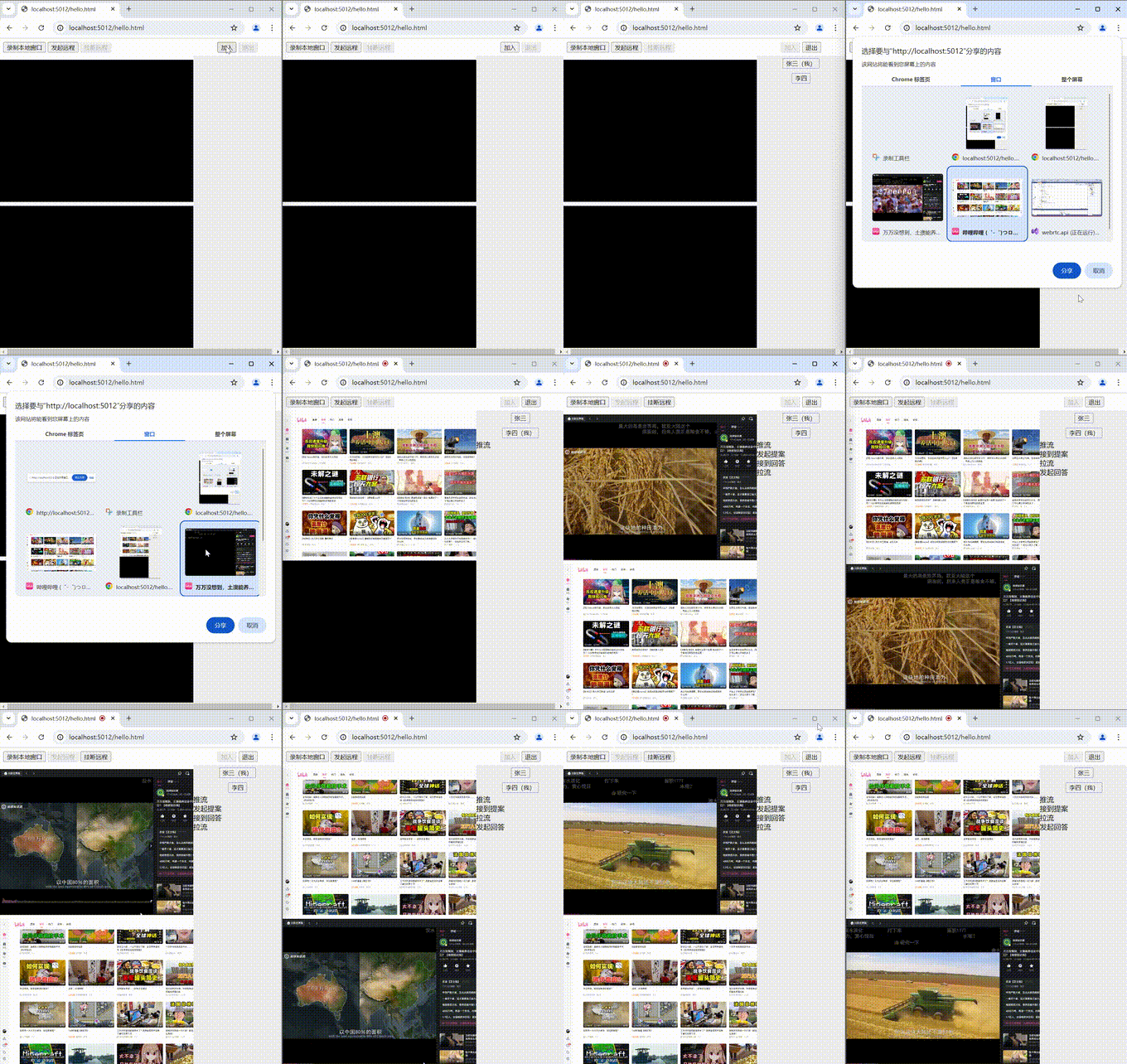
WebSokcet 和中心服务器的连接,中心服务器也叫信令服务器,用来建立连接前中转消息,相当于相亲前的媒人
RTCPeerConnection 视频通话连接
rc.createOffer 发起方创建本地提案,获得SDP描述
rc.createAnswer 接收方创建本地回答,获得SDP描述
rc.setLocalDescription 设置本地创建的SDP描述
rc.setRemoteDescription 设置对方传递过来的SDP描述
rc.onicecandidate 在创建本地提案会本地回答时触发此事件,获得交互式连接对象,用于发送给对方
rc.addIceCandidate 设置中心服务器转发过来IceCandidate
rc.addStream 向连接中添加媒体流
rc.addTrack 向媒体流中添加轨道
rc.ontrack 在此事件中接受来自对方的媒体流
其实两个人通信只需要一个RTCPeerConnection,A和B各持一端,不需要两个RTCPeerConnection,这点容易被误导
这里我获取的是窗口视频流,而不是摄像头视频流
navigator.mediaDevices.getDisplayMedia()
    .then(meStream => {
        //在本地显示预览
        document.getElementById("local").srcObject = meStream;
    })
        //给对方发送视频流
        other.stream = meStream;
        const videoTracks = meStream.getVideoTracks();
        const audioTracks = meStream.getAudioTracks();
        //log("推流")
        other.peerConnection.addStream(meStream);
        meStream.getVideoTracks().forEach(track => {
            other.peerConnection.addTrack(track, meStream);
        });
other.peerConnection.addEventListener("track", event => {
    //log("拉流")
    document.getElementById("remote").srcObject = event.streams[0];
})
这是最开始需要建立的和信令服务器的连接,用于点对点连接建立前转发消息,这算是最重要的逻辑了
ws = new WebSocket('/sdp');
ws.addEventListener("message", event => {
    var msg = JSON.parse(event.data);
    if (msg.type == "connect") {
        //log("接到提案");
        var other = remotes.find(r => r.name != myName);
        onReciveOffer(msg.data.description, msg.data.candidate, other);
    }
    else if (msg.type == "connected") {
        //log("接到回答");
        var other = remotes.find(r => r.name != myName);
        onReciveAnwer(msg.data.description, msg.data.candidate, other);
    }
    //获取自己在房间中的临时名字
    else if (msg.type == "id") {
        myName = msg.data;
    }
    //有人加入或退出房间时
    else if (msg.type == "join") {
        //成员列表
        for (var i = 0; i < msg.data.length; i++) {
            var other = remotes.find(r => r.name == msg.data[i]);
            if (other == null) {
                remotes.push({
                    stream: null,
                    peerConnection: new RTCPeerConnection(null),
                    description: null,
                    candidate: null,
                    video: null,
                    name: msg.data[i]
                });
            }
        }
        //过滤已经离开的人
        remotes = remotes.filter(r => msg.data.find(x => x == r.name) != null);
        //...
    }
});
在都已经加入聊天室后就可以开始建立点对点连接了
//对某人创建提案
other.peerConnection.createOffer({ offerToReceiveVideo: 1 })
    .then(description => {
        //设置成自己的本地描述
        other.description = description;
        other.peerConnection.setLocalDescription(description);
    });
在创建提案后会触发此事件,然后把提案和交互式连接消息一起发送出去
//交互式连接候选项
other.peerConnection.addEventListener("icecandidate", event => {
    other.candidate = event.candidate;
    //log("发起提案");
    //发送提案到中心服务器
    ws.send(JSON.stringify({
        type: "connect",
        data: {
            name: other.name,
            description: other.description,
            candidate: other.candidate
        }
    }));
})
对方收到提案后按照同样的流程创建回答和响应
/**接收到提案 */
function onReciveOffer(description, iceCandidate,other) {
    //交互式连接候选者
    other.peerConnection.addEventListener("icecandidate", event => {
        other.candidate = event.candidate;
        //log("发起回答");
        //回答信令到中心服务器
        ws.send(JSON.stringify({
            type: "connected",
            data: {
                name: other.name,
                description: other.description,
                candidate: other.candidate
            }
        }));
    })
    //设置来自对方的远程描述
    other.peerConnection.setRemoteDescription(description);
    other.peerConnection.addIceCandidate(new RTCIceCandidate(iceCandidate));
    other.peerConnection.createAnswer()
        .then(answerDescription => {
            other.description = answerDescription;
            other.peerConnection.setLocalDescription(answerDescription);
        })
}
发起方收到回答后,点对点连接建立,双方都能看到画面了,至此已经不需要中心服务器了
/**接收到回答 */
function onReciveAnwer(description, iceCandidate,other) {
    //收到回答后设置接收方的描述
    other.peerConnection.setRemoteDescription(description);
    other.peerConnection.addIceCandidate(new RTCIceCandidate(iceCandidate));
}
[ApiController]
[Route("sdp")]
public class SDPController : Controller
{
    public static List<(string name, WebSocket ws)> clients = new List<(string, WebSocket)>();
    private List<string> names = new List<string>() { "张三", "李四", "王五","钟鸣" };

    [HttpGet("")]
    public async Task Index()
    {
        WebSocket client = await HttpContext.WebSockets.AcceptWebSocketAsync();
        var ws = (name:names[clients.Count], client);
        clients.Add(ws);
        await client.SendAsync(UTF8Encoding.UTF8.GetBytes(JsonConvert.SerializeObject(new {type="id",data=ws.name})), WebSocketMessageType.Text, true, CancellationToken.None);
        List<string> list = new List<string>();
        foreach (var person in clients)
        {
            list.Add(person.name);
        }
        var join = new
        {
            type = "join",
            data = list,
        };
        foreach (var item in clients)
        {
            await item.ws.SendAsync(UTF8Encoding.UTF8.GetBytes(JsonConvert.SerializeObject(join)), WebSocketMessageType.Text, true, CancellationToken.None);
        }

        var defaultBuffer = new byte[40000];
        try
        {
            while (!client.CloseStatus.HasValue)
            {
                //接受信令
                var result = await client.ReceiveAsync(defaultBuffer, CancellationToken.None);
                JObject obj=JsonConvert.DeserializeObject<JObject>(UTF8Encoding.UTF8.GetString(defaultBuffer,0,result.Count));
                if (obj.Value<string>("type")=="connect" || obj.Value<string>("type") == "connected")
                {
                    var another = clients.FirstOrDefault(r => r.name == obj["data"].Value<string>("name"));
                    await another.ws.SendAsync(new ArraySegment<byte>(defaultBuffer, 0, result.Count), result.MessageType, result.EndOfMessage, CancellationToken.None);
                }
            }
        }
        catch (Exception e)
        {
        }
        Console.WriteLine("退出");
        clients.Remove(ws);
        list = new List<string>();
        foreach (var person in clients)
        {
            list.Add(person.name);
        }
        join = new
        {
            type = "join",
            data = list
        };
        foreach (var item in clients)
        {
            await item.ws.SendAsync(UTF8Encoding.UTF8.GetBytes(JsonConvert.SerializeObject(join)), WebSocketMessageType.Text, true, CancellationToken.None);
        }
    }
}
<!DOCTYPE html>
<html>
<head>
    <meta charset="utf-8" />
    <title></title>
    <style>
        html,body{
            height:100%;
            margin:0;
        }
        .container{
            display:grid;
            grid-template:auto 1fr 1fr/1fr 200px;
            height:100%;
            grid-gap:8px;
            justify-content:center;
            align-items:center;
        }
        .video {
            background-color: black;
            height:calc(100% - 1px);
            overflow:auto;
        }
        #local {
            grid-area:2/1/3/2;
        }
        #remote {
            grid-area: 3/1/4/2;
        }
        .list{
            grid-area:1/2/4/3;
            background-color:#eeeeee;
            height:100%;
            overflow:auto;
        }
        #persons{
            text-align:center;
        }
        .person{
            padding:5px;
        }
    </style>
</head>
<body>
    <div class="container">
        <div style="grid-area:1/1/2/2;padding:8px;">
            <button id="start">录制本地窗口</button>
            <button id="call">发起远程</button>
            <button id="hangup">挂断远程</button>
        </div>
        <video autoplay id="local" class="video"></video>
        <video autoplay id="remote" class="video"></video>
        <div class="list">
            <div style="text-align:center;background-color:white;padding:8px;">
                <button id="join">加入</button>
                <button id="exit">退出</button>
            </div>
            <div id="persons">

            </div>
            <div id="log">

            </div>
        </div>
    </div>

    <script>
        /**在屏幕顶部显示一条消息,3秒后消失 */
        function layerMsg(msg) {
            // 创建一个新的div元素作为消息层
            var msgDiv = document.createElement('div');
            msgDiv.textContent = msg;

            // 设置消息层的样式
            msgDiv.style.position = 'fixed';
            msgDiv.style.top = '0';
            msgDiv.style.left = '50%';
            msgDiv.style.transform = 'translateX(-50%)';
            msgDiv.style.background = '#f2f2f2';
            msgDiv.style.color = '#333';
            msgDiv.style.padding = '10px';
            msgDiv.style.borderBottom = '2px solid #ccc';
            msgDiv.style.width = '100%';
            msgDiv.style.textAlign = 'center';
            msgDiv.style.zIndex = '9999'; // 确保消息层显示在最顶层

            // 将消息层添加到文档的body中
            document.body.appendChild(msgDiv);

            // 使用setTimeout函数,在3秒后移除消息层
            setTimeout(function () {
                document.body.removeChild(msgDiv);
            }, 3000);
        }
        function log(msg) {
            document.getElementById("log").innerHTML += `<div>${msg}</div>`;
        }
    </script>

    <script>
        var myName = null;
        // 服务器配置
        const servers = null;
        var remotes = [];
        var startButton = document.getElementById("start");
        var callButton = document.getElementById("call");
        var hangupButton = document.getElementById("hangup");
        var joinButton = document.getElementById("join");
        var exitButton = document.getElementById("exit");
        startButton.disabled = false;
        callButton.disabled = false;
        hangupButton.disabled = true;
        joinButton.disabled = false;
        exitButton.disabled = true;

        /**和中心服务器的连接,用于交换信令 */
        var ws;
        //加入房间
        document.getElementById("join").onclick = function () {
            ws = new WebSocket('/sdp');
            ws.addEventListener("message", event => {
                var msg = JSON.parse(event.data);
                if (msg.type == "offer") {
                    log("接收到offer");
                    onReciveOffer(msg);
                }
                else if (msg.type == "answer") {
                    log("接收到answer");
                    onReciveAnwer(msg);
                }
                else if (msg.candidate != undefined) {
                    layerMsg("接收到candidate");
                    onReciveIceCandidate(msg);
                }
                else if (msg.type == "connect") {
                    log("接到提案");
                    var other = remotes.find(r => r.name != myName);
                    onReciveOffer(msg.data.description, msg.data.candidate, other);
                }
                else if (msg.type == "connected") {
                    log("接到回答");
                    var other = remotes.find(r => r.name != myName);
                    onReciveAnwer(msg.data.description, msg.data.candidate, other);
                }
                else if (msg.type == "id") {
                    myName = msg.data;
                }
                else if (msg.type == "join") {
                    //新增
                    for (var i = 0; i < msg.data.length; i++) {
                        var other = remotes.find(r => r.name == msg.data[i]);
                        if (other == null) {
                            remotes.push({
                                stream: null,
                                peerConnection: new RTCPeerConnection(servers),
                                description: null,
                                candidate: null,
                                video: null,
                                name: msg.data[i]
                            });
                        }
                    }
                    //过滤已经离开的人
                    remotes = remotes.filter(r => msg.data.find(x => x == r.name) != null);
                    document.getElementById("persons").innerHTML = "";
                    for (var i = 0; i < remotes.length; i++) {
                        var div = document.createElement("div");
                        div.classList.add("person")
                        var btn = document.createElement("button");
                        btn.innerText = remotes[i].name;
                        if (remotes[i].name == myName) {
                            btn.innerText += "(我)";
                        }
                        div.appendChild(btn);
                        document.getElementById("persons").appendChild(div);
                    }
                }
            });
            startButton.disabled = false;
            joinButton.disabled = true;
            exitButton.disabled = false;

        }
        //退出房间
        document.getElementById("exit").onclick = function () {
            if (ws != null) {
                ws.close();
                ws = null;
                startButton.disabled = true;
                callButton.disabled = true;
                hangupButton.disabled = true;
                joinButton.disabled = false;
                exitButton.disabled = true;
                document.getElementById("persons").innerHTML = "";
                remotes = [];
                local.peerConnection = null;
                local.candidate = null;
                local.description = null;
                local.stream = null;
                local.video = null;
            }
        }

        //推流
        startButton.onclick = function () {
            var local = remotes.find(r => r.name == myName);
            var other = remotes.find(r => r.name != myName);
            if (other == null) {
                return;
            }
            navigator.mediaDevices.getDisplayMedia()
                .then(meStream => {
                    //在本地显示预览
                    document.getElementById("local").srcObject = meStream;
                    //给对方发送视频流
                    other.stream = meStream;
                    const videoTracks = meStream.getVideoTracks();
                    const audioTracks = meStream.getAudioTracks();
                    log("推流")
                    other.peerConnection.addStream(meStream);
                    meStream.getVideoTracks().forEach(track => {
                        other.peerConnection.addTrack(track, meStream);
                    });
                })
        }
        callButton.onclick = function () {
            callButton.disabled = true;
            hangupButton.disabled = false;
            var other = remotes.find(r => r.name != myName);
            //交互式连接候选者
            other.peerConnection.addEventListener("icecandidate", event => {
                if (event.candidate == null) {
                    return;
                }
                other.candidate = event.candidate;
                log("发起提案");
                //发送提案到中心服务器
                ws.send(JSON.stringify({
                    type: "connect",
                    data: {
                        name: other.name,
                        description: other.description,
                        candidate: other.candidate
                    }
                }));
            })
            other.peerConnection.addEventListener("track", event => {
                log("拉流")
                document.getElementById("remote").srcObject = event.streams[0];
            })
            //对某人创建信令
            other.peerConnection.createOffer({ offerToReceiveVideo: 1 })
                .then(description => {
                    //设置成自己的本地描述
                    other.description = description;
                    other.peerConnection.setLocalDescription(description);
                })
                .catch(e => {
                    debugger
                });
        }
        //挂断给对方的流
        hangupButton.onclick = function () {
            callButton.disabled = false;
            hangupButton.disabled = true;
            var local = remotes.find(r => r.name == myName);
            var other = remotes.find(r => r.name != myName);
            other.peerConnection = new RTCPeerConnection(servers);
            other.description = null;
            other.candidate = null;
            other.stream = null;
        }

        /**接收到回答 */
        function onReciveAnwer(description, iceCandidate,other) {
            if (other == null) {
                return;
            }
            //收到回答后设置接收方的描述
            other.peerConnection.setRemoteDescription(description)
                .catch(e => {
                    debugger
                });
            other.peerConnection.addIceCandidate(new RTCIceCandidate(iceCandidate));
        }

        /**接收到提案 */
        function onReciveOffer(description, iceCandidate,other) {
            //交互式连接候选者
            other.peerConnection.addEventListener("icecandidate", event => {
                if (event.candidate == null) {
                    return;
                }
                other.candidate = event.candidate;
                log("发起回答");
                //回答信令到中心服务器
                ws.send(JSON.stringify({
                    type: "connected",
                    data: {
                        name: other.name,
                        description: other.description,
                        candidate: other.candidate
                    }
                }));
            })
            other.peerConnection.addEventListener("track", event => {
                log("拉流")
                document.getElementById("remote").srcObject = event.streams[0];
            })
            //设置来自对方的远程描述
            other.peerConnection.setRemoteDescription(description)
                .catch(e => {
                    debugger
                });
            other.peerConnection.addIceCandidate(new RTCIceCandidate(iceCandidate));
            other.peerConnection.createAnswer()
                .then(answerDescription => {
                    other.description = answerDescription;
                    other.peerConnection.setLocalDescription(answerDescription);
                })
        }

        function onReciveIceCandidate(iceCandidate) {
            if (remotePeerConnection == null) {
                return;
            }
            remotePeerConnection.addIceCandidate(new RTCIceCandidate(iceCandidate));
        }
    </script>
</body>
</html>
 官方公众号
官方公众号