ETJava Beta | Java
 注册
登录
注册
登录
注册
登录
注册
登录
我的博客园:https://www.cnblogs.com/CQman/
如何通过PowerShell批量修改O365用户的office phone属性值?
需求信息:
组织中的O365用户在创建时,已手动录入了办公电话(Office phone),现在需要在办公电话前面加上统一的数字,如“0571-0985”,以批量的方式统一修改。
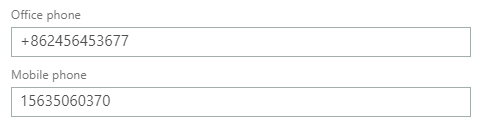
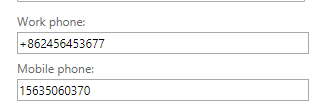
备注: O365用户的Office phone对应Exchange邮箱用户的Work phone
O365用户的Mobile phone 对应Exchange邮箱用户的Mobile phone
用户后台的属性是:Office phone和Work phone对应 PhoneNumber; Mobile phone对应Mobilephone

O365管理控制台:
Exchange admin center:
解决方法:
通过get-mailbox命令获取邮箱账号,再使用筛选命令只获取邮箱用户(排除“会议室账号”),之后将数据传递给get-msoluser来获取用户的phone属性值并把已有的phone属性值
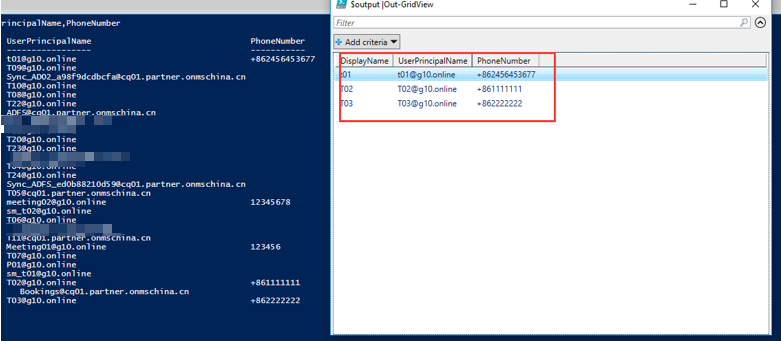
赋给一个变量进行保存;然后进行特定电话号码前缀组合,并把值赋给一个新的变量,最后使用Set-MsolUser进行更改设置,最后会把所有已更改的用户的DisplayName,UserPrincipalName,PhoneNumber输出进行展示。
步骤:
#Change Powershell execution policy
Set-Executionpolicy -scope Process -executionPolicy Unrestricted -force
#connect to Exchange online
$UserCredential = Get-Credential
$exchangeSession = New-PSSession -ConfigurationName Microsoft.Exchange -ConnectionUri https://partner.outlook.cn/PowerShell -Credential $UserCredential -Authentication Basic -AllowRedirection
Import-PSSession $exchangeSession -DisableNameChecking -AllowClobber
#connect to Office 365
Import-Module MSOnline
Connect-MsolService -AzureEnvironment AzureChinaCloud -Credential $UserCredential
#Get all mailbox users
$users = Get-Mailbox -ResultSize unlimited -Filter {(RecipientTypeDetails -eq 'UserMailbox')}|% {Get-MsolUser -UserPrincipalName $_.UserPrincipalName }
$Output = @()
#Traversing every user and make changes
foreach($user in $users){
if($user.PhoneNumber -ne $null )
{
$phone = $user.PhoneNumber
$Prefix = "+86" #这里以+86为例
$PN = $Prefix + $phone
Set-MsolUser -UserPrincipalName $user.UserPrincipalName -PhoneNumber $PN
$output += Get-MsolUser -UserPrincipalName $user.UserPrincipalName |Select-Object DisplayName,UserPrincipalName,PhoneNumber
}
else {continue}
}
$output |Out-GridView
注意:以上命令只针对邮箱用户且原始Office phone(或Work phone)属性不为空。
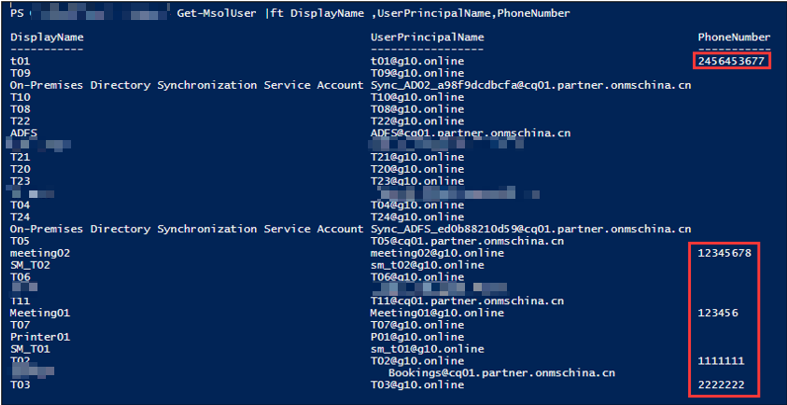
修改前
Get-MsolUser |ft DisplayName ,UserPrincipalName,PhoneNumber
运行命令后:
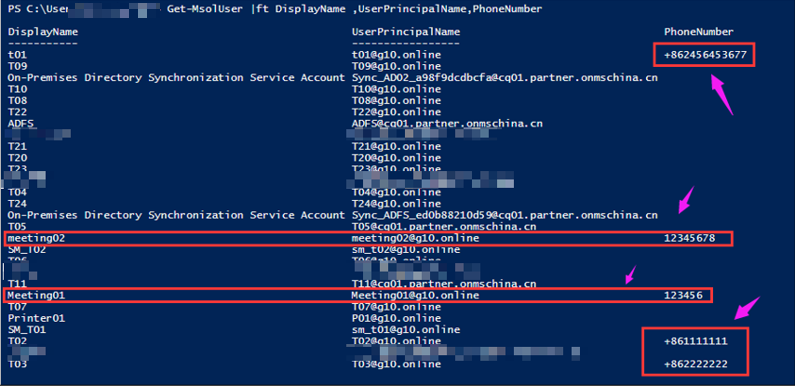
注意:上面的命令并不会对会议室邮箱的电话属性值进行更改。
输出内容
 官方公众号
官方公众号