ETJava Beta | Java
 注册
登录
注册
登录
注册
登录
注册
登录
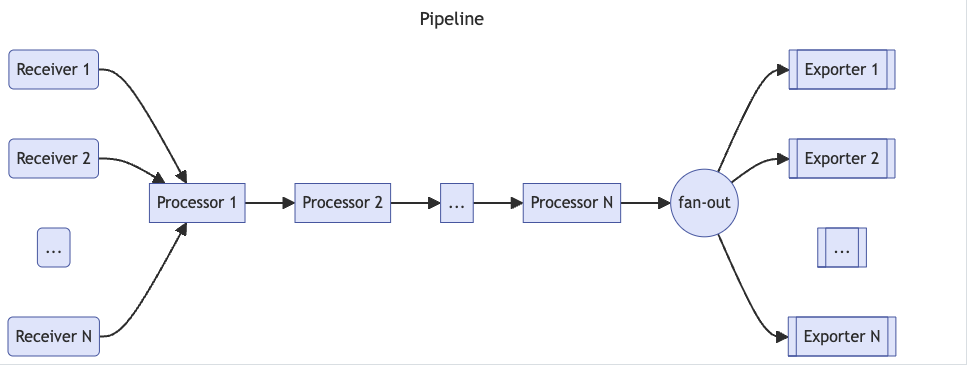
Opentelemetry collector包含如下几个组件:
注意这里只是定义了各个组件,若要真正生效,则需要将其添加到service中.
官方的opentelemetry-collector和opentelemetry-collector-contrib两个库给出了大量Collector组件实现。前者是opentelemetry-collector的核心配置,用于提供vendor无关的collector配置,后者则由不同的vendor提供,如aws、aure、kafka等。在使用时可以通过结合二者功能来满足业务需求。另外值得注意的是,两个仓库的各个组件目录中都提供了README.md帮助文档,如otlpreceiver、prometheusremotewriteexporter等。
service字段用于组织启用receivers, processors, exporters和 extensions 组件。一个service包含如下子字段:
默认情况下,opentelemetry会在http://127.0.0.1:8888/metrics下暴露metrics,可以通过telemetry.metrics.address指定暴露metrics的地址。可以使用level字段控制暴露的metrics数(这里给出了各个level下的metrics):
none: 不采集遥测数据basic: 采集基本的遥测数据normal: 默认级别,在basic之上增加标准的遥测数据detailed: 最详细的级别,包括dimensions 和 views.log的默认级别为INFO,支持DEBUG、 WARN、 ERROR。
可以使用extensions实现Collector的认证、健康监控、服务发现或数据转发等。大部分extensions都有默认配置。
service:
  extensions: [health_check, pprof, zpages]
  telemetry:
    metrics:
      address: 0.0.0.0:8888
      level: normal
可以为pod的probe提供健康检查:
    extensions:
      health_check:
        endpoint: ${env:MY_POD_IP}:13133
一个pipeline包含receivers、processors和exporters集,相同的receivers、processors和exporters可以放到多个pipeline中。
配置pipeline,类型为:
traces: 采集和处理trace数据metrics:采集和处理metric数据logs:采集和处理log数据注意processors的位置顺序决定了其处理顺序。
service:
  pipelines:
    metrics:
      receivers: [opencensus, prometheus]
      processors: [batch]
      exporters: [opencensus, prometheus]
    traces:
      receivers: [opencensus, jaeger]
      processors: [batch, memory_limiter]
      exporters: [opencensus, zipkin]
下面主要介绍几种常见的组件配置。
用于接收遥测数据。
可以通过<receiver type>/<name>为一类receiver配置多个receivers,确保receiver的名称唯一性。collector中至少需要配置一个receiver。
receivers:
  # Receiver 1.
  # <receiver type>:
  examplereceiver:
    # <setting one>: <value one>
    endpoint: 1.2.3.4:8080
    # ...
  # Receiver 2.
  # <receiver type>/<name>:
  examplereceiver/settings:
    # <setting two>: <value two>
    endpoint: 0.0.0.0:9211
使用OTLP格式接收gRPC或HTTP流量,这种为push模式,即需要client将遥测数据push到opentelemetry:
receivers:
  otlp:
    protocols:
      grpc:
      http:
k8s下可以使用如下方式定义otlp receiver:
receivers:
  otlp:
    protocols:
      grpc:
        endpoint: ${env:MY_POD_IP}:4317 #定义接收grpc数据格式的server
      http:
        endpoint: ${env:MY_POD_IP}:4318 #定义接收http数据格式的server
Receiver本身支持push和pull模式,如haproxyreceiver就是pull模式:
receivers:
  haproxy:
    endpoint: http://127.0.0.1:8080/stats
    collection_interval: 1m
    metrics:
      haproxy.connection_rate:
        enabled: false
      haproxy.requests:
        enabled: true
prometheusreceiver支持使用prometheus 的方式pull metrics数据,但需要注意的是,该方式目前处于开发阶段,官方给出了注意事项和不支持的特性:
receivers:
    prometheus:
      config:
        scrape_configs:
          - job_name: 'otel-collector'
            scrape_interval: 5s
            static_configs:
              - targets: ['0.0.0.0:8888']
          - job_name: k8s
            kubernetes_sd_configs:
            - role: pod
            relabel_configs:
            - source_labels: [__meta_kubernetes_pod_annotation_prometheus_io_scrape]
              regex: "true"
              action: keep
            metric_relabel_configs:
            - source_labels: [__name__]
              regex: "(request_duration_seconds.*|response_duration_seconds.*)"
              action: keep
filelog-receiver用于从文件中采集日志。
根据各个processor定义的规则或配置来修改或转换receiver采集的数据,如过滤、丢弃、重命名等操作。Processors的执行顺序取决于service.pipelines中定义的Processors顺序。推荐的processors如下:
k8sattributes
由于一个receiver可能会附加到多个pipelines上,因此可能存在多个processors同时处理来自同一个receiver的数据,这里涉及到数据归属权的问题。从pipelines的角度看有两种数据归属模式:
MutatesData=false来避免独占模式下的数据拷贝。注意:在官方的文档中有如下警告,即当多个pipelines引用了同一个receiver时,只能保证各个pipeline的数据是独立的,但由于整个流程使用的是同步调用方式,因此如果一个pipeline阻塞,则会导致其他使用使用相同receiver的pipelines也被阻塞:
Important
When the same receiver is referenced in more than one pipeline, the Collector creates only one receiver instance at runtime that sends the data to a fan-out consumer. The fan-out consumer in turn sends the data to the first processor of each pipeline. The data propagation from receiver to the fan-out consumer and then to processors is completed using a synchronous function call. This means that if one processor blocks the call, the other pipelines attached to this receiver are blocked from receiving the same data, and the receiver itself stops processing and forwarding newly received data.
用于防止collector OOM。该processor会周期性地检查内存情况,如果使用的内存大于设置的阈值,则执行一次runtime.GC()。memorylimiterprocessor有两个阈值:soft limit和hard limit。当内存用量超过soft limit时,processor将拒绝接收数据并返回错误(因此要求能够重试发生数据,否则会有数据丢失),直到内存用量低于soft limit;如果内存用量超过hard limit,则会强制执行一次GC。
推荐将memorylimiterprocessor设置为第一个processor。设置参数如下:
check_interval (默认 0s): 内存检查周期,推荐值为1s。如果Collector内存有尖刺,则可以降低check_interval或增加spike_limit_mib,以避免内存超过hard limit。limit_mib (默认 0): 定义hard limit,进程堆申请的最大内存值,单位MiB。注意,通常总内存会高于该值约50MiB。spike_limit_mib (默认为20%的 limit_mib): 测量内存使用之间预期的最大峰值,必须小于 limit_mib.。soft limit 等于 (limit_mib - spike_limit_mib),spike_limit_mib的推荐值为20% limit_mib。limit_percentage (默认 0): 通过百分比来定义进程堆申请的最大内存,其优先级低于limit_mibspike_limit_percentage (默认 0): 通过百分比来测量内存使用之间预期的最大峰值,只能和limit_percentage配合使用。使用方式如下:
processors:
  memory_limiter:
    check_interval: 1s
    limit_mib: 4000
    spike_limit_mib: 800
processors:
  memory_limiter:
    check_interval: 1s
    limit_percentage: 50
    spike_limit_percentage: 30
batch processor可以接收spans, metrics,或logs,通过压缩数据来降低数据传输所需的连接。
推荐在每个Collector上都配置batch processor,并将其放到memory_limiter和sampling processors之后。有根据大小和间隔时间两种batch发送模式。
配置参数如下:
send_batch_size (默认 8192): 定义发送batch的(spans, metric data points或 log records的)数目,超过该数值后会发送一个batch。timeout (默认 200ms): 定义发送batch的超时时间,超过该时间会发送一个batch。如果设置为0,则会忽略send_batch_size并只根据 send_batch_max_size来发送数据。send_batch_max_size (默认 0): batch的大小上限,必须大于或等于send_batch_size。 0表示没有上限。metadata_keys (默认为空): 如果设置了该值,则processor会为每个不同组合的client.Metadata值创建一个batcher实例。注意使用元数据执行batch会增加batch所需要的内存。metadata_cardinality_limit (默认1000): 当 metadata_keys 非空,该值限制了需要处理的metadata key的组合数目。下面定义了一个默认的batch processor和一个自定义的batch processor。注意这里只是声明,若要生效还需在service中引用。
processors:
  batch:
  batch/2:
    send_batch_size: 10000
    timeout: 10s
Resource Processor可以看作是attributes processor的子集,用于修改资源( span、log、metric)属性。
attributes processor有两个主要功能:修改资源属性,以及数据过滤。通常用于修改资源属性,数据过滤可以考虑使用filterprocessor。
下面是常见的修改资源属性的方式,类似prometheus修改label。更多参见官方例子:
processors:
  attributes/example:
    actions:
      - key: db.table
        action: delete
      - key: redacted_span
        value: true
        action: upsert
      - key: copy_key
        from_attribute: key_original
        action: update
      - key: account_id
        value: 2245
        action: insert
      - key: account_password
        action: delete
      - key: account_email
        action: hash
      - key: http.status_code
        action: convert
        converted_type: int
用于丢弃Collector采集的spans、span events、metrics、datapoints和logs。filterprocessor会使用OTTL语法来创建是否需要丢弃遥测数据的conditions,如果匹配任意condition,则丢弃。
traces.span |
Span |
|---|---|
traces.spanevent |
SpanEvent |
metrics.metric |
Metric |
metrics.datapoint |
DataPoint |
logs.log_record |
Log |
如下面丢弃所有HTTP spans:
processors:
  filter:
    error_mode: ignore
    traces:
      span:
        - attributes["http.request.method"] == nil
此外filter processor还支持OTTL Converter functions。如
# Drops metrics containing the 'bad.metric' attribute key
filter/keep_good_metrics:
  error_mode: ignore
  metrics:
    metric:
      - 'HasAttrKeyOnDatapoint("bad.metric")'
该processor可以自动发现k8s资源,然后将所需的metadata信息注入span、metrics和log中,作为resources属性。
k8sattributesprocessor在接收到数据(log, trace or metric)时,会尝试将数据和pod进行匹配,如果匹配成功,则将相关的pod metadata注入该数据。默认情况下,k8sattributesprocessor使用入站的连接IP 和Pod IP进行关联,但也可以通过resource_attribute自定义关联方式:
每条规则包含一对from(表示规则类型)和name(如果from为resource_attribute,则表示属性名称)。
from有两种类型:
connection:使用连接上下午中的IP属性匹配数据。使用此类型时,该processor必须位于任何batching或tail sampling之前。resource_attribute:从接收的资源中指定用于匹配数据的属性。只能使用metadata的属性。pod_association:
# below association takes a look at the datapoint's k8s.pod.ip resource attribute and tries to match it with
# the pod having the same attribute.
- sources:
- from: resource_attribute
name: k8s.pod.ip
# below association matches for pair `k8s.pod.name` and `k8s.namespace.name`
- sources:
- from: resource_attribute
name: k8s.pod.name
- from: resource_attribute
name: k8s.namespace.name
默认情况下会提取并添加如下属性,可以通过metadata修改默认值:
k8s.namespace.namek8s.pod.namek8s.pod.uidk8s.pod.start_timek8s.deployment.namek8s.node.namek8sattributesprocessor支持从pods、namespaces和nodes的labels和annotations上提取(extract)资源属性。
extract:
  annotations:
    - tag_name: a1 # extracts value of annotation from pods with key `annotation-one` and inserts it as a tag with key `a1`
      key: annotation-one
      from: pod
    - tag_name: a2 # extracts value of annotation from namespaces with key `annotation-two` with regexp and inserts it as a tag with key `a2`
      key: annotation-two
      regex: field=(?P<value>.+)
      from: namespace
    - tag_name: a3 # extracts value of annotation from nodes with key `annotation-three` with regexp and inserts it as a tag with key `a3`
      key: annotation-three
      regex: field=(?P<value>.+)
      from: node
  labels:
    - tag_name: l1 # extracts value of label from namespaces with key `label1` and inserts it as a tag with key `l1`
      key: label1
      from: namespace
    - tag_name: l2 # extracts value of label from pods with key `label2` with regexp and inserts it as a tag with key `l2`
      key: label2
      regex: field=(?P<value>.+)
      from: pod
    - tag_name: l3 # extracts value of label from nodes with key `label3` and inserts it as a tag with key `l3`
      key: label3
      from: node
完整例子如下,由于k8sattributesprocessor本身也是一个k8s Controller,因此需要通过filter指定listwatch的范围:
k8sattributes:
k8sattributes/2:
  auth_type: "serviceAccount"
  passthrough: false
  filter:
    node_from_env_var: KUBE_NODE_NAME
  extract:
    metadata:
      - k8s.pod.name
      - k8s.pod.uid
      - k8s.deployment.name
      - k8s.namespace.name
      - k8s.node.name
      - k8s.pod.start_time
   labels:
     - tag_name: app.label.component
       key: app.kubernetes.io/component
       from: pod
  pod_association:
    - sources:
        - from: resource_attribute
          name: k8s.pod.ip
    - sources:
        - from: resource_attribute
          name: k8s.pod.uid
    - sources:
        - from: connection
基于预定义的策略来采样traces。注意,为了有效执行采样策略,必须在相同的Collector实例中处理一个trace下的所有spans。必须将该processor放到依赖context的processors(如k8sattributes)之后,否则重组会导致丢失原始的context。在执行采样之前,会根据trace_id对spans进行分组,因此无需groupbytraceprocessor就可以直接使用tail sampling processor。
tailsamplingprocessor中and是一个比较特别的策略,它会使用AND逻辑串联多条策略。例如下面例子中的and串联了多条策略,用于:
service.name为[service-1, service-2, service-3]的数据http.route为[/live, /ready]的数据[service-1, service-2, service-3]服务的[/live, /ready]的数据的采样率设置为0.1 and:
{
and_sub_policy: # and逻辑的策略集
[
{
# filter by service name
name: service-name-policy,
type: string_attribute,
string_attribute:
{
key: service.name,
values: [service-1, service-2, service-3],
},
},
{
# filter by route
name: route-live-ready-policy,
type: string_attribute,
string_attribute:
{
key: http.route,
values: [/live, /ready],
enabled_regex_matching: true, #启用正则表达式
},
},
{
# apply probabilistic sampling
name: probabilistic-policy,
type: probabilistic,
probabilistic: { sampling_percentage: 0.1 },
},
],
},
更多参见官方例子
该processor包含一系列与Context 类型相关的conditions和statements,并按照配置顺序,对接收的遥测数据执行conditions和statements。它使用了一种名为OpenTelemetry Transformation Language的类SQL语法。
transform processor可以trace、metrics和logs配置多个context statements,context指定了statements使用的OTTL Context:
| Telemetry | OTTL Context |
|---|---|
Resource |
Resource |
Instrumentation Scope |
Instrumentation Scope |
Span |
Span |
Span Event |
SpanEvent |
Metric |
Metric |
Datapoint |
DataPoint |
Log |
Log |
trace、metric和log支持的Context如下:
| Signal | Context Values |
|---|---|
| trace_statements | resource, scope, span, and spanevent |
| metric_statements | resource, scope, metric, and datapoint |
| log_statements | resource, scope, and log |
每个statement可以包含一个Where子语句来校验是否执行statement。
transform processor 还支持一个可选字段,error_mode,用于确定processor如何应对statement产生的错误。
| error_mode | description |
|---|---|
| ignore | processor忽略错误,记录日志,并继续执行下一个statement,推荐模式。 |
| silent | processor忽略错误,不记录日志,并继续执行下一个statement。 |
| propagate | processor向pipeline返回错误,导致Collector丢弃payload。默认选项。 |
此外transform processor还支持OTTL函数可以添加、删除、修改遥测数据。
如下面例子中,如果attribute test不存在,则将attribute test设置为pass:
transform:
  error_mode: ignore
  trace_statements:
    - context: span
      statements:
        # accessing a map with a key that does not exist will return nil.
        - set(attributes["test"], "pass") where attributes["test"] == nil
通过在Collector启用debug日志来进行定位:
receivers:
  filelog:
    start_at: beginning
    include: [ test.log ]

processors:
  transform:
    error_mode: ignore
    log_statements:
      - context: log
        statements:
          - set(resource.attributes["test"], "pass")
          - set(instrumentation_scope.attributes["test"], ["pass"])
          - set(attributes["test"], true)

exporters:
  debug:

service:
  telemetry:
    logs:
      level: debug
  pipelines:
    logs:
      receivers:
        - filelog
      processors:
        - transform
      exporters:
        - debug
将logs, metrics 或 traces路由到指定的exporter。此processor需要根据入站的HTTP请求(gRPC)首部或资源属性值来将trace信息路由到特定的exporters。
注意:
batch 或 groupbytrace)配置的必须参数如下:
from_attribute: HTTP header名称或资源属性名称,用于获取路由值。table: processor的路由表table.value: FromAttribute字段的可能值table.exporters: 如果FromAttribute字段值匹配table.value,则使用此处定义的exporters。可选字段如下:
attribute_source: 定义from_attribute的属性来源:
context (默认) - 查询 context(包含HTTP headers)。默认的from_attribute的数据来源,可以手动注入,或由第三方服务(如网关)注入。resource - 查询资源属性drop_resource_routing_attribute - 是否移除路由所用的资源属性。default_exporters:无法匹配路由表的数据的exporters。举例如下:
processors:
  routing:
    from_attribute: X-Tenant
    default_exporters:
    - jaeger
    table:
    - value: acme
      exporters: [jaeger/acme]
exporters:
  jaeger:
    endpoint: localhost:14250
  jaeger/acme:
    endpoint: localhost:24250
注意opentelemetry的Exporter大部分是push模式,需要发送到后端。
调试使用,可以将遥测数据输出到终端,配置参数如下:
verbosity:(默认basic),可选值为basic(输出摘要信息)、normal(输出实际数据)、detailed(输出详细信息)sampling_initial:(默认2),一开始每秒内输出的消息数sampling_thereafter:(默认1),在sampling_initial之后的采样率,1表示禁用该功能。即每秒内输出前sampling_initial个消息,然后再输出第sampling_thereafter个消息,丢弃其余消息。exporters:
debug:
verbosity: detailed
sampling_initial: 5
sampling_thereafter: 200
使用OTLP 格式,通过gRPC发送数据,注意这是push模式,默认需要TLS。可以选择设置retry和queue。
exporters:
  otlp:
    endpoint: otelcol2:4317
    tls:
      cert_file: file.cert
      key_file: file.key
  otlp/2:
    endpoint: otelcol2:4317
    tls:
      insecure: true
通过HTTP发送OTLP 格式的数据,
endpoint: "https://1.2.3.4:1234"
tls:
  ca_file: /var/lib/mycert.pem
  cert_file: certfile
  key_file: keyfile
  insecure: true
timeout: 10s
read_buffer_size: 123
write_buffer_size: 345
sending_queue:
  enabled: true
  num_consumers: 2
  queue_size: 10
retry_on_failure:
  enabled: true
  initial_interval: 10s
  randomization_factor: 0.7
  multiplier: 1.3
  max_interval: 60s
  max_elapsed_time: 10m
headers:
  "can you have a . here?": "F0000000-0000-0000-0000-000000000000"
  header1: "234"
  another: "somevalue"
compression: gzip
使用 Prometheus 格式暴露metrics,pull模式。
endpoint:暴露metrics的地址,路径为/metricsconst_labels: 为每个metrics追加的key/valuesnamespace: 如果设置,则指标暴露为<namespace>_<metrics>send_timestamps: 默认false,是否在响应中发送metrics的采集时间metric_expiration:默认5m,定义暴露的metrics无需更新的时长resource_to_telemetry_conversion:默认false,如果启用,则会将所有resource attributes转变为metric labelsenable_open_metrics:默认false,如果启用,则会使用OpenMetrics格式暴露metrics,可以支持Exemplars功能。add_metric_suffixes:默认true,如果false,则不会启用type和unit后缀。exporters:
prometheus:
endpoint: "1.2.3.4:1234" # 暴露地址为:https://1.2.3.4:1234/metrics
tls:
ca_file: "/path/to/ca.pem"
cert_file: "/path/to/cert.pem"
key_file: "/path/to/key.pem"
namespace: test-space
const_labels:
label1: value1
"another label": spaced value
send_timestamps: true
metric_expiration: 180m
enable_open_metrics: true
add_metric_suffixes: false
resource_to_telemetry_conversion:
enabled: true
推荐使用transform processor来将最常见的resource attribute设置为metric labels。
processor:
  transform:
    metric_statements:
      - context: datapoint
        statements:
        - set(attributes["namespace"], resource.attributes["k8s.namespace.name"])
        - set(attributes["container"], resource.attributes["k8s.container.name"])
        - set(attributes["pod"], resource.attributes["k8s.pod.name"])
用于将opentelemetry metrics发送到兼容prometheus remote wirte的后端,如Cortex、Mimir和thanos等。
配置参数如下:
endpoint:remote write URLtls:默认必须配置TLS
insecure:默认false。如需启动TLS,则需要配置cert_file和key_fileexternal_labels:为每个metric添加额外的label name和valueheaders:为每个HTTP 请求添加额外的header。add_metric_suffixes:默认true,如果false,则不会启用type和unit后缀。send_metadata:默认false,如果true,则会生成并发送prometheus metadataremote_write_queue:配置remote write的队列和发送参数
enabled: 启动发送队列,默认truequeue_size: 入队列的OTLP指标数,默认10000num_consumers: 发送请求的最小workers数,默认5resource_to_telemetry_conversion:默认false,如果true,则会将所有的resource attribute转变为metric labels。target_info:默认false,如果true,则会为每个resource指标生成一个target_info指标max_batch_size_bytes:默认 3000000 -> ~2.861 mb。发送给远端的batch采样数。如果一个batch大于该值,则会给切分为多个batches。exporters:
prometheusremotewrite:
endpoint: "https://my-cortex:7900/api/v1/push"
external_labels:
label_name1: label_value1
label_name2: label_value2
resource_to_telemetry_conversion:
enabled: true # Convert resource attributes to metric labels
推荐使用transform processor来将最常见的resource attribute设置为metric labels。
processor:
  transform:
    metric_statements:
      - context: datapoint
        statements:
        - set(attributes["namespace"], resource.attributes["k8s.namespace.name"])
        - set(attributes["container"], resource.attributes["k8s.container.name"])
        - set(attributes["pod"], resource.attributes["k8s.pod.name"])
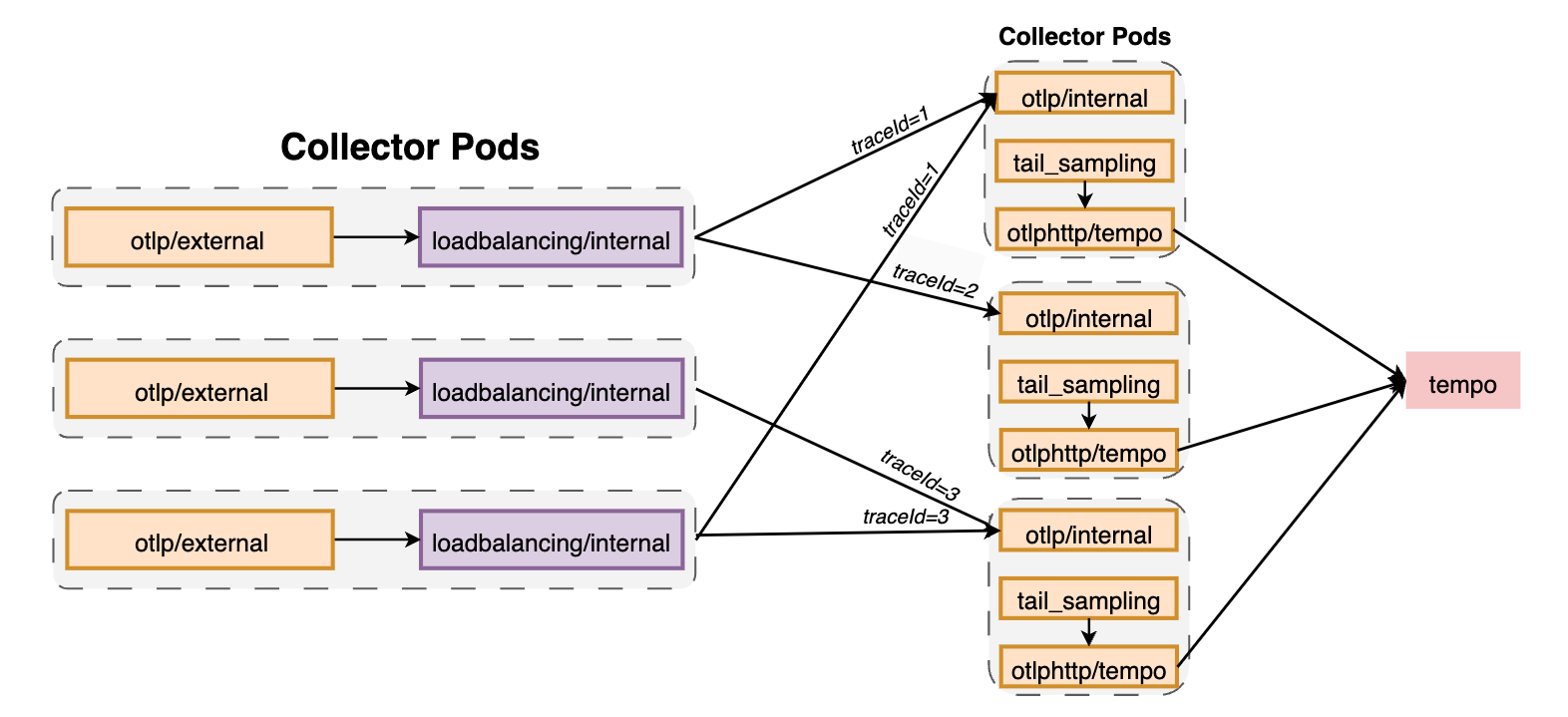
基于routing_key实现spans, metrics 和 logs的负载均衡。如果不配置routing_key,则traces的默认值为traceID,metrics的默认值为service,即相同traceID(或service.name(当service作为routing_key))的spans会被发送到相同的后端。特别适用于tail-based samplers或red-metrics-collectors这种需要基于完整trace的后端。
需要注意的是负载均衡仅基于Trace ID或Service名称,且不会考虑实际后端的负载,也不会执行轮询负载均衡。
routing_key 的可选值为:
| routing_key | can be used for |
|---|---|
| service | logs, spans, metrics |
| traceID | logs, spans |
| resource | metrics |
| metric | metrics |
| streamID | metrics |
可以通过静态或DNS的方式配置后端。当更新后端时,会根据R/N(路由总数/后端总数)重新路由。如果后端经常变动,可以考虑使用groupbytrace processor。
需要注意的是,如果后端出现异常,此时loadbalancingexporter并不会尝试重新发送数据,存在数据丢失的可能,因此要求在exporter上配置queue和retry机制。
static时,如果一个后端不可用,则会所有后端的数据负载均衡失败,直到该后端恢复正常或从static列表中移除。dns resolver也遵循相同的原则。k8s、dns时,拓扑变更会最终反映到loadbalancingexporter上。主要配置参数如下:
otlp:用于配置OTLP exporter。注意此处无需配置endpoint,该字段会被resolver的后端覆盖。resolver:可以配置一个static ,一个 dns,以及一个 k8s 或 aws_cloud_map,但不能同时指定4个resolvers。
dns中的hostname用于获取IP地址列表,port指用于导入traces的端口,默认为4317;interval指定解析间隔,如5s, 1d, 30m,默认5s;timeout指定解析超时时间,如5s, 1d, 30m,默认1sk8s中的service指kubernetes的service域名,如lb-svc.lb-ns。port指用于导入traces的端口,默认为4317,如果指定了多个端口,则会在loadbalancer中添加对应的backend,就像不同的pods一样;timeout指定解析超时时间,如5s, 1d, 30m,默认1srouting_key:用于数据(spans或metrics)路由。目前仅支持trace和metrics 类型。支持如下参数:
service:基于service 名称进行路由。非常适用于span metrics,这样每个服务的所有spans都会被发送到一致的metrics Collector中。否则相同服务的metrics可能会被发送到不同的Collectors上,造成聚合不精确。traceID:根据traceID路由spans。metrics无效。metric:根据metric名称路由metrics。spans无效。streamID:根据数据的streamID路由metrics。streamID为对attributes和resource、scope和metrics数据哈希产生的唯一值。在下面例子中可以确保相同traceID的spans发送到相同的后端(Pod)上, :
    receivers:
      otlp/external:
        protocols:
          grpc:
            endpoint: ${env:MY_POD_IP}:4317
          http:
            endpoint: ${env:MY_POD_IP}:4318
      otlp/internal:
        protocols:
          grpc:
            endpoint: ${env:MY_POD_IP}:14317
          http:
            endpoint: ${env:MY_POD_IP}:14318

    exporters:
      loadbalancing/internal:
        protocol:
          otlp:
            sending_queue:
              queue_size: 50000
            timeout: 1s
            tls:
              insecure: true
        resolver:
          k8s:
            ports:
            - 14317
            service: infrastructure-opentelemetry-tracingcollector.infrastructure-opentelemetry
            timeout: 10s
      otlphttp/tempo:
        endpoint: http://infrastructure-tracing-tempo.net:14252/otlp
        sending_queue:
          queue_size: 50000
        tls:
          insecure: true

    service:
      pipelines:
        traces:
          exporters:
          - loadbalancing/internal
          processors:
          - memory_limiter
          - resource/metadata
          receivers:
          - otlp/external
        traces/loadbalancing:
          exporters:
          - otlphttp/tempo
          processors:
          - memory_limiter
          - resource/metadata
          - tail_sampling
          receivers:
          - otlp/internal
Connector可以将两个pipelines连接起来,使其中一个pipeline作为exporter,另一个作为receiver。connector可以看作一个exporter,从一个pipeline的尾部消费数据,从将数据发送到另一个pipeline开始处的receiver上。可以使用connector消费、复制或路由数据。
下面表示将traces的数据导入metrics中:
receivers:
  foo/traces:
  foo/metrics:
exporters:
  bar:
connectors:
  count:
service:
  pipelines:
    traces:
      receivers: [foo/traces]
      exporters: [count]
    metrics:
      receivers: [foo/metrics, count]
      exporters: [bar]
用于使用轮询方式实现负载均衡,适用于可扩展性不是很好的exporter,如prometheusremotewrite,下面用于将接收到的数据(metrics)以轮询方式分发到不同的prometheusremotewrite(metrics/1和metrics/2):
receivers:
  otlp:
processors:
  resourcedetection:
  batch:
exporters:
  prometheusremotewrite/1:
  prometheusremotewrite/2:
connectors:
  roundrobin:
service:
  pipelines:
    metrics:
      receivers: [otlp]
      processors: [resourcedetection, batch]
      exporters: [roundrobin]
    metrics/1:
      receivers: [roundrobin]
      exporters: [prometheusremotewrite/1]
    metrics/2:
      receivers: [roundrobin]
      exporters: [prometheusremotewrite/2]
用于从span数据中聚合Request、Error和Duration(R.E.D) metrics。
Request:
calls{service.name="shipping",span.name="get_shipping/{shippingId}",span.kind="SERVER",status.code="Ok"}
Error:
calls{service.name="shipping",span.name="get_shipping/{shippingId},span.kind="SERVER",status.code="Error"}
Duration:
duration{service.name="shipping",span.name="get_shipping/{shippingId}",span.kind="SERVER",status.code="Ok"}
每条metric至少包含如下dimension(所有span都存在这些dimensions):
service.namespan.namespan.kindstatus.code常见参数如下:
histogram:默认explicit,用于配置histogram,只能选择explicit或exponential
disable:默认false,禁用所有histogram metricsunit:默认ms,可以选择ms或sexplicit:指定histogram的time bucket Duration。默认[2ms, 4ms, 6ms, 8ms, 10ms, 50ms, 100ms, 200ms, 400ms, 800ms, 1s, 1400ms, 2s, 5s, 10s, 15s]exponential:正负数范围内的最大bucket数dimensions:除默认的dimensions之外还需添加的dimensions。每个dimension必须定一个name字段来从span的attributes集合或resource attribute中进行查找,如ip,host.name或region。如果没有在span中找到name属性,则查找default中定义的属性,如果没有定义default,则忽略此dimensionexclude_dimensions:从default dimensions中排除的dimensions列表。用于从metrics排除掉不需要的数据。dimensions_cache_size:保存Dimensions的缓存大小,默认1000。metrics_flush_interval:flush 生成的metrics的间隔,默认60s。metrics_expiration:如果在该时间内没有接收到任何新的spans,则不会再export metrics。默认0,表示不会超时。metric_timestamp_cache_size:,默认1000。events:配置events metrics。
enable:默认falsedimensions:如果enable,则该字段必须存在。event metric的额外的Dimensionresource_metrics_key_attributes:过滤用于生成resource metrics key哈希值的resource attributes,可以防止resource attributes变动影响到Counter metrics。receivers:
nop:
exporters:
nop:
connectors:
spanmetrics:
histogram:
explicit:
buckets: [100us, 1ms, 2ms, 6ms, 10ms, 100ms, 250ms]
dimensions:
- name: http.method
default: GET
- name: http.status_code
exemplars:
enabled: true
exclude_dimensions: ['status.code']
dimensions_cache_size: 1000
aggregation_temporality: "AGGREGATION_TEMPORALITY_CUMULATIVE"
metrics_flush_interval: 15s
metrics_expiration: 5m
events:
enabled: true
dimensions:
- name: exception.type
- name: exception.message
resource_metrics_key_attributes:
- service.name
- telemetry.sdk.language
- telemetry.sdk.name
service:
pipelines:
traces:
receivers: [nop]
exporters: [spanmetrics]
metrics:
receivers: [spanmetrics]
exporters: [nop]
1777,采集pprof数据55679,地址为/debug/tracez可以定位如下问题:
memory_limiter processor时,可以通过otelcol_processor_refused_spans来检查内存是否充足otelcol_exporter_queue_size > otelcol_exporter_queue_capacity则会拒绝数据(otelcol_exporter_enqueue_failed_spans)otelcol_loadbalancer_backend_latency对于扩容,可以将组件分为三类:stateless、scrapers 和 stateful。对于stateless来说只需要增加副本数即可。
scrapers
对于hostmetricsreceiver和prometheusreceiver这样的receivers,不能简单地增加实例数,否则会导致每个Collector都scrape系统的endpoints。可以通过Target Allocator来对endpoints进行分片。
对于某些将数据存放在内存中的组件来说,扩容可能会导致不同的结果。如tail-sampling processor,它会在内存中保存一定时间的spans数据,并在认为trace结束时评估采样决策。如果通过增加副本数来对此类Collector进行扩容,就会导致不同的Collectors接收到相同trace的spans,导致每个Collector都会评估是否应该对该trace进行采样,从而可能得到不同的结果(trace丢失spans)。
类似的还有span-to-metrics processor,当不同的Collectors接收到相同服务的数据时,基于service name聚合就会变得不精确。
为了避免该问题,可以在执行tail-sampling 或 span-to-metrics 前面加上 load-balancing exporter, load-balancing exporter会根据trace ID 或service name获取哈希值,保证后端的Collector接收到一致的数据。
receivers:
  otlp:
    protocols:
      grpc:
        endpoint: 0.0.0.0:4317

processors:

exporters:
  loadbalancing:
    protocol:
      otlp:
    resolver:
      dns:
        hostname: otelcol.observability.svc.cluster.local

service:
  pipelines:
    traces:
      receivers:
        - otlp
      processors: []
      exporters:
        - loadbalancing
 官方公众号
官方公众号