ETJava Beta | Java
 注册
登录
注册
登录
注册
登录
注册
登录
try-with-resources 是 JDK 7中引入的一种新的异常处理机制,它主要用于自动管理资源,能够很容易地关闭在 try-catch 语句块中使用的资源。确保资源在不再需要时能够被正确关闭。这种机制简化了资源管理,使得资源的释放更加安全和可预测。
resource:是指在程序完成后,必须关闭的对象(例如:文件资源File、IO流、Socket、ServerSocket网络对象、数据库链接对象等)。try-with-resources 语句确保了每个资源在语句结束时关闭。
class Myresources1 implements AutoCloseable {
    @Override
    public void close() throws Exception {
        System.out.println("资源1关闭方法执行");
        throw new Exception("资源1关闭异常");
    }
}
class Myresources2 implements AutoCloseable {
    @Override
    public void close() throws Exception {
        System.out.println("资源2关闭方法执行");
        throw new Exception("资源2关闭异常");
    }
}
为了避免在代码执行中出现异常,使用try-catch-finally进行异常捕获
        Myresources1 myresources1 =null;
        Myresources2 myresources2 = null;
        try{
            myresources1 = new Myresources1();
            myresources2 = new Myresources2();
            System.out.println("hello");
        }catch (Exception e){
            e.printStackTrace();
        }finally {
            if (myresources1!=null){
                try {
                    myresources1.close();
                }catch (Exception e){
                    e.printStackTrace();
                }finally {
                    if (myresources2!=null){
                        try {
                            myresources2.close();
                        }catch (Exception e){
                            e.printStackTrace();
                        }
                    }
                }
            }
        }
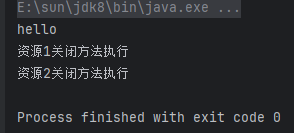
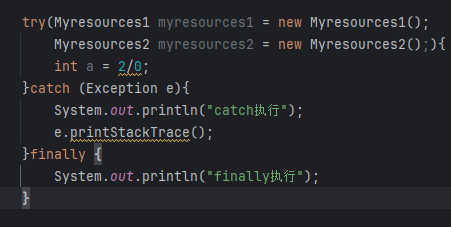
    try(Myresources1 myresources1 = new Myresources1();
        Myresources2 myresources2 = new Myresources2();){
           System.out.println("hello");
        //int a = 2/0;
       }catch (Exception e){
           e.printStackTrace();
       }
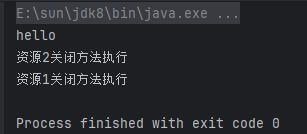
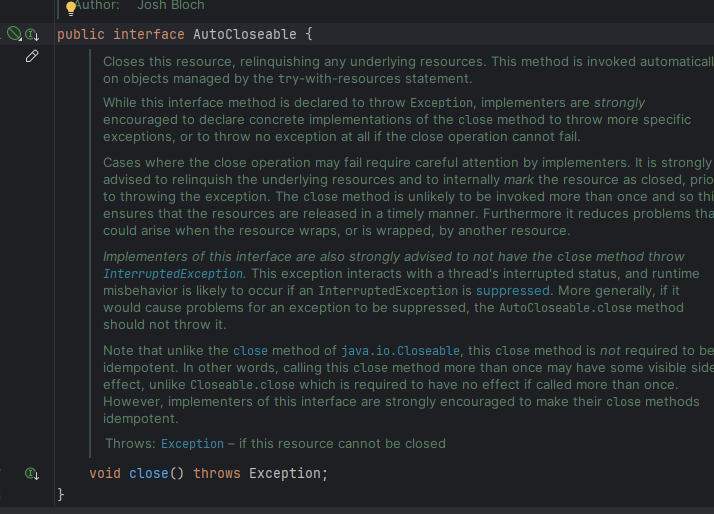 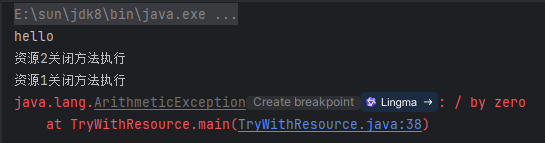
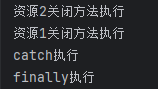
Myresources1 myresources1 = null;
        try{
            myresources1 = new Myresources1();
            //算数异常
            System.out.println(10/0);
        }finally {
            if (myresources1!=null)
                myresources1.close();
        }

//myresources1类
class Myresources1 implements AutoCloseable {
    @Override
    public void close() throws Exception {
        System.out.println("资源1关闭方法执行");
        throw new Exception("资源1关闭异常");
    }
}
运行异常打印:

此时可以看到,异常只打印了close()方法的异常,而 10/0 的异常被抑制了
        try(Myresources1 myresources1 = new Myresources1();){
            System.out.println(10/0);
        }
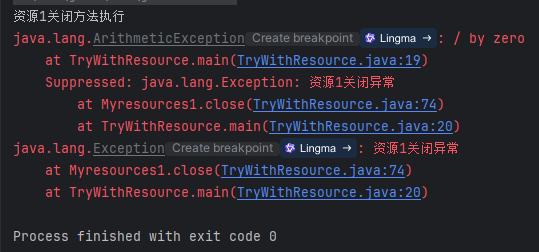
运行异常打印: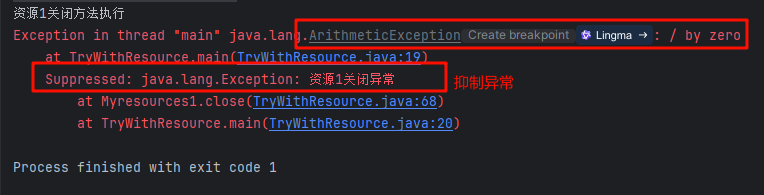 <br 当一个异常被抛出的时候,可能有其他异常因为该异常而被抑制住,从而无法正常抛出。这时可以通过
addSuppressed() 方法把这些被抑制的方法记录下来,然后被抑制的异常就会出现在抛出的异常的堆栈信息中,可以通过 getSuppressed() 方法来获取这些异常。这样做的好处是不会丢失任何异常,方便我们进行调试。
        Myresources1 myresources1 = new Myresources1();
        Throwable var2 = null;

        try {
            System.out.println(10 / 0);
        } catch (Throwable var11) {
            var2 = var11;
            throw var11;
        } finally {
            if (myresources1 != null) {
                //判断程序运行时是否出现异常
                if (var2 != null) {	//出现异常
                    try {
                        myresources1.close();
                    } catch (Throwable var10) {
                        var2.addSuppressed(var10);	//把close()发生的异常添加为抑制异常
                    }
                } else {	//程序运行时无异常
                    myresources1.close();
                }
            }

        }
循环打印抑制异常
try(Myresources1 myresources1 = new Myresources1();){
System.out.println(10/0);
}catch (Exception e){
e.printStackTrace();
Throwable[] suppressed = e.getSuppressed();
for (Throwable t : suppressed){
t.printStackTrace();
}
}
运行结果:
try-with-resources 语法适用于任何需要自动管理资源关闭,以防止资源泄漏的场景。
简单粗暴点就是,ctrl点进去看当前资源,只要当前资源实现了AutoCloseable或者Closeable接口就可以用。但是,具体使用还要根据要实现的业务场景来决定。
如果资源没有实现 AutoCloseable 或 Closeable 接口,那么它就不能在 try-with-resources 语句中被自动关闭。这种情况下,仍然需要手动关闭资源,或者使用其他机制来确保资源的正确关闭。
try-with-resources 语句中的资源在 try块执行完毕后会自动关闭,因此在 try块外部无法访问这些资源。如果资源需要在 try 块外部被使用,那么就不能使用 try-with-resources语句来管理这些资源。
在某些情况下,开发者可能需要根据特定的逻辑或条件来决定何时关闭资源,而不是在 try 块结束时立即关闭。try-with-resources 语句无法提供这种精细的控制,因此在这些场景下可能不适用。
虽然 try-with-resources 语句会尝试关闭资源,并捕获在关闭过程中抛出的异常,但这些异常通常会被抑制(suppressed),而不是直接抛出。如果开发者需要特别处理这些关闭异常,或者需要将这些异常与 try 块中抛出的其他异常进行区分,那么 try-with-resources 可能不是最佳选择。
如果一个资源需要在多个 try块中被共享和使用,那么使用 try-with-resources 语句可能会变得复杂或不可行。因为每个 try-with-resources 语句都会尝试在结束时关闭其声明的资源,这可能会导致资源在需要时已经被关闭。
如果资源的关闭逻辑非常复杂,或者需要在关闭前执行一些特定的操作(如回滚事务、释放锁等),那么使用 try-with-resources语句可能不足以满足需求。在这些情况下可能需要编写更复杂的finally块来确保资源的正确关闭。综上所述,try-with-resources 语句虽然是一种强大的资源管理机制,但它并不适用于所有场景。在选择是否使用 try-with-resources 时,开发者需要根据具体的需求和资源的特点来做出决策。
finally 块中编写资源关闭的代码,减少了代码量和出错的可能性。try 块中发生异常,资源也会被自动关闭,避免了资源泄漏的风险。支持的资源类型有限:并非所有的类都可以作为 try-with-resources 的资源,只有实现了 AutoCloseable 或 Closeable 接口的类才行。
性能考虑:
虽然try-with-resources在大多数情况下对性能的影响可以忽略不计,但在极端情况下(例如:在性能敏感的应用程序中频繁地打开和关闭大量资源),它可能会引入一些额外的开销。这是因为 try-with-resources语句在编译时会生成额外的代码来管理资源的关闭。
对在 try() 中声明的对象不能重新赋值
     FileWriter fw = new FileWriter("a.txt");
     fw = new FileWriter("e:/b.txt");
		try(FileWriter fw = new FileWriter("a.txt")){
            fw = new FileWriter("b.txt");	//报错
        }catch (Exception e){
            e.printStackTrace();
        }

//此时会编译出错:The resource is1 of a try-with-resources statement cannot be assigned
官方文档:
It is a compile-time error if final appears more than once as a modifier for each variable declared in a resource specification.
A variable declared in a resource specification is implicitly declared final (§4.12.4) if it is not explicitly declared final.
在资源规范中声明的每个变量,如果 final 作为修饰符出现不止一次,则属于编译时错误。
在资源规范中声明的变量,如果没有显式地声明为 final,则隐式地声明为 final(§4.12.4)。
try-with-resource中声明的变量会隐式的加上final 关键字,所以无法再进行赋值
try-with-resources 的优点通常大于缺点,在大多数情况下,它是一种更安全、简洁和可靠的资源管理方式。具体的使用方式根据业务场景决定,但是一般情况下,处理必须关闭的资源时,始终有限考虑使用 try-with-resources,而不是 try–catch-finally。前者产生的代码更加简洁、清晰,产生的异常信息也更靠谱。
 官方公众号
官方公众号