ETJava Beta | Java
 注册
登录
注册
登录
注册
登录
注册
登录
在上篇《国产化信创开源云原生平台》文章中,我们介绍了 Rainbond 作为可能是国内首个开源国产化信创平台,在支持国产化和信创方面的能力,并简要介绍了如何在国产化信创环境中在线部署 Kubernetes 和 Rainbond。
然而,对于大多数国产化信创环境,如银行、政府等机构,离线部署的需求更为普遍。值得注意的是,Rainbond 官网文档目前仅提供了在已有 Kubernetes 环境中离线部署 Rainbond 的指南。那么,为什么我们不提供离线部署 Kubernetes 的文档呢?Rainbond 开源社区与其他开源社区不同,Rainbond 始终对每一位开源用户提出的问题负责,并积极帮助解决问题。然而,这无疑会为社区支持团队带来额外的工作负担,特别是在处理本不属于 Rainbond 范畴的问题时。
因此,本篇文章将详细介绍如何在国产化信创环境下部署 Kubernetes 以及 Rainbond,希望能够为用户提供实用的指导,减少在部署过程中的困扰。
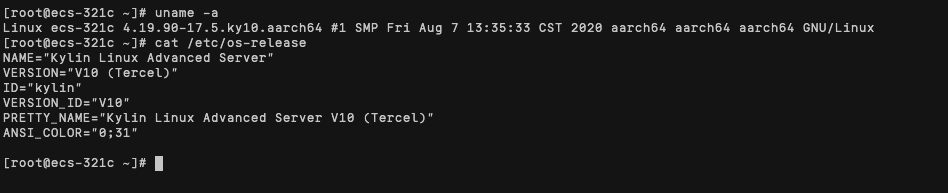
在有网的 Arm 环境中准备以下镜像和安装包。
下载 Docker 离线安装包和离线安装脚本。
wget https://pkg.rainbond.com/offline/docker/docker-arm-20.10.9.tgz
wget https://get.rainbond.com/install_docker_offline.sh
本次部署 K8s 版本为 v1.23.10,采用 Rancher Kubernetes Engine 简称 RKE,是一个经过 CNCF 认证的 Kubernetes 安装程序。
在 Arm 环境中获取以下离线包。
# Kubectl和 Helm 二进制文件
wget https://pkg.goodrain.com/pkg/kubectl/v1.23.10/kubectl-arm -O kubectl
wget https://pkg.goodrain.com/pkg/helm/v3.10.1/helm-arm64 -O helm
# RKE安装二进制文件
wget https://pkg.goodrain.com/pkg/rke/v1.3.15/rke-arm -O rke
#!/bin/bash
# RKE Docker镜像
image_list="registry.cn-hangzhou.aliyuncs.com/goodrain/mirrored-coreos-etcd:v3.5.3
registry.cn-hangzhou.aliyuncs.com/goodrain/rke-tools:v0.1.87
registry.cn-hangzhou.aliyuncs.com/goodrain/rke-tools:v0.1.87
registry.cn-hangzhou.aliyuncs.com/goodrain/rke-tools:v0.1.87
registry.cn-hangzhou.aliyuncs.com/goodrain/rke-tools:v0.1.87
registry.cn-hangzhou.aliyuncs.com/goodrain/mirrored-k8s-dns-kube-dns:1.21.1
registry.cn-hangzhou.aliyuncs.com/goodrain/mirrored-k8s-dns-dnsmasq-nanny:1.21.1
registry.cn-hangzhou.aliyuncs.com/goodrain/mirrored-k8s-dns-sidecar:1.21.1
registry.cn-hangzhou.aliyuncs.com/goodrain/cluster-proportional-autoscaler:1.8.1
registry.cn-hangzhou.aliyuncs.com/goodrain/mirrored-coredns-coredns:1.10.1
registry.cn-hangzhou.aliyuncs.com/goodrain/cluster-proportional-autoscaler:1.8.1
registry.cn-hangzhou.aliyuncs.com/goodrain/mirrored-k8s-dns-node-cache:1.21.1
registry.cn-hangzhou.aliyuncs.com/goodrain/hyperkube:v1.23.10-rancher1
registry.cn-hangzhou.aliyuncs.com/goodrain/mirrored-coreos-flannel:v0.15.1
registry.cn-hangzhou.aliyuncs.com/goodrain/flannel-cni:v0.3.0-rancher6
registry.cn-hangzhou.aliyuncs.com/goodrain/mirrored-pause:3.6
registry.cn-hangzhou.aliyuncs.com/goodrain/mirrored-metrics-server:v0.6.1"

for image in ${image_list}; do
    docker pull "${image}"
done

docker save -o rke-images.tar ${image_list}
在有网络的环境下提前准备好 Rainbond 所需的镜像。
#!/bin/bash
VERSION=${VERSION:-'v5.17.3-release'}

image_list="registry.cn-hangzhou.aliyuncs.com/goodrain/kubernetes-dashboard:v2.6.1
registry.cn-hangzhou.aliyuncs.com/goodrain/registry:2.6.2
registry.cn-hangzhou.aliyuncs.com/goodrain/metrics-server:v0.4.1
registry.cn-hangzhou.aliyuncs.com/goodrain/etcd:v3.3.18
registry.cn-hangzhou.aliyuncs.com/goodrain/metrics-scraper:v1.0.4
registry.cn-hangzhou.aliyuncs.com/goodrain/rainbond:${VERSION}-allinone
registry.cn-hangzhou.aliyuncs.com/goodrain/rbd-mesh-data-panel:${VERSION}
registry.cn-hangzhou.aliyuncs.com/goodrain/rbd-webcli:${VERSION}
registry.cn-hangzhou.aliyuncs.com/goodrain/rbd-eventlog:${VERSION}
registry.cn-hangzhou.aliyuncs.com/goodrain/rbd-init-probe:${VERSION}
registry.cn-hangzhou.aliyuncs.com/goodrain/rbd-chaos:${VERSION}
registry.cn-hangzhou.aliyuncs.com/goodrain/rbd-mq:${VERSION}
registry.cn-hangzhou.aliyuncs.com/goodrain/rainbond-operator:${VERSION}
registry.cn-hangzhou.aliyuncs.com/goodrain/rbd-worker:${VERSION}
registry.cn-hangzhou.aliyuncs.com/goodrain/rbd-node:${VERSION}
registry.cn-hangzhou.aliyuncs.com/goodrain/rbd-monitor:${VERSION}
registry.cn-hangzhou.aliyuncs.com/goodrain/rbd-gateway:${VERSION}
registry.cn-hangzhou.aliyuncs.com/goodrain/rbd-api:${VERSION}
registry.cn-hangzhou.aliyuncs.com/goodrain/rbd-db:8.0.19
registry.cn-hangzhou.aliyuncs.com/goodrain/mysqld-exporter:latest
registry.cn-hangzhou.aliyuncs.com/goodrain/nfs-provisioner:latest"

for image in ${image_list}; do
    docker pull "${image}"
done

docker save -o rainbond-"${VERSION}".tar ${image_list}
获取 Rainbond Helm Chart 安装包
git clone --depth=1 https://github.com/goodrain/rainbond-chart
在开始安装 K8s 之前请阅读 RKE 安装要求,该文档讲述了 RKE 对操作系统、软件、端口和 SSH 配置的要求,安装前,请检查您的节点是否满足这些要求。
导入 Docker 离线包到所有节点,执行脚本安装 Docker。
$ ls
docker-arm-20.10.9.tgz install_docker_offline.sh
$ bash ./install_docker_offline.sh
导入 K8s 相关的离线包和 Docker 镜像到所有节点。
RKE 要求使用一个免密的用户用于后续的集群安装,该用户需有执行 Docker 的权限。
# 创建用户并加入 root 组
adduser -g root docker && echo "docker:password" | chpasswd
# 生成 ssh 密钥,一直回车全默认即可
ssh-keygen
# 配置免密登录
ssh-copy-id docker@xxxx
使用 Docker 用户登录检查是否有 Docker 执行权限。
$ ssh docker@xxxx
$ docker ps
使用 RKE 安装 K8s 集群需要使用 RKE 生成的配置文件,以下是我的示例,更多请参阅RKE配置文件说明。
需要我们修改的只有 nodes 字段,如果导入镜像的镜像仓库地址不变则 yml 也无需修改,如有改动需修改 system_images 字段下所有镜像地址。
nodes:
- address: 192.168.0.138
  port: "22"
  internal_address: 192.168.0.138
  role:
  - etcd
  - controlplane
  - worker
  hostname_override: ""
  user: docker
  docker_socket: ""
  ssh_key: ""
  ssh_key_path: ~/.ssh/id_rsa
  ssh_cert: ""
  ssh_cert_path: ""
  labels: {}
  taints: []
services:
  etcd:
    image: ""
    extra_args: {}
    extra_args_array: {}
    extra_binds: []
    extra_env:
    - ETCD_AUTO_COMPACTION_RETENTION=1
    win_extra_args: {}
    win_extra_args_array: {}
    win_extra_binds: []
    win_extra_env: []
    external_urls: []
    ca_cert: ""
    cert: ""
    key: ""
    path: ""
    uid: 0
    gid: 0
    snapshot: null
    retention: ""
    creation: ""
    backup_config: null
  kube-api:
    image: ""
    extra_args: {}
    extra_args_array: {}
    extra_binds: []
    extra_env: []
    win_extra_args: {}
    win_extra_args_array: {}
    win_extra_binds: []
    win_extra_env: []
    service_cluster_ip_range: 10.43.0.0/16
    service_node_port_range: ""
    pod_security_policy: false
    always_pull_images: false
    secrets_encryption_config: null
    audit_log: null
    admission_configuration: null
    event_rate_limit: null
  kube-controller:
    image: ""
    extra_args: {}
    extra_args_array: {}
    extra_binds: []
    extra_env: []
    win_extra_args: {}
    win_extra_args_array: {}
    win_extra_binds: []
    win_extra_env: []
    cluster_cidr: 10.42.0.0/16
    service_cluster_ip_range: 10.43.0.0/16
  scheduler:
    image: ""
    extra_args: {}
    extra_args_array: {}
    extra_binds: []
    extra_env: []
    win_extra_args: {}
    win_extra_args_array: {}
    win_extra_binds: []
    win_extra_env: []
  kubelet:
    image: ""
    extra_args: {}
    extra_args_array: {}
    extra_binds:
    - /grlocaldata:/grlocaldata:rw,z
    - /cache:/cache:rw,z
    extra_env: []
    win_extra_args: {}
    win_extra_args_array: {}
    win_extra_binds: []
    win_extra_env: []
    cluster_domain: cluster.local
    infra_container_image: ""
    cluster_dns_server: 10.43.0.10
    fail_swap_on: false
    generate_serving_certificate: false
  kubeproxy:
    image: ""
    extra_args: {}
    extra_args_array: {}
    extra_binds: []
    extra_env: []
    win_extra_args: {}
    win_extra_args_array: {}
    win_extra_binds: []
    win_extra_env: []
network:
  plugin: flannel # calico
  options: {}
  mtu: 0
  node_selector: {}
  update_strategy: null
  tolerations: []
authentication:
  strategy: x509
  sans: []
  webhook: null
addons: ""
addons_include: []
system_images:
  etcd: registry.cn-hangzhou.aliyuncs.com/goodrain/mirrored-coreos-etcd:v3.5.3
  alpine: registry.cn-hangzhou.aliyuncs.com/goodrain/rke-tools:v0.1.87
  nginx_proxy: registry.cn-hangzhou.aliyuncs.com/goodrain/rke-tools:v0.1.87
  cert_downloader: registry.cn-hangzhou.aliyuncs.com/goodrain/rke-tools:v0.1.87
  kubernetes_services_sidecar: registry.cn-hangzhou.aliyuncs.com/goodrain/rke-tools:v0.1.87
  kubedns: registry.cn-hangzhou.aliyuncs.com/goodrain/mirrored-k8s-dns-kube-dns:1.21.1
  dnsmasq: registry.cn-hangzhou.aliyuncs.com/goodrain/mirrored-k8s-dns-dnsmasq-nanny:1.21.1
  kubedns_sidecar: registry.cn-hangzhou.aliyuncs.com/goodrain/mirrored-k8s-dns-sidecar:1.21.1
  kubedns_autoscaler: registry.cn-hangzhou.aliyuncs.com/goodrain/cluster-proportional-autoscaler:1.8.1
  coredns: registry.cn-hangzhou.aliyuncs.com/goodrain/mirrored-coredns-coredns:1.10.1
  coredns_autoscaler: registry.cn-hangzhou.aliyuncs.com/goodrain/cluster-proportional-autoscaler:1.8.1
  nodelocal: registry.cn-hangzhou.aliyuncs.com/goodrain/mirrored-k8s-dns-node-cache:1.21.1
  kubernetes: registry.cn-hangzhou.aliyuncs.com/goodrain/hyperkube:v1.23.10-rancher1
  flannel: registry.cn-hangzhou.aliyuncs.com/goodrain/mirrored-coreos-flannel:v0.15.1
  flannel_cni: registry.cn-hangzhou.aliyuncs.com/goodrain/flannel-cni:v0.3.0-rancher6
  calico_node: registry.cn-hangzhou.aliyuncs.com/goodrain/mirrored-calico-node:v3.22.0
  calico_cni: registry.cn-hangzhou.aliyuncs.com/goodrain/calico-cni:v3.22.0-rancher1
  calico_controllers: registry.cn-hangzhou.aliyuncs.com/goodrain/mirrored-calico-kube-controllers:v3.22.0
  calico_ctl: registry.cn-hangzhou.aliyuncs.com/goodrain/mirrored-calico-ctl:v3.22.0
  calico_flexvol: registry.cn-hangzhou.aliyuncs.com/goodrain/mirrored-calico-pod2daemon-flexvol:v3.22.0
  canal_node: registry.cn-hangzhou.aliyuncs.com/goodrain/mirrored-calico-node:v3.22.0
  canal_cni: ""
  canal_controllers: ""
  canal_flannel: ""
  canal_flexvol: ""
  weave_node: ""
  weave_cni: ""
  pod_infra_container: registry.cn-hangzhou.aliyuncs.com/goodrain/mirrored-pause:3.6
  ingress: ""
  ingress_backend: ""
  ingress_webhook: ""
  metrics_server: registry.cn-hangzhou.aliyuncs.com/goodrain/mirrored-metrics-server:v0.6.1
  windows_pod_infra_container: ""
  aci_cni_deploy_container: ""
  aci_host_container: ""
  aci_opflex_container: ""
  aci_mcast_container: ""
  aci_ovs_container: ""
  aci_controller_container: ""
  aci_gbp_server_container: ""
  aci_opflex_server_container: ""
ssh_key_path: ""
ssh_cert_path: ""
ssh_agent_auth: false
authorization:
  mode: rbac
  options: {}
ignore_docker_version: null
enable_cri_dockerd: null
kubernetes_version: ""
private_registries: []
ingress:
  provider: none
  options: {}
  node_selector: {}
  extra_args: {}
  dns_policy: ""
  extra_envs: []
  extra_volumes: []
  extra_volume_mounts: []
  update_strategy: null
  http_port: 0
  https_port: 0
  network_mode: ""
  tolerations: []
  default_backend: null
  default_http_backend_priority_class_name: ""
  nginx_ingress_controller_priority_class_name: ""
  default_ingress_class: null
cluster_name: ""
cloud_provider:
  name: ""
prefix_path: ""
win_prefix_path: ""
addon_job_timeout: 300
bastion_host:
  address: ""
  port: ""
  user: ""
  ssh_key: ""
  ssh_key_path: ""
  ssh_cert: ""
  ssh_cert_path: ""
  ignore_proxy_env_vars: false
monitoring:
  provider: none
  options: {}
  node_selector: {}
  update_strategy: null
  replicas: null
  tolerations: []
  metrics_server_priority_class_name: ""
restore:
  restore: false
  snapshot_name: ""
rotate_encryption_key: false
dns: null
执行以下命令开始安装 K8s。经验证麒麟V10必须 SSH 配置 AllowTcpForwarding yes,不然就会报错,参阅 RKE SSH配置。
./rke up
如果安装过程中遇到错误需要清理集群可使用以下脚本进行清理。
curl -sfL https://get.rainbond.com/clean-rke | bash
集群安装成功后需要将 kubeconfig 文件拷贝到默认路径下。
mkdir /root/.kube && cp kube_config_cluster.yml /root/.kube/config
执行以下命令确认安装结果
kubectl get node
每个节点都需要安装 nfs-utils 包,这里就不详细说明了,网上教程很多,大概就是挂载 DVD 镜像,然后做个本地镜像源,直接 yum install 就可以。
docker load -i rainbond-v5.17.3-release.tar
复制准备节点 Git 克隆的 Helm Chart。
使用 Helm Chart 安装 Rainbond。
kubectl create namespace rbd-system
operator:
  image:
    name: registry.cn-hangzhou.aliyuncs.com/goodrain/rainbond-operator
    tag: v5.17.3-release

Cluster:
  enableEnvCheck: false
  gatewayIngressIPs: 192.168.0.138
  nodesForChaos:
  - name: 192.168.0.138
  nodesForGateway:
  - externalIP: 192.168.0.138
    internalIP: 192.168.0.138
    name: 192.168.0.138
  rainbondImageRepository: registry.cn-hangzhou.aliyuncs.com/goodrain
  installVersion: v5.17.3-release
Component:
  rbd_app_ui:
    enable: true
    env:
      DISABLE_DEFAULT_APP_MARKET: true
helm install rainbond ./rainbond-chart -n rbd-system -f value.yml
执行完安装命令后,在集群中执行以下命令查看安装状态。
watch kubectl get po -n rbd-system
当名称包含 rbd-app-ui 的 Pod 为 Running 状态时即安装成功。
复制如下命令,在集群中执行,可以获取到平台访问地址。如果有多个网关节点,则任意一个地址均可访问到控制台。
kubectl get rainbondcluster rainbondcluster -n rbd-system -o go-template --template='{{range.spec.gatewayIngressIPs}}{{.}}:7070{{printf "\n"}}{{end}}'
如果你需要在离线环境下进行源码构建,请参阅Rainbond离线源码构建文档进行配置。
通过本文的指导,希望您能顺利完成在鲲鹏ARM和麒麟V10环境下的 Kubernetes 和 Rainbond 的离线部署。在国产化信创环境中,离线部署的需求越来越普遍,我们提供的详细步骤和示例,帮助您减少部署过程中的不确定性和挑战。未来,我们还将继续更新更多相关教程和文档,以更好地服务于国产化信创领域的需求。
 官方公众号
官方公众号