ETJava Beta | Java
 注册
登录
注册
登录
注册
登录
注册
登录
当前.NET环境下,生成WebApi代理类的工具已经有很多选择了,比如OpenApi Generator,NSwag和Refitter等,不同的工具生成的代码风格以及实现方式略有不同,比如Refitter生成的客户端是Refit风格.
本人比较喜欢Refit风格的标注风格因此还是比较喜欢使用Refitter的,TA生成的代码风格如下:
[Headers("Accept: application/json")]
[Get("/pet/{petId}")]
Task<Pet> GetPetById(long petId);
不过呢今天介绍的主角是Kiota,这个MS于2023年正式发布的一款代理生成工具,体验还是挺棒的,毫不夸张的说,算是这一领域的新贵了!
Kiota有以下诸多特性:
C#、CLI、Go、Java、PHP、Python、Ruby、Swift 和 TypeScriptOpenAPI描述的指定子集生成代码接下来我们简单使用一下该工具:
当前以我们使用最多的Windows操作系统为例,首先安装NET8SDK,然后打开命令行工具,安装Kiota,当前最新版已经更新到了 1.17.0:
dotnet tool install --global Microsoft.OpenApi.Kiota

接下来我们随意创建一个NET8的MinimalApi项目,然后我们以Petshop3的Api为例,为了加快速度我们将接口Scheme文件下载到项目文件夹下:
文档地址为: https://petstore3.swagger.io/api/v3/openapi.json
当然了你也可以使用自己的WebApi;Schema文件下载完成后 我们使用命令行工具定位到对应的文件夹,然后键入如下命令:
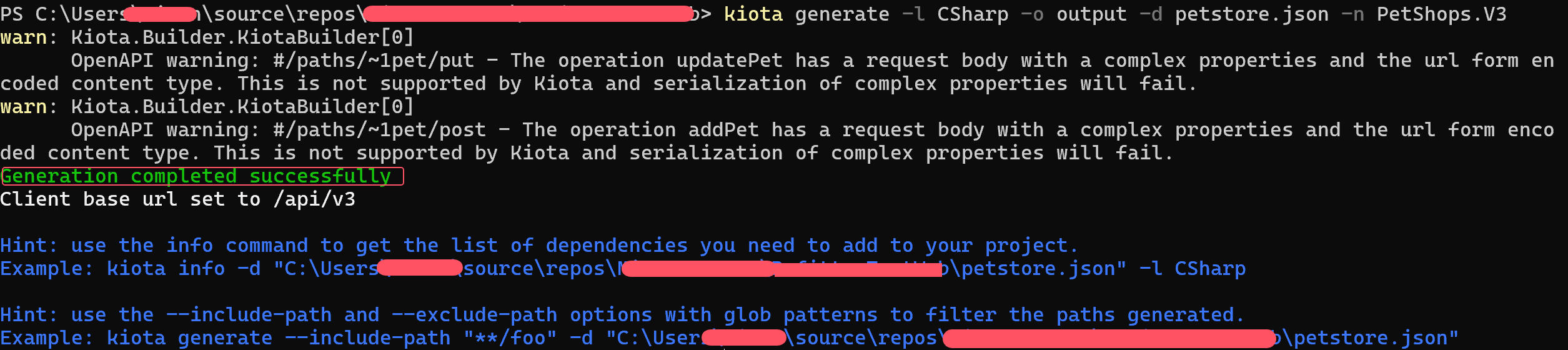
kiota generate -l CSharp -o output -d petstore.json -n PetShops.V3
这里解释一下参数:
-l是客户端目标语言,CSharp就是C#-o表示生成的代理类文件保存的文件夹-d表示对应的schema文件,-n表示生成的代理类的命名空间如果没有其他问题,将会成功创建代理文件:
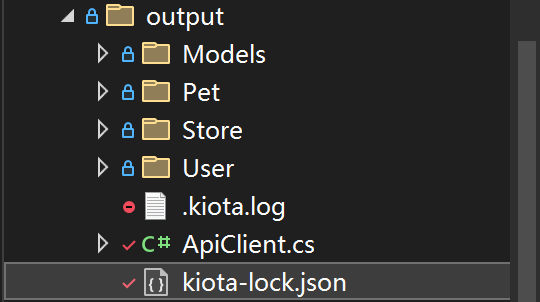
生成了代理类那使用起来就相当简单了:
接下来我们引用Kiota必须的几个类库:
<PackageReference Include="Microsoft.Kiota.Abstractions" />
<PackageReference Include="Microsoft.Kiota.Http.HttpClientLibrary" />
<PackageReference Include="Microsoft.Kiota.Serialization.Form" />
<PackageReference Include="Microsoft.Kiota.Serialization.Json"/>
<PackageReference Include="Microsoft.Kiota.Serialization.Multipart" />
<PackageReference Include="Microsoft.Kiota.Serialization.Text"  />
这里假设PetShop的接口需要简单验证才能访问:
我们首先定义一个名为SimpleAuthenticationProvider的类,该类实现了IAuthenticationProvider接口,代码如下:
internal class SimpleAuthenticationProvider(string baseUrl, string? userName, string? password) : IAuthenticationProvider
{
    public async Task AuthenticateRequestAsync(
        RequestInformation request,
        Dictionary<string, object>? additionalAuthenticationContext = null,
        CancellationToken cancellationToken = default)
    {
        using var httpClient = new HttpClient()
        {
            BaseAddress = new Uri(baseUrl)
        };
        httpClient.DefaultRequestHeaders.Accept.Add(
            new MediaTypeWithQualityHeaderValue("application/xml"));
        var authRequest = await httpClient.GetAsync(
            $"v3/user/login?username={userName}&password={password}", cancellationToken);

        if (!authRequest.IsSuccessStatusCode)
        {
            throw new Exception("Authentication failed");
        }
        var session = await authRequest.Content.ReadAsStringAsync(cancellationToken);

        Console.WriteLine($"session: {session}");
        await Task.CompletedTask;
        //todo:
    }
}
上面的代码很简单就是模拟一个登录,然后后面的请求就存在了session即可进行后续的接口调用,如果有些认证是JWT之内的这里可以把得到的Token传入到后续的Header中,当然认证请求务必缓存起来,不用每个接口调用都请求一次!
MS默认帮我们实现了AnonymousAuthenticationProvider和BaseBearerTokenAuthenticationProvider两个认证Provider.
以下是简单的调用接口:
//分别调用条件查询Pet,以及根据Id查询指定的Pet
app.MapGet("/test", async () =>
{
    var baseUrl = "https://petstore3.swagger.io/api/v3";
    var userName = "万雅虎";
    var password = "12345";

    var adaptor = new HttpClientRequestAdapter(
        new SimpleAuthenticationProvider(baseUrl, userName, password))
    {
        BaseUrl = baseUrl
    };
    var api = new ApiClient(adaptor);
    var pets = await api.Pet.FindByStatus.GetAsync(x =>
    {
        x.QueryParameters.StatusAsGetStatusQueryParameterType =
        PetShops.V3.Pet.FindByStatus.GetStatusQueryParameterType.Sold;
    });

    var pet = await api.Pet[1].GetAsync();
    return new { Pets = pets, Pet = pet };
});
不出意外请求成功了:
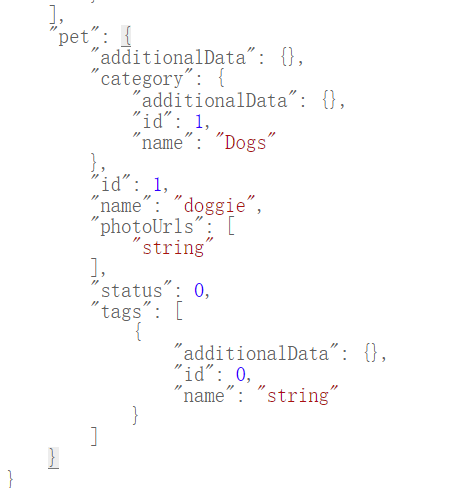
当然上面的调用代码显得有一些粗糙,实际上大多数开发代码会使用到DI,
我们使用MS提供的示例代码扩展一下IServiceCollection和IHttpClientBuilder
using Microsoft.Kiota.Http.HttpClientLibrary;

/// <summary>
/// Service collection extensions for Kiota handlers.
/// </summary>
public static class KiotaServiceCollectionExtensions
{
    /// <summary>
    /// Adds the Kiota handlers to the service collection.
    /// </summary>
    /// <param name="services"><see cref="IServiceCollection"/> to add the services to</param>
    /// <returns><see cref="IServiceCollection"/> as per convention</returns>
    /// <remarks>The handlers are added to the http client by the <see cref="AttachKiotaHandlers(IHttpClientBuilder)"/> call, which requires them to be pre-registered in DI</remarks>
    public static IServiceCollection AddKiotaHandlers(this IServiceCollection services)
    {
        // Dynamically load the Kiota handlers from the Client Factory
        var kiotaHandlers = KiotaClientFactory.GetDefaultHandlerTypes();
        // And register them in the DI container
        foreach(var handler in kiotaHandlers)
        {
            services.AddTransient(handler);
        }

        return services;
    }

    /// <summary>
    /// Adds the Kiota handlers to the http client builder.
    /// </summary>
    /// <param name="builder"></param>
    /// <returns></returns>
    /// <remarks>
    /// Requires the handlers to be registered in DI by <see cref="AddKiotaHandlers(IServiceCollection)"/>.
    /// The order in which the handlers are added is important, as it defines the order in which they will be executed.
    /// </remarks>
    public static IHttpClientBuilder AttachKiotaHandlers(this IHttpClientBuilder builder)
    {
        // Dynamically load the Kiota handlers from the Client Factory
        var kiotaHandlers = KiotaClientFactory.GetDefaultHandlerTypes();
        // And attach them to the http client builder
        foreach(var handler in kiotaHandlers)
        {
            builder.AddHttpMessageHandler((sp) => (DelegatingHandler)sp.GetRequiredService(handler));
        }
        return builder;
    }
}
然后实现一个Api的ClientFactory:
//这里是伪代码,因为认证需要根据Api按需实现,比如这里是匿名请求
public class PetShopClientFactory
{
    private readonly IAuthenticationProvider _authenticationProvider;
    private readonly HttpClient _httpClient;

    public PetShopClientFactory(HttpClient httpClient)
    {
        _authenticationProvider = new AnonymousAuthenticationProvider();
        _httpClient = httpClient;
    }

    public ApiClient GetClient() {
      return new ApiClient(new HttpClientRequestAdapter(_authenticationProvider, httpClient: _httpClient));
    }
}
然后在服务注册中添加如下代码:
// ----------- Add this part to register the generated client -----------
// Add Kiota handlers to the dependency injection container
builder.Services.AddKiotaHandlers();

// Register the factory for the PetShop client
builder.Services.AddHttpClient<PetShopClientFactory>((sp, client) => {
    // Set the base address and accept header
    // or other settings on the http client
    client.BaseAddress = new Uri("https://petstore3.swagger.io/api/v3");
    client.DefaultRequestHeaders.Add("Accept", "application/json");
}).AttachKiotaHandlers(); // Attach the Kiota handlers to the http client, this is to enable all the Kiota features.

// Register the PetShop client
builder.Services.AddTransient(sp => sp.GetRequiredService<PetShopClientFactory>().GetClient());
// ----------- Add this part to register the generated client end -------
最后我们在使用的地方注入ApiClient即可!
对于不同的代理类和工具选型这里不做推荐,能满足项目需求以及节省开发时间即可,不过如果你有兴趣倒是推荐体验一下Kiota和Refitter,没准你会和我一样喜欢上TA!
 官方公众号
官方公众号