ETJava Beta | Java
 注册
登录
注册
登录
注册
登录
注册
登录
这个导出依赖于模板文件,可便捷设置表头样式。 也可以不使用模板,直接创建。
<dependency>
    <groupId>org.apache.poi</groupId>
    <artifactId>poi</artifactId>
    <version>4.1.2</version>
</dependency>
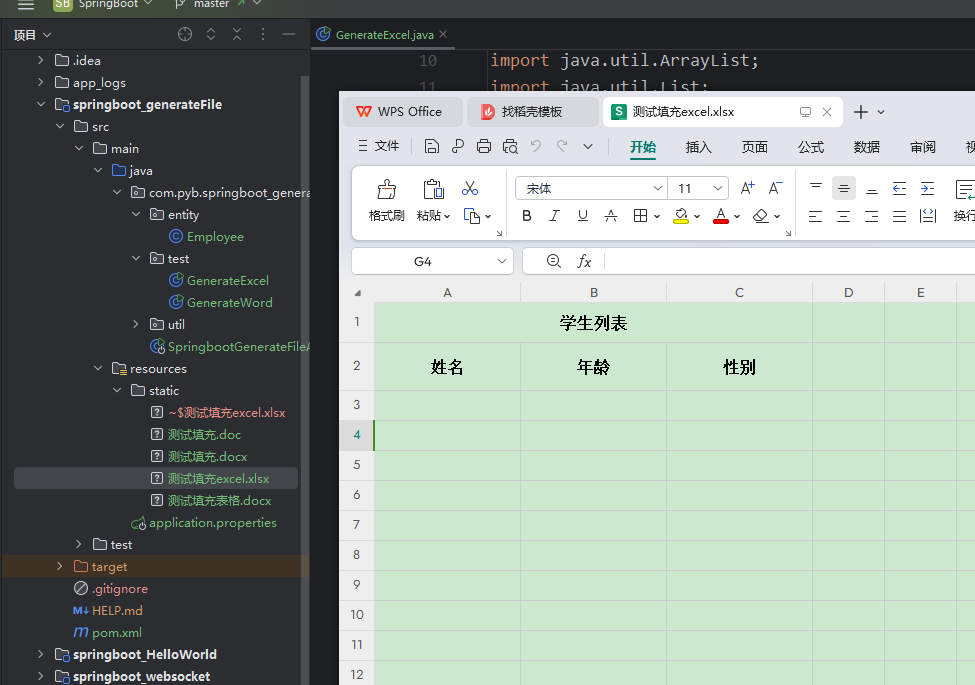
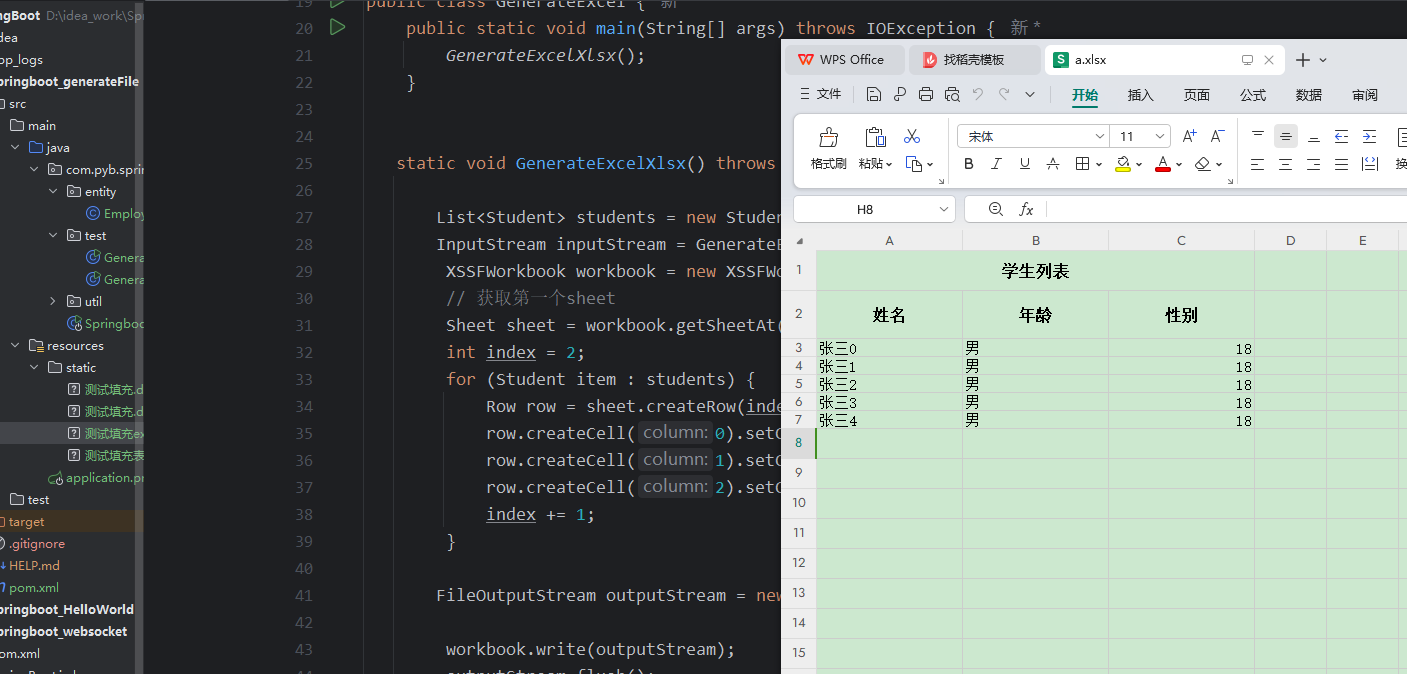
测试代码直接导出到本地,如需要在浏览器中导出将输出流交给浏览器即可
public class GenerateExcel {
    public static void main(String[] args) throws IOException {
        GenerateExcelXlsx();
    }


   static void GenerateExcelXlsx() throws IOException {

       List<Student> students = new Student().stuAll();
       InputStream inputStream = GenerateExcel.class.getClassLoader().getResourceAsStream("static/测试填充excel.xlsx");
        XSSFWorkbook workbook = new XSSFWorkbook(inputStream);
        // 获取第一个sheet
        Sheet sheet = workbook.getSheetAt(0);
        int index = 2;
        for (Student item : students) {
            Row row = sheet.createRow(index);
            row.createCell(0).setCellValue(item.getName());
            row.createCell(1).setCellValue(item.getSex().toString());
            row.createCell(2).setCellValue(item.getAge());
            index += 1;
        }

       FileOutputStream outputStream = new FileOutputStream("C:\\Users\\pyb\\Desktop\\a.xlsx");

        workbook.write(outputStream);
        outputStream.flush();
        outputStream.close();

    }


    static class Student{
        private String name;
        private Integer age;
        private Character sex;

        public Student() {
        }

        public Student(String name, Character sex, Integer age) {
            this.name = name;
            this.sex = sex;
            this.age = age;
        }

        List<Student> stuAll(){
             ArrayList<Student> list = new ArrayList<>();
             for (int i = 0; i < 5; i++) {
                 Student student = new Student("张三" + i, '男' ,18 );
                 list.add(student);
             }
             return list;
         }

        public String getName() {
            return name;
        }

        public Integer getAge() {
            return age;
        }

        public Character getSex() {
            return sex;
        }
    }

}
这种方式表头内容需要自己手动写,
public class GenerateExcel {
    public static void main(String[] args) throws IOException {
        GenerateExcelXlsx2();
    }

   static void GenerateExcelXlsx2() throws IOException {

        List<Student> students = new Student().stuAll();
        XSSFWorkbook workbook = new XSSFWorkbook();
        // 创建一个sheet,这里面形参是内部名称,不可见
        Sheet sheet = workbook.createSheet();
        // 设置为第几个sheet,并设置用户可见名称
        workbook.setSheetName(0,"测试sheet");

        int index = 0;
        for (Student item : students) {
            Row row = sheet.createRow(index);
            row.createCell(0).setCellValue(item.getName());
            row.createCell(1).setCellValue(item.getSex().toString());
            row.createCell(2).setCellValue(item.getAge());
            index += 1;
        }

       FileOutputStream outputStream = new FileOutputStream("C:\\Users\\pyb\\Desktop\\b.xlsx");

        workbook.write(outputStream);
        outputStream.flush();
        outputStream.close();

    }


    static class Student{
        private String name;
        private Integer age;
        private Character sex;

        public Student() {
        }

        public Student(String name, Character sex, Integer age) {
            this.name = name;
            this.sex = sex;
            this.age = age;
        }

        List<Student> stuAll(){
             ArrayList<Student> list = new ArrayList<>();
             for (int i = 0; i < 5; i++) {
                 Student student = new Student("张三" + i, '男' ,18 );
                 list.add(student);
             }
             return list;
         }

        public String getName() {
            return name;
        }

        public Integer getAge() {
            return age;
        }

        public Character getSex() {
            return sex;
        }
    }

}
一般应用与固定位置填充完毕的计算,动态的没测试过
数据塞入完毕后加入以下代码
 // 计算公式
FormulaEvaluator evaluator = workbook.getCreationHelper().createFormulaEvaluator();
evaluator.evaluateAll();
获取某行或者某列时候,尽量用创建方式,除非确定行和列都能被获取到(行列不做操作、修改格式的情况下内容是空,会报空指针)
 官方公众号
官方公众号