ETJava Beta | Java
 注册
登录
注册
登录
注册
登录
注册
登录
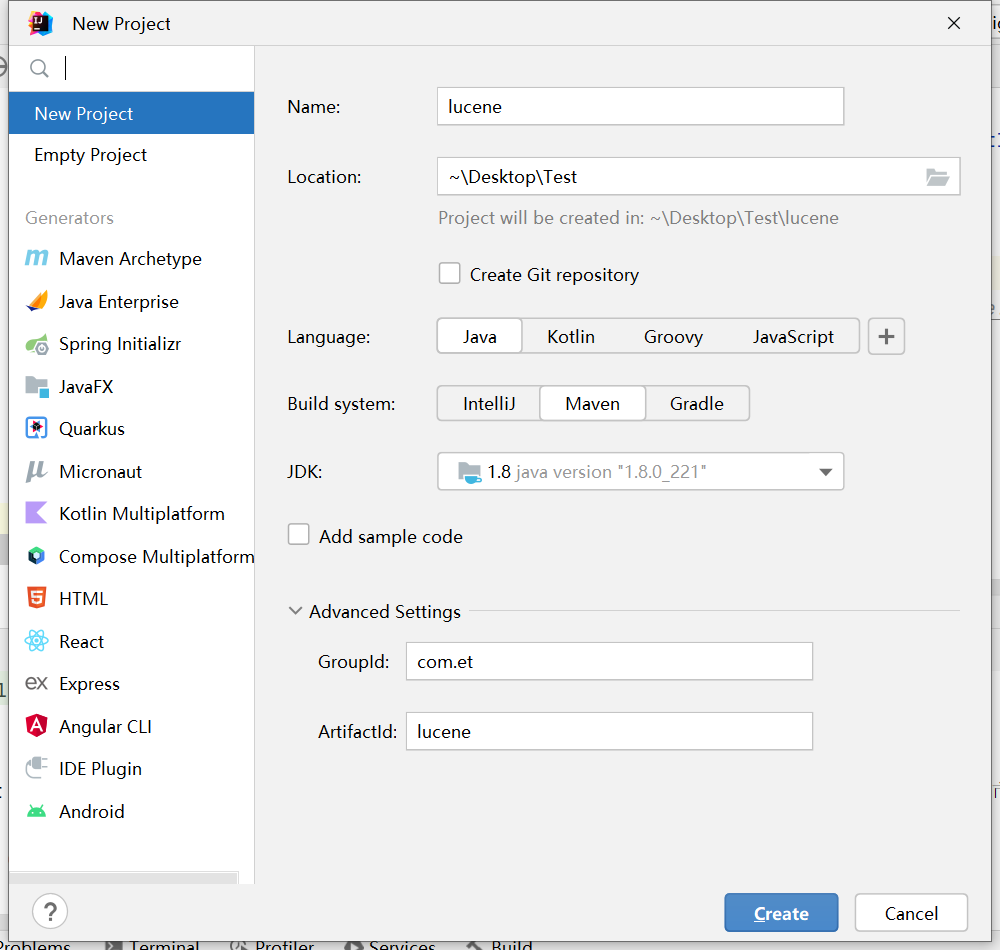
要是有Lucene首选需要添加对应的支持(jar包) 可以直接在官网下载后 将core和analyzers-common两个包添加到工程中即可
如果使用的是maven管理的项目 需要添加对应的依赖即可

lucene官方地址:   https://lucene.apache.org/
lucene其他版本下载地址: https://downloads.apache.org/lucene/
maven中央仓库地址: https://mvnrepository.com/
luke下载地址:https://github.com/DmitryKey/luke/releases

说明:目前Lucene最新版本为9.10 但分词器的版本最高到8.11  而luke工具最新是8.0 这里我们就拿8.0的版本来讲解
	针对创建索引和查询索引 每个版本虽然做了些许的优化 但基本使用是相同的
	luke是用来查询分词后的词片中内容的 相当于数据库的连接工具 这里需要注意的是 lucene版本的不同 luke的版本需要对应 否则无法查看
<!-- 核心包 -->
<dependency>
    <groupId>org.apache.lucene</groupId>
    <artifactId>lucene-core</artifactId>
    <version>8.0.0</version>
</dependency>
<!-- 解析器公共包 -->
<dependency>
    <groupId>org.apache.lucene</groupId>
    <artifactId>lucene-analyzers-common</artifactId>
    <version>8.0.0</version>
</dependency>

<!-- 分词查询 queryParser包 -->
<dependency>
    <groupId>org.apache.lucene</groupId>
    <artifactId>lucene-queryparser</artifactId>
    <version>8.0.0</version>
</dependency>
实现步骤
1. 创建Driectory对象
		用来指定索引库的位置(如果不存在会新建)
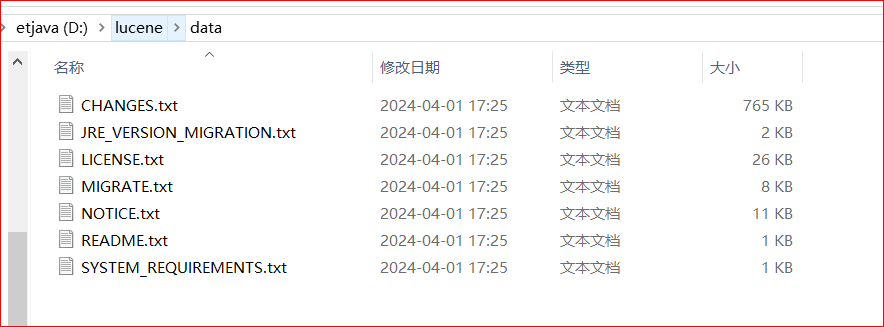
2. 读取磁盘上的文件,针对每个文件创建一个Document对象
		Document对象 也叫做文档对象
		每个文档对象对应的是一条数据
3. 向文档对象中添加文档域
4. 基于Driectory对象创建IndexWriter对象
		IndexWriter是写索引对象 用来创建索引的
5. 把文档对象写入到索引库
6. 获取分词文件数量
7. 释放资源
		关闭IndexWriter对象
package com.et.lucene01;

import org.apache.commons.io.FileUtils;
import org.apache.lucene.document.Document;
import org.apache.lucene.document.Field;
import org.apache.lucene.document.TextField;
import org.apache.lucene.index.IndexWriter;
import org.apache.lucene.index.IndexWriterConfig;
import org.apache.lucene.store.Directory;
import org.apache.lucene.store.FSDirectory;

import java.io.File;
import java.nio.file.Paths;

/**
 * @Author: ETJAVA
 * @CreateTime: 2024-04-03  17:08
 * @Description: TODO 创建索引
 * @Version: 1.0
 */
public class CreateIndex01 {

    /**
     * 创建索引库
     * @param dir 索引库所在的位置
     */
    private static void createIndex(String dir)throws Exception{
        //1. 创建Driectory对象 用来指定索引库的位置(如果不存在会新建)
        Directory directory = FSDirectory.open(Paths.get(dir));
        //2. 基于Driectory对象创建IndexWriter对象 用来创建索引的
        // IndexWriterConfig 空参构造方法中使用默认分词器 StandardAnalyzer不支持中文
        IndexWriter writer = new IndexWriter(directory,new IndexWriterConfig());
        //3. 读取磁盘上的文件,针对每个文件创建一个Document对象 也叫做文档对象 每个文档对象对应的是一条数据
        File[] files = new File("D://lucene//data").listFiles();
        for (File file : files) {
            // 获取文件名
            String fileName = file.getName();
            // 获取文件路径
            String filePath = file.getPath();
            // 获取文件大小
            long fileSize = FileUtils.sizeOf(file);
            // 获取文件内容
            String content = FileUtils.readFileToString(file, "UTF-8");
            // 创建文档对象
            Document document = new Document();
            // 创建域 参数1 域的名称 参数2域的值 参数3 是否将内容保存到磁盘
            Field fieldName = new TextField("fileName",fileName, Field.Store.YES);
            Field fieldPath = new TextField("filePath",fileName, Field.Store.YES);
            Field fieldSize = new TextField("fileSize",String.valueOf(fileSize), Field.Store.YES);
            Field fieldContent = new TextField("content",content, Field.Store.YES);
            //4. 向文档对象中添加文档域
            document.add(fieldName);
            document.add(fieldPath);
            document.add(fieldSize);
            document.add(fieldContent);
            //5. 把文档对象写入到索引库
            writer.addDocument(document);
        }
        // 统计 分词了多少个文件
        int fileNums = writer.numRamDocs();
        //6. 释放资源 关闭IndexWriter对象
        writer.close();

        System.out.println("对 "+fileNums+" 个文件进行分词");
    }

    public static void main(String[] args) throws Exception {
        createIndex("D://lucene");
    }
}
查询索引库的步骤
	1. 创建Directory对象 指定索引库的位置
	2. 创建IndexReader对象 用来读取索引信息
	3. 创建IndexSearcher对象 用来搜索,构造方法中需要传入IndexReader对象
	4. 创建Query对象,封装查询相关信息的
		TermQuery 根据关键词查询
	5. 执行查询 返回查询结果 TopDocs
	6. 获取查询结果的总记录数
	7. 获取文档列表 输出查询到的数据
	8. 释放资源 关闭IndexReader对象
package com.et.lucene01;

import org.apache.lucene.document.Document;
import org.apache.lucene.index.DirectoryReader;
import org.apache.lucene.index.IndexReader;
import org.apache.lucene.index.Term;
import org.apache.lucene.search.*;
import org.apache.lucene.store.Directory;
import org.apache.lucene.store.FSDirectory;

import java.nio.file.Paths;

/**
 * @Author: ETJAVA
 * @CreateTime: 2024-04-04  11:06
 * @Description: TODO 查询索引
 * @Version: 1.0
 */
public class SearchIndex01 {

    private static void searchIndex(String dir) throws Exception{
        //1. 创建Directory对象 指定索引库的位置
        Directory directory = FSDirectory.open(Paths.get(dir));
        //2. 创建IndexReader对象 用来读取索引信息
        IndexReader reader = DirectoryReader.open(directory);
        //3. 创建IndexSearcher对象 用来搜索,构造方法中需要传入IndexReader对象
        IndexSearcher indexSearcher = new IndexSearcher(reader);
        //4. 创建Query对象,封装查询相关信息的
        Query query = new TermQuery(new Term("content","spring"));
        //5. 执行查询 返回查询结果 TopDocs
        // 参数1 查询对象,参数2 返回结果的最大记录数
        TopDocs topDocs = indexSearcher.search(query, 10);
        //6. 获取查询结果的总记录数
        System.out.println("查询到的总记录数:"+topDocs.totalHits);
        //7. 获取文档列表 输出查询到的数据
        for (ScoreDoc scoreDoc : topDocs.scoreDocs) {
            // 获取文档ID
            int docId = scoreDoc.doc;
            // 根据ID获取文档对象
            Document document = indexSearcher.doc(docId);
            // 输出查询到的内容
            System.out.println("fileName: "+document.get("fileName"));
            System.out.println("filePath: "+document.get("filePath"));
            System.out.println("fileSize: "+document.get("fileSize"));
            System.out.println("content: "+document.get("content"));
            System.out.println("==============================");
        }
        //8. 释放资源 关闭IndexReader对象
        reader.close();
    }

    public static void main(String[] args) throws Exception {
        searchIndex("D://lucene8");
    }
}
 官方公众号
官方公众号
