ETJava Beta | Java
 注册
登录
注册
登录
注册
登录
注册
登录
每个Document对象表示一条数据,每个文档对象中需要包含一个文档域,对文档的维护就是对文档域的增删改操作
1. 文档域的介绍和使用
2. 对文档的增删改操作
Field域用来封装分析器分词,每个文档表示一条数据,每个文档中都包含一个Field域对象
Field域的属性
	是否分析:是否对域中内容进行分词处理,前提是我们是否要对域中内容进行查询
	是否索引:将Field中分析后的词或整个Field值进行索引,只有索引才能进行搜索
		例如 商品名,商品介绍 分析后进行索引,订单号,身份信息不用分析 但也要索引 这些数据都要作为查询条件
	是否存储:将Field值存储到文档中,只有存储到Document中的Field才能从Document中获取
| Field子类 | 数据类型 | 是否分析(Analyzed) | 是否索引(Indexed) | 是否存储(Stored) | 说明 |
|---|---|---|---|---|---|
| StringField | 字符串 | N | Y | YES表示存储,NO表示不存储 | 用来构建一个String的文档域,不会进行分析分词,是将整个字符串存储在索引中,是否存储在文档中 由Store.YES或Store.NO决定 |
| LongPoint | Long类型 | Y | Y | N | 使用LongPoint、IntPoint等类型来存储数值类型的数据,让数值类型可以进行索引,但不能存储数据 如果想存储数据 需要使用StoredField |
| StoredField | 重载方法,支持多种类型 | N | N | Y | 用来构建不同类型的Field,不分析 不索引 但会将值存储到文档中 |
| TextField(FieldName,FieldValue,Store.YES/NO)或TextField(FieldName,reader) | 字符串或流 | Y | Y | Y/N | 可以添加字符串和流数据,如果是流数据 则lucene会采用Unstored策略 |
扫描目录下的文件,将文件名、文件内容进行并创建索引和存储,对于文件路径和文件大小 不分析 不索引 只存储对应的值即可
package com.et.lucene01;

import org.apache.commons.io.FileUtils;
import org.apache.lucene.analysis.Analyzer;
import org.apache.lucene.analysis.cn.smart.SmartChineseAnalyzer;
import org.apache.lucene.document.*;
import org.apache.lucene.index.DirectoryReader;
import org.apache.lucene.index.IndexReader;
import org.apache.lucene.index.IndexWriter;
import org.apache.lucene.index.IndexWriterConfig;
import org.apache.lucene.queryparser.classic.QueryParser;
import org.apache.lucene.search.IndexSearcher;
import org.apache.lucene.search.Query;
import org.apache.lucene.search.ScoreDoc;
import org.apache.lucene.search.TopDocs;
import org.apache.lucene.store.Directory;
import org.apache.lucene.store.FSDirectory;

import java.io.File;
import java.nio.file.Paths;

/**
 * @Author: ETJAVA
 * @CreateTime: 2024-04-06  09:59
 * @Description: TODO 测试文档域
 * @Version: 1.0
 */
public class TestField {

    public static void main(String[] args) throws Exception {
        // 创建索引库
        //index();
        // 查询索引
        search();
    }

    private static void index() throws Exception{
        // 1. 创建Driectory对象 用来指定索引库的位置(如果不存在会新建)
        Directory directory = FSDirectory.open(Paths.get("D://lucene01"));
        // 2. 读取磁盘上的文件,针对每个文件创建一个Document对象 每个文档对象对应的是一条数据
        // 使用中文分析器SmartChineseAnalyzer
        IndexWriter writer = new IndexWriter(directory,new IndexWriterConfig(new SmartChineseAnalyzer()));
        // 读取磁盘上的文件 对其进行分析分词
        File[] files = new File("D://lucene//data").listFiles();
        for (File file : files) {
            // 3. 创建文档对象
            Document document = new Document();
            // 4. 想文档对象中添加文档域  文档域中会对原始数据进行分析分词
            document.add(new TextField("fileName",file.getName(), Field.Store.YES));
            document.add(new TextField("content", FileUtils.readFileToString(file, "UTF-8"), Field.Store.YES));
            long fileSize = FileUtils.sizeOf(file);
            LongPoint fileSizeValue = new LongPoint("size", fileSize);
            Field size = new StoredField("size", fileSize);
            document.add(new StoredField("fileSize",fileSize));// 只存储 不分析 不索引
            document.add(new StoredField("filePath",file.getPath()));// 只存储 不分析 不索引
            // 4. 把文档对象写入到索引库
            writer.addDocument(document);

        }
        // 5. 获取分词文件数量
        int numRamDocs = writer.numRamDocs();
        // 6. 释放资源 关闭IndexWriter对象
        writer.close();
        System.out.println("共分析了"+numRamDocs+"个文档");
    }

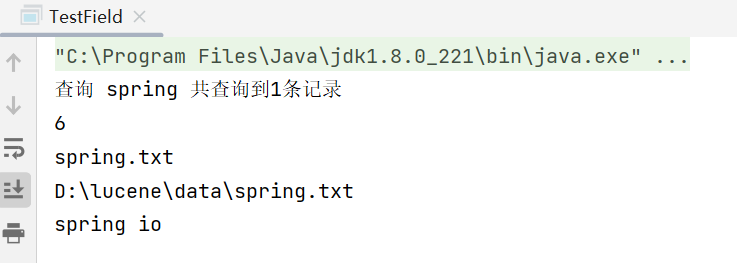
    private static void search()throws Exception{
        // 1. 创建Driectory对象 用来指定索引库的位置
        Directory directory = FSDirectory.open(Paths.get("D://lucene01"));
        // 2. 创建IndexReader对象 用来读取索引信息
        IndexReader reader = DirectoryReader.open(directory);
        //3. 创建IndexSearcher对象 用来搜索,构造方法中需要传入IndexReader对象
        IndexSearcher indexSearcher = new IndexSearcher(reader);
        // 4. 创建中文分词器
        Analyzer analyzer = new SmartChineseAnalyzer();
        // 5. 创建查询解析器
        QueryParser parser = new QueryParser("content",analyzer);
        // 6. 创建Query对象 封装查询信息
        Query query = parser.parse("spring");
        // 7. 执行查询 返回TopDocs结果集
        TopDocs topDocs = indexSearcher.search(query, 10);
        System.out.println("查询 spring 共查询到"+topDocs.totalHits.value+"条记录");
        // 8. 遍历结果集
        for (ScoreDoc scoreDoc : topDocs.scoreDocs) {
            // 9. 获取文档ID
            int docId = scoreDoc.doc;
            // 10. 根据文档ID获取文档数据
            Document document = indexSearcher.doc(docId);
            // 11. 获取查询的索引内容
            System.out.println(docId);
            System.out.println(document.get("fileName"));
            System.out.println(document.get("filePath"));
            System.out.println(document.get("content"));
        }
        // 12. 关闭IndexReader对象
        reader.close();
    }
}
 官方公众号
官方公众号
