ETJava Beta | Java
 注册
登录
注册
登录
注册
登录
注册
登录
// 创建索引库
    public static void createIndex()throws Exception{
        // 1. 创建Directory对象 封装索引库所在位置
        Directory directory = FSDirectory.open(Paths.get("D://lucene6"));
        // 2. 创建IndexWriterConfig对象 配置中文分析器SmartChineseAnalyzer
        IndexWriterConfig config = new IndexWriterConfig(new SmartChineseAnalyzer());
        // 3. 创建IndexWriter对象 用来向索引库中写索引
        IndexWriter writer = new IndexWriter(directory,config);
        // 4. 定义测试数据
        Integer[] ids = {1,2,3,4};
        String[] citys = {"广州","深圳","佛山","惠州"};
        String[] descs = {
                "广州是广东省的省会城市",
                "深圳是特区城市",
                "佛山是美食城市",
                "惠州是历史悠久的城市"
        };
        // 5. 向索引库中写索引
        for (int i=0;i<ids.length;i++) {
            // 6. 创建文档对象
            Document document = new Document();
            // 7. 将原始数据添加到文档域
            TextField fieldId = new TextField("ids",String.valueOf(ids[i]), Field.Store.YES);
            TextField fieldCitys = new TextField("citys",citys[i], Field.Store.YES);
            TextField fieldDesc = new TextField("descs",descs[i], Field.Store.YES);
            // 8. 将文档域添加到文档中
            document.add(fieldId);
            document.add(fieldCitys);
            document.add(fieldDesc);
            // 9. 添加索引到索引库
            writer.addDocument(document);
        }
        int ramDocs = writer.numRamDocs();
        // 10. 关闭写索引对象
        writer.close();

        System.out.println("一个写了 "+ramDocs+" 个文档");
    }
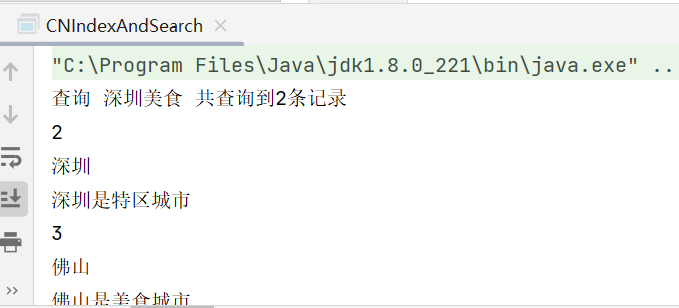
用户在搜索时 不一定会按照常规的关键词进行查询,有时候可能会出现组合词,这时就需要使用到多词查询
多词查询默认是OR的关系 即只要包含关键词的都会被查询出来

实现步骤
1. 创建Directory镀锡 封装索引库位置
2. 创建IndexReader对象 用来读取索引信息
3. 创建IndexSearch对象 用来查询索引
4. 创建中文分词器
5. 创建查询解析器
6. 创建Query对象 封装查询信息
7. 执行查询 返回TopDocs结果集
8. 遍历结果集
9. 获取文档ID
10. 根据文档ID获取文档数据
11. 获取查询的索引内容
12. 关闭IndexReader对象
/**
     * 多词查询
     * @param indexDir
     * @param q
     * @throws Exception
     */
    public static void searchIndex2(String indexDir,String q) throws Exception{
        // 1. 创建Directory镀锡 封装索引库位置
        Directory directory = FSDirectory.open(Paths.get(indexDir));
        // 2. 创建IndexReader对象 用来读取索引信息
        IndexReader indexReader = DirectoryReader.open(directory);
        // 3. 创建IndexSearch对象 用来查询索引
        IndexSearcher indexSearcher = new IndexSearcher(indexReader);
        // 4. 创建中文分词器
        Analyzer analyzer = new SmartChineseAnalyzer();
        // 5. 创建查询解析器
        QueryParser parser = new QueryParser("descs",analyzer);
        // 6. 创建Query对象 封装查询信息
        Query query = parser.parse(q);
        // 7. 执行查询 返回TopDocs结果集
        TopDocs topDocs = indexSearcher.search(query, 10);
        System.out.println("查询 "+q+" 共查询到"+topDocs.totalHits.value+"条记录");
        // 8. 遍历结果集
        for (ScoreDoc scoreDoc : topDocs.scoreDocs) {
            // 9. 获取文档ID
            int docId = scoreDoc.doc;
            // 10. 根据文档ID获取文档数据
            Document document = indexSearcher.doc(docId);
            // 11. 获取查询的索引内容
            System.out.println(document.get("ids"));
            System.out.println(document.get("citys"));
            System.out.println(document.get("descs"));
        }
        // 12. 关闭IndexReader对象
        indexReader.close();
    }
searchIndex2("D://lucene6","深圳美食");
 官方公众号
官方公众号
