ETJava Beta | Java
 注册
登录
注册
登录
注册
登录
注册
登录
本文介绍如何操作windows系统光标。正常我们设置/隐藏光标,只能改变当前窗体或者控件范围,无法全局操作windows光标。接到一个需求,想隐藏windows全局的鼠标光标显示,下面讲下如何操作
先了解下系统鼠标光标,在鼠标属性-自定义列表中可以看到一共有13种类型,对应13种工作状态:
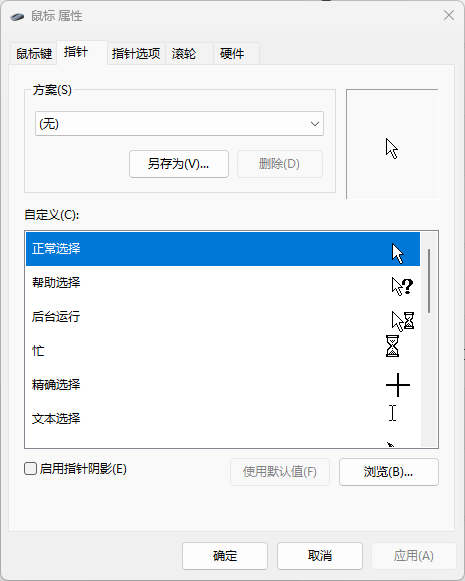
操作系统提供了一组预定义的光标,如箭头、手形、沙漏等,位于 C:\Windows\Cursors目录下。
对应的Windows.Input.CursorType枚举:
 1   public enum CursorType
 2   {
 3     None,
 4     No,
 5     Arrow,
 6     AppStarting,
 7     Cross,
 8     Help,
 9     IBeam,
10     SizeAll,
11     SizeNESW,
12     SizeNS,
13     SizeNWSE,
14     SizeWE,
15     UpArrow,
16     Wait,
17     Hand,
18     Pen,
19     ScrollNS,
20     ScrollWE,
21     ScrollAll,
22     ScrollN,
23     ScrollS,
24     ScrollW,
25     ScrollE,
26     ScrollNW,
27     ScrollNE,
28     ScrollSW,
29     ScrollSE,
30     ArrowCD,
31   }
光标显示逻辑:
对当前鼠标状态有获取需求的,可以通过GetCursorInfo获取,当前鼠标光标id以及句柄:
1     private IntPtr GetCurrentCursor()
2     {
3         CURSORINFO cursorInfo;
4         cursorInfo.cbSize = Marshal.SizeOf(typeof(CURSORINFO));
5         GetCursorInfo(out cursorInfo);
6         var cursorId = cursorInfo.hCursor;
7         var cursorHandle = CopyIcon(cursorId);
8         return cursorHandle;
9     }
那如何隐藏系统光标呢?系统光标可以通过SetSystemCursor function (winuser.h) - Win32 apps | Microsoft Learn函数设置,不过貌似没有隐藏光标的入口
可以换个思路,创建一个空白光标即可。我做了一个blank.cur:自己动手制作 windows鼠标光标文件(.cur格式)-CSDN博客然后隐藏系统光标:
1   private void HideCursor()
2   {
3       _cursorHandle = GetCurrentCursor();
4       //替换为空白鼠标光标
5       var cursorFile = Path.Combine(AppDomain.CurrentDomain.BaseDirectory, "Blank.cur");
6       IntPtr cursor = LoadCursorFromFile(cursorFile);
7       SetSystemCursor(cursor, OcrNormal);
8  }
恢复系统光标的显示,将之前光标Handle设置回去:
1 var success = SetSystemCursor(_cursorHandle, OcrNormal);
以上是实现了当前光标的替换。但上面有介绍过鼠标光标状态有13种,会根据应用程序状态进行切换,所以其它光标也要处理。
对13种光标都替换为空白光标,13种光标CursorId值在setSystemCursor文档有说明:
 1     private readonly int[] _systemCursorIds = new int[] { 32512, 32513, 32514, 32515, 32516, 32642, 32643, 32644, 32645, 32646, 32648, 32649, 32650 };
 2     private readonly IntPtr[] _previousCursorHandles = new IntPtr[13];
 3     private void HideCursor()
 4     {
 5         for (int i = 0; i < _systemCursorIds.Length; i++)
 6         {
 7             var cursor = LoadCursor(IntPtr.Zero, _systemCursorIds[i]);
 8             var cursorHandle = CopyIcon(cursor);
 9             _previousCursorHandles[i] = cursorHandle;
10             //替换为空白鼠标光标
11             var cursorFile = Path.Combine(AppDomain.CurrentDomain.BaseDirectory, "Blank.cur");
12             IntPtr blankCursor = LoadCursorFromFile(cursorFile);
13             SetSystemCursor(blankCursor, (uint)_systemCursorIds[i]);
14         }
15     }
运行验证:系统桌面、应用窗体如VisualStudio以及网页等光标编辑状态,都成功隐藏
还原光标状态:
1     private void ShowCursor()
2     {
3         for (int i = 0; i < _systemCursorIds.Length; i++)
4         {
5             SetSystemCursor(_previousCursorHandles[i], (uint)_systemCursorIds[i]);
6         }
7     }
用到的User32及参数类:

 1    [DllImport("user32.dll", SetLastError = true)]
 2    public static extern IntPtr LoadCursor(IntPtr hInstance, int lpCursorName);
 3    [DllImport("user32.dll")]
 4    public static extern IntPtr CopyIcon(IntPtr cusorId);
 5    [DllImport("user32.dll")]
 6    public static extern IntPtr LoadCursorFromFile(string lpFileName);
 7    [DllImport("user32.dll")]
 8    public static extern bool SetSystemCursor(IntPtr hcur, uint id);
 9    [DllImport("user32.dll")]
10    static extern bool GetCursorInfo(out CURSORINFO pci);
11
12    [StructLayout(LayoutKind.Sequential)]
13    public struct POINT
14    {
15        public Int32 x;
16        public Int32 y;
17    }
18
19    [StructLayout(LayoutKind.Sequential)]
20    public struct CURSORINFO
21    {
22        public Int32 cbSize;        // Specifies the size, in bytes, of the structure.
23                                    // The caller must set this to Marshal.SizeOf(typeof(CURSORINFO)).
24        public Int32 flags;         // Specifies the cursor state. This parameter can be one of the following values:
25                                    //    0             The cursor is hidden.
26                                    //    CURSOR_SHOWING    The cursor is showing.
27        public IntPtr hCursor;          // Handle to the cursor.
28        public POINT ptScreenPos;       // A POINT structure that receives the screen coordinates of the cursor.
29    }
需要说明的是,系统光标修改请谨慎处理,光标修改后人工操作不太容易恢复,对应用程序退出、崩溃等情况做好光标恢复操作。
以上demo代码见:kybs00/HideSystemCursorDemo: 隐藏windows系统光标 (github.com)
参考资料:
AllAPI.net - Your #1 source for using API-functions in Visual Basic! (mentalis.org)
createCursor 函数 (winuser.h) - Win32 apps | Microsoft Learn
SetSystemCursor function (winuser.h) - Win32 apps | Microsoft Learn
关键字:自定义光标、隐藏/显示光标、windows系统光标显示
 官方公众号
官方公众号
