ETJava Beta | Java
 注册
登录
注册
登录
注册
登录
注册
登录
️基础链接导航️
服务器 → ️ 阿里云活动地址
看样例 → 摸鱼小网站地址
学代码 → 源码库地址
大家好呀,我是summo,最近小网站崩溃了几天,原因一个是SSL证书到期,二个是免费的RDS也到期了,而我正边学习边找工作中,就没有顾得上修,不好意思哈(PS:八股文好难背,算法好难刷)。
小网站的内容和组件也不少了,今天我们继续来丰富的它的功能,让它看起来更美观和有用。今天会增加词云组件和搜索组件,并且还会将网站的内容排列一下,难度不高,但是更有意思。我们先从词云组件开始做。
不同机构的热搜有一样也有不一样的,词云组件的作用是将热搜标题进行分词和计数,统计出最高频率的热搜,方便大家快速了解最热的热搜内容是什么。
jieba是一个分词器,可以实现智能拆词,最早是提供了python包,后来由花瓣(huaban)开发出了java版本。
源码连接:https://github.com/huaban/jieba-analysis
<!-- jieba分词器 -->
<dependency>
  <groupId>com.huaban</groupId>
  <artifactId>jieba-analysis</artifactId>
  <version>1.0.2</version>
</dependency>
Demo如下:
package com.summo.sbmy.web.controller;

import com.google.common.collect.Lists;
import com.huaban.analysis.jieba.JiebaSegmenter;

import java.util.HashMap;
import java.util.Iterator;
import java.util.List;
import java.util.Map;

public class WordCloudTest {

    public static void main(String[] args) {
        List<String> titleList = Lists.newArrayList(
                "《花100块做个摸鱼小网站! 》第七篇—谁访问了我们的网站?",
                "《花100块做个摸鱼小网站! 》第六篇—将小网站部署到云服务器上",
                "《花100块做个摸鱼小网站! 》第五篇—通过xxl-job定时获取热搜数据",
                "《花100块做个摸鱼小网站! 》第四篇—前端应用搭建和完成第一个热搜组件",
                "《花100块做个摸鱼小网站! 》第三篇—热搜表结构设计和热搜数据存储",
                "《花100块做个摸鱼小网站! 》第二篇—后端应用搭建和完成第一个爬虫",
                "《花100块做个摸鱼小网站! 》第一篇—买云服务器和初始化环境",
                "《花100块做个摸鱼小网站! · 序》灵感来源");
        JiebaSegmenter segmenter = new JiebaSegmenter();
        Map<String, Integer> wordCount = new HashMap<>();
        Iterator<String> var4 = titleList.iterator();

        while (var4.hasNext()) {
            String title = var4.next();
            List<String> words = segmenter.sentenceProcess(title.trim());
            Iterator<String> var7 = words.iterator();

            while (var7.hasNext()) {
                String word = var7.next();
                wordCount.put(word, wordCount.getOrDefault(word, 0) + 1);
            }
        }
        wordCount.forEach((word, count) -> {
            System.out.println("word->" + word + ";count->" + count);
        });
    }

}
运行结果如下:
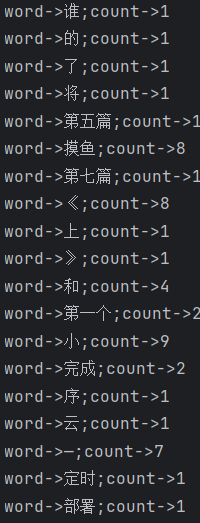
从结果上看,句子已经被分成多个词语,并且统计出了次数,但是还出现了很多无意义的词语,比如“的”、“和”、“了”这些,这样的词语被称为
停用词,一般这样的词要过滤掉。我们可以去网上搜索常见的停用词,然后在设置权重的时候把它给剔除掉。我使用的停用词库已经提交到了代码库中,大家可以直接取用。
WordCloudController.java
package com.summo.sbmy.web.controller;

import com.alibaba.fastjson.JSONArray;
import com.alibaba.fastjson.JSONObject;
import com.google.common.collect.Sets;
import com.huaban.analysis.jieba.JiebaSegmenter;
import com.summo.sbmy.cache.hotSearch.HotSearchCacheManager;
import com.summo.sbmy.cache.sys.SysConfigCacheManager;
import com.summo.sbmy.common.model.dto.HotSearchDTO;
import com.summo.sbmy.common.model.dto.WordCloudDTO;
import com.summo.sbmy.common.result.ResultModel;
import org.apache.commons.collections4.CollectionUtils;
import org.springframework.web.bind.annotation.RequestMapping;
import org.springframework.web.bind.annotation.RequestParam;
import org.springframework.web.bind.annotation.RestController;

import java.util.*;
import java.util.stream.Collectors;

@RestController
@RequestMapping("/api/hotSearch/wordCloud")
public class WordCloudController {

    private static Set<String> STOP_WORDS;
    private static JSONArray WEIGHT_WORDS_ARRAY;

    @RequestMapping("/queryWordCloud")
    public ResultModel<List<WordCloudDTO>> queryWordCloud(@RequestParam(required = true) Integer topN) {
        List<HotSearchDTO> hotSearchDTOS = gatherHotSearchData();
        List<String> titleList = hotSearchDTOS.stream().map(HotSearchDTO::getHotSearchTitle).collect(Collectors.toList());
        return ResultModel.success(findTopFrequentNouns(titleList, topN));
    }

    /**
     * 获取停用词
     *
     * @return
     */
    private List<HotSearchDTO> gatherHotSearchData() {
        String stopWordsStr = SysConfigCacheManager.getConfigByGroupCodeAndKey("WordCloud", "StopWords");
        STOP_WORDS = Sets.newHashSet(stopWordsStr.split(","));
        WEIGHT_WORDS_ARRAY = JSONArray.parseArray(SysConfigCacheManager.getConfigByGroupCodeAndKey("WordCloud", "WeightWords"));
        List<HotSearchDTO> hotSearchDTOS = new ArrayList<>();
        HotSearchCacheManager.CACHE_MAP.forEach((key, detail) -> {
            hotSearchDTOS.addAll(detail.getHotSearchDTOList());
        });
        return hotSearchDTOS;
    }

    /**
     * 分词
     *
     * @param titleList 标题列表
     * @param topN      截取指定长度的热词大小
     * @return
     */
    public static List findTopFrequentNouns(List<String> titleList, int topN) {
        JiebaSegmenter segmenter = new JiebaSegmenter();
        Map<String, Integer> wordCount = new HashMap<>();
        Iterator<String> var4 = titleList.iterator();

        while (var4.hasNext()) {
            String title = var4.next();
            List<String> words = segmenter.sentenceProcess(title.trim());
            Iterator<String> var7 = words.iterator();

            while (var7.hasNext()) {
                String word = var7.next();
                wordCount.put(word, wordCount.getOrDefault(word, 0) + 1);
            }
        }

        return wordCount.entrySet().stream()
                //停用词过滤
                .filter(entry -> !STOP_WORDS.contains(entry.getKey()))
                //构建对象
                .map(entry -> WordCloudDTO.builder().word(entry.getKey()).rate(entry.getValue()).build())
                //权重替换
                .map(wordCloudDTO -> {
                    if (CollectionUtils.isEmpty(WEIGHT_WORDS_ARRAY)) {
                        return wordCloudDTO;
                    } else {
                        WEIGHT_WORDS_ARRAY.forEach(weightedWord -> {
                            JSONObject tempObject = (JSONObject) weightedWord;
                            if (wordCloudDTO.getWord().equals(tempObject.getString("originWord"))) {
                                wordCloudDTO.setWord(tempObject.getString("targetWord"));
                                if (tempObject.containsKey("weight")) {
                                    wordCloudDTO.setRate(tempObject.getIntValue("weight"));
                                }
                            }
                        });
                        return wordCloudDTO;
                    }
                })
                //按出现频率进行排序
                .sorted(Comparator.comparing(WordCloudDTO::getRate).reversed())
                //截取前topN的数据
                .limit(topN)
                .collect(Collectors.toList());
    }

}
这里我加了一个权重替换的逻辑,因为我发现分词器对于有些热词的解析有问题。比如前段时间很火的热搜“黑神话-悟空”,但在中文里面“黑神话”并不是一个词语,所以结巴在分词的时候只能识别“神话”这个词。为了解决这样的问题,我就加了一个手动替换的逻辑。
组件官方文档链接如下:https://www.npmjs.com/package/vue-wordcloud
npm引入指令如下:cnpm install vue-wordcloud
WordCloud.vue
<template>
  <el-card class="word-cloud-card">
    <wordcloud
      class="word-cloud"
      :data="words"
      nameKey="name"
      valueKey="value"
      :wordPadding="2"
      :fontSize="[10,50]"
      :showTooltip="true"
      :wordClick="wordClickHandler"
    />
  </el-card>
</template>

<script>
import wordcloud from "vue-wordcloud";
import apiService from "@/config/apiService.js";

export default {
  name: "app",
  components: {
    wordcloud,
  },
  methods: {
    wordClickHandler(name, value, vm) {
      console.log("wordClickHandler", name, value, vm);
    },
  },
  data() {
    return {
      words: [],
    };
  },
  created() {
    apiService
      .get("/hotSearch/wordCloud/queryWordCloud?topN=100")
      .then((res) => {
        this.words = res.data.data.map((item) => ({
          value: item.rate,
          name: item.word,
        }));
      })
      .catch((error) => {
        // 处理错误情况
        console.error(error);
      });
  },
};
</script>
<style scoped>
.word-cloud-card {
  padding: 0% !important;
  max-height: 300px;
  margin-top: 10px;
}
.word-cloud {
  max-height: 300px;
}
>>> .el-card__body {
  padding: 0;
}
</style>
组件使用起来很容易,效果也还不错,但是造成了一个小BUG,用完这个组件后会导致小网站底部出现一个留白,现在都不知道怎么解决。
由于小网站的组件越来越多,整体的布局也需要重新设计一下,目前大概的布局如下:
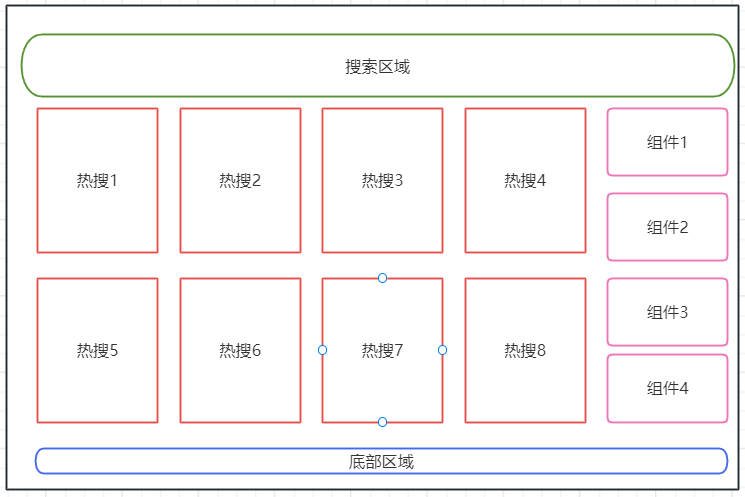
布局使用的也是ElementUI自带的布局组件:
<el-container>
  <el-header> ... </el-header>
  <el-main> ... </el-main>
  <el-footer> ... </<el-footer>
</el-container>
搜索组件使用的是<el-autocomplete>,使用方法看API文档就可以了。组件不难,唯一要注意的是搜索出来的结果内容是可能会重复的,所以我们需要对结果加一个来源标识。
这里需要使用一个slot组装一个自定义组件,效果像这样:
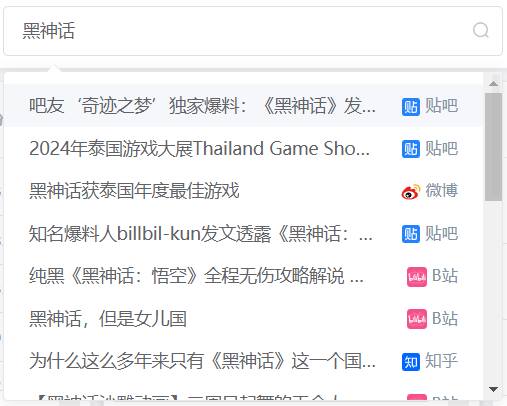
组件代码如下:
<template slot-scope="{ item }">
  <div style="display: flex; justify-content: space-between">
    <span style="max-width: 280px;overflow: hidden;text-overflow: ellipsis;white-space: nowrap;">
      {{ item.label }}
    </span>
    <span style="max-width: 80px; color: #8492a6; font-size: 13px; white-space: nowrap; " >
      <img :src="getResourceInfo(item.resource).icon" style="width: 16px; height: 16px; vertical-align: middle"/>
        {{ getResourceInfo(item.resource).title }}
    </span>
  </div>
</template>
具体的逻辑可以去看我的源码,我这里就不贴整个代码了。
这些小组件并不是一开始就想好要做的,大部分都是我突然灵机一动想起来才做的。可能有些东西看起来并不是那么有用,但是看着小网站的内容不断丰富起来感觉非常不错。这段时间我已经把全部的源码都提交到Gitee上了,但是还没来得及review,所以后面我除了分享怎么做组件外,还会跟大家分享我这4个月来遇到的一些BUG和问题,以及为什么我的代码要这样写。
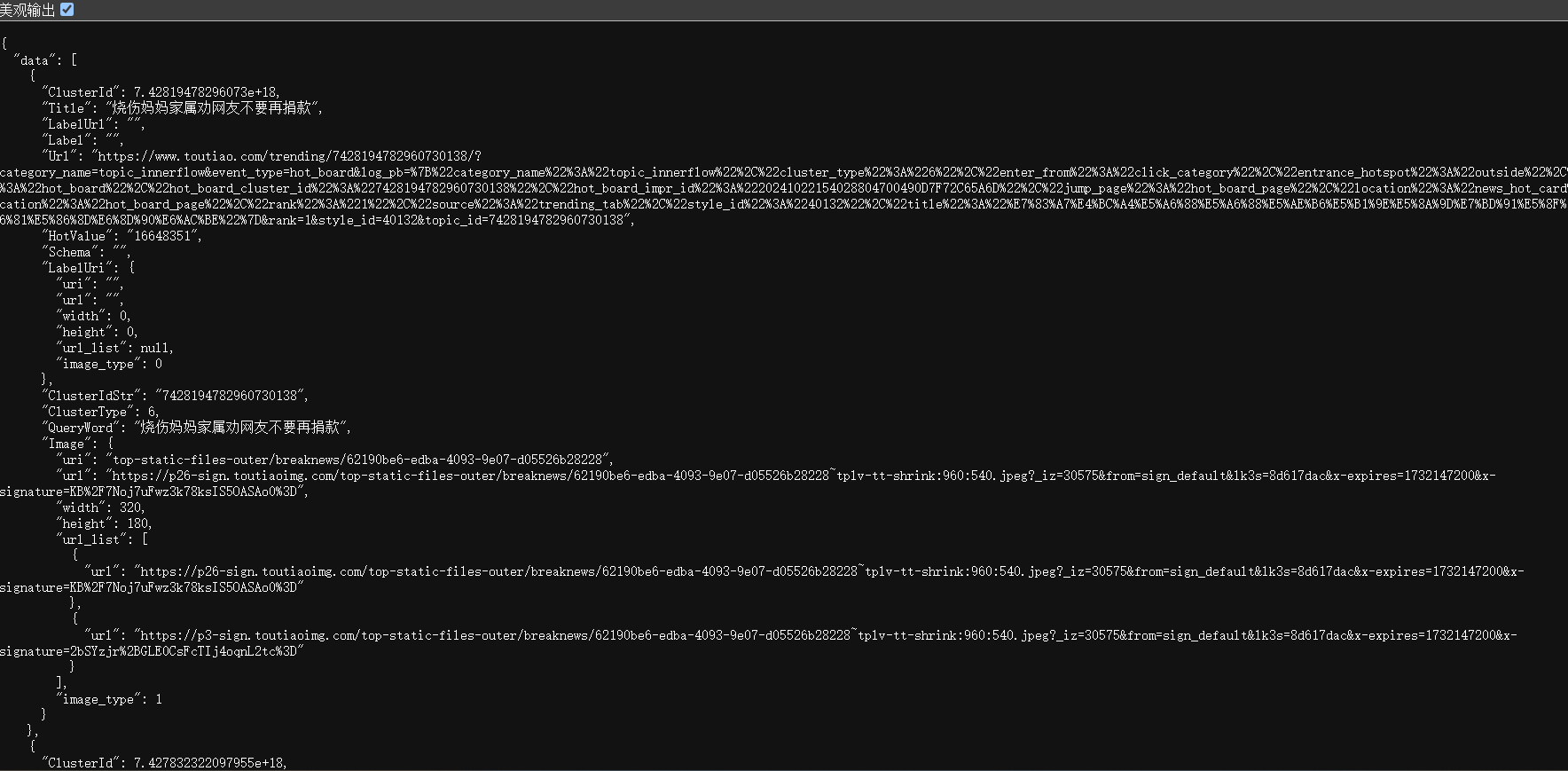
头条的热搜接口返回的一串JSON格式数据,这就很简单了,省的我们去解析dom,访问链接是:[https://www.toutiao.com/hot-event/hot-board/?origin=toutiao_pc)
ToutiaoHotSearchJob.java
package com.summo.sbmy.job.toutiao;

import com.alibaba.fastjson.JSONArray;
import com.alibaba.fastjson.JSONObject;
import com.google.common.collect.Lists;
import com.summo.sbmy.common.model.dto.HotSearchDetailDTO;
import com.summo.sbmy.dao.entity.SbmyHotSearchDO;
import com.summo.sbmy.service.SbmyHotSearchService;
import com.summo.sbmy.service.convert.HotSearchConvert;
import com.xxl.job.core.biz.model.ReturnT;
import com.xxl.job.core.handler.annotation.XxlJob;
import lombok.extern.slf4j.Slf4j;
import okhttp3.OkHttpClient;
import okhttp3.Request;
import okhttp3.Response;
import org.apache.commons.collections4.CollectionUtils;
import org.jsoup.Jsoup;
import org.jsoup.nodes.Document;
import org.jsoup.select.Elements;
import org.springframework.beans.factory.annotation.Autowired;
import org.springframework.stereotype.Component;

import javax.annotation.PostConstruct;
import java.io.IOException;
import java.util.*;
import java.util.concurrent.atomic.AtomicInteger;
import java.util.stream.Collectors;

import static com.summo.sbmy.cache.hotSearch.HotSearchCacheManager.CACHE_MAP;
import static com.summo.sbmy.common.enums.HotSearchEnum.TOUTIAO;

/**
 * @author summo
 * @version ToutiaoHotSearchJob.java, 1.0.0
 * @description  头条热搜Java爬虫代码
 * @date 2024年08月09
 */
@Component
@Slf4j
public class ToutiaoHotSearchJob {

    @Autowired
    private SbmyHotSearchService sbmyHotSearchService;

    @XxlJob("toutiaoHotSearchJob")
    public ReturnT<String> hotSearch(String param) throws IOException {
        log.info(" 头条热搜爬虫任务开始");
        try {
            //查询今日头条热搜数据
            OkHttpClient client = new OkHttpClient().newBuilder().build();
            Request request = new Request.Builder().url(
                    "https://www.toutiao.com/hot-event/hot-board/?origin=toutiao_pc").method("GET", null).build();
            Response response = client.newCall(request).execute();
            JSONObject jsonObject = JSONObject.parseObject(response.body().string());
            JSONArray array = jsonObject.getJSONArray("data");
            List<SbmyHotSearchDO> sbmyHotSearchDOList = Lists.newArrayList();
            for (int i = 0, len = array.size(); i < len; i++) {
                //获取知乎热搜信息
                JSONObject object = (JSONObject)array.get(i);
                //构建热搜信息榜
                SbmyHotSearchDO sbmyHotSearchDO = SbmyHotSearchDO.builder().hotSearchResource(
                        TOUTIAO.getCode()).build();
                //设置知乎三方ID
                sbmyHotSearchDO.setHotSearchId(object.getString("ClusterIdStr"));
                //设置文章连接
                sbmyHotSearchDO.setHotSearchUrl(object.getString("Url"));
                //设置文章标题
                sbmyHotSearchDO.setHotSearchTitle(object.getString("Title"));
                //设置热搜热度
                sbmyHotSearchDO.setHotSearchHeat(object.getString("HotValue"));
                //按顺序排名
                sbmyHotSearchDO.setHotSearchOrder(i + 1);
                sbmyHotSearchDOList.add(sbmyHotSearchDO);
            }
            if (CollectionUtils.isEmpty(sbmyHotSearchDOList)) {
                return ReturnT.SUCCESS;
            }
            //数据加到缓存中
            CACHE_MAP.put(TOUTIAO.getCode(), HotSearchDetailDTO.builder()
                    //热搜数据
                    .hotSearchDTOList(sbmyHotSearchDOList.stream().map(HotSearchConvert::toDTOWhenQuery).collect(Collectors.toList()))
                    //更新时间
                    .updateTime(Calendar.getInstance().getTime()).build());
            //数据持久化
            sbmyHotSearchService.saveCache2DB(sbmyHotSearchDOList);
            log.info(" 头条热搜爬虫任务结束");
        } catch (IOException e) {
            log.error("获取头条数据异常", e);
        }
        return ReturnT.SUCCESS;
    }

    @PostConstruct
    public void init() {
        // 启动运行爬虫一次
        try {
            hotSearch(null);
        } catch (IOException e) {
            log.error("启动爬虫脚本失败",e);
        }
    }
}
 官方公众号
官方公众号