ETJava Beta | Java
 注册
登录
注册
登录
注册
登录
注册
登录
在 .NET AOT 编程中,难免会在 泛型,序列化,以及反射的问题上纠结和反复纠错尝试,这篇我们就来好好聊一聊相关的处理方案。
研究过泛型的朋友应该都知道,从开放类型上产下来的封闭类型往往会有单独的 MethodTable,并共用 EEClass,对于值类型的泛型相当于是不同的个体,如果在 AOT Compiler 的过程中没有单独产生这样的个体信息,自然在运行时就会报错,这么说可能有点懵,举一个简单的例子。
    internal class Program
    {
        static void Main(string[] args)
        {
            var type = Type.GetType(Console.ReadLine());

            try
            {
                var mylist = typeof(List<>).MakeGenericType(type);

                var instance = Activator.CreateInstance(mylist);
                int count = (int)mylist.GetProperty("Count").GetValue(instance);
                Console.WriteLine(count);
            }
            catch (Exception ex)
            {
                Console.WriteLine(ex.ToString());
                Console.WriteLine(ex.Message);
            }
            Console.ReadLine();
        }
    }

    public class Location
    {
    }

从上图看直接抛了一个异常,主要原因在于 Location 被踢出了依赖图,那怎么办呢?很显然可以直接 new List<Location> 到依赖图中,但在代码中直接new是非常具有侵入性的操作,那如何让侵入性更小呢?自然就是借助 AOT 独有的 rd (Runtime Directives) 这种xml机制,具体可参见:https://github.com/dotnet/runtime/blob/main/src/coreclr/nativeaot/docs/rd-xml-format.md
rd机制非常强大,大概如下:
1)可以指定程序集,类型,方法作为编译图的根节点使用,和 ILLink 有部分融合。
2)可以手工的进行泛型初始化,也可以将泛型下的某方法作为根节点使用。
3)为Marshal和Delegate提供Pinvoke支持。
在 ilc 源码中是用 compilationRoots 来承载rd过去的根节点,可以一探究竟。
foreach (var rdXmlFilePath in Get(_command.RdXmlFilePaths))
{
    compilationRoots.Add(new RdXmlRootProvider(typeSystemContext, rdXmlFilePath));
}
有了这些知识就可以在 rd.xml 中实例化 List<Location> 了,参考如下:
<?xml version="1.0" encoding="utf-8" ?>
<Directives xmlns="http://schemas.microsoft.com/netfx/2013/01/metadata">
	<Application>
		<Assembly Name="Example_21_1">
			<Type Name="System.Collections.Generic.List`1[[Example_21_1.Location,Example_21_1]]" Dynamic="Required All" />
		</Assembly>
	</Application>
</Directives>
同时在 csproj 做一下引入即可。
<Project Sdk="Microsoft.NET.Sdk">
	<PropertyGroup>
		<OutputType>Exe</OutputType>
		<TargetFramework>net8.0</TargetFramework>
		<ImplicitUsings>enable</ImplicitUsings>
		<Nullable>enable</Nullable>
		<PublishAot>true</PublishAot>
		<InvariantGlobalization>true</InvariantGlobalization>
	</PropertyGroup>
	<ItemGroup>
		<RdXmlFile Include="rd.xml" />
	</ItemGroup>
</Project>
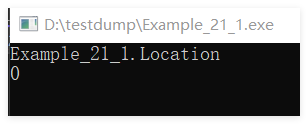
执行之后如下,要注意一点的是 Dynamic="Required All" 它可以把 List<Location> 下的所有方法和字段都注入到了依赖图中,比如下图中的 Count 属性方法。
序列化会涉及到大量的反射,而反射又需要得到大量的元数据支持,所以很多第三方的Json序列化无法实现,不过官方提供的Json序列化借助于 SourceGenerator 将原来 dll 中的元数据迁移到了硬编码中,从而变相的实现了AOT的Json序列化,参考代码如下:
namespace Example_21_1
{
    internal class Program
    {
        static void Main(string[] args)
        {
            var person = new Person()
            {
                Name = "john",
                Age = 30,
                BirthDate = new DateTime(1993, 5, 15),
                Gender = "Mail"
            };

            var jsonString = JsonSerializer.Serialize(person,
                                            SourceGenerationContext.Default.Person);

            Console.WriteLine(jsonString);
            Console.ReadLine();
        }
    }
}

[JsonSourceGenerationOptions(WriteIndented = true)]
[JsonSerializable(typeof(Person))]
internal partial class SourceGenerationContext : JsonSerializerContext { }

public class Person
{
    public int Age { get; set; }
    public string Name { get; set; }
    public DateTime BirthDate { get; set; }
    public string Gender { get; set; }
}
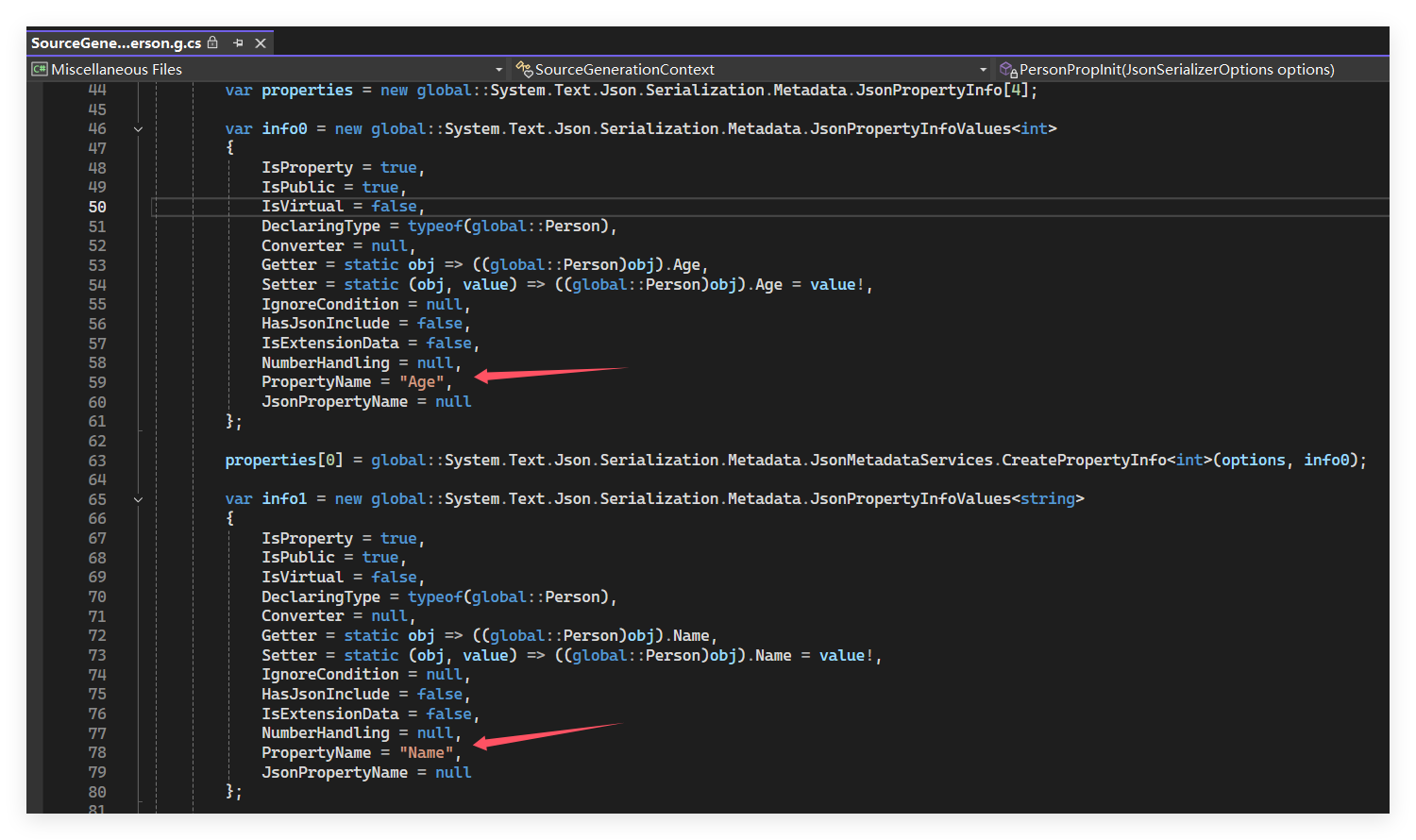
当用 VS 调试的时候,你会发现多了一个 SourceGenerationContext.Person.g.cs 文件,并且用 properties 数组承载了 Person 的元数据,截图如下:
反射其实也是一个比较纠结的问题,简单的反射AOT编译器能够轻松推测,但稍微需要上下文关联的就搞不定了,毕竟涉及到上下文关联需要大量的算力,而目前的AOT编译本身就比较慢了,所以暂时没有做支持,相信后续的版本会有所改进吧,接下来举一个例子演示下。
    internal class Program
    {
        static void Main(string[] args)
        {
            Invoke(typeof(Person));

            Console.ReadLine();
        }

        static void Invoke(Type type)
        {
            var props = type.GetProperties();

            foreach (var prop in props)
            {
                Console.WriteLine(prop);
            }
        }
    }

    public class Person
    {
        public int Age { get; set; }
        public string Name { get; set; }
        public DateTime BirthDate { get; set; }
        public string Gender { get; set; }
    }
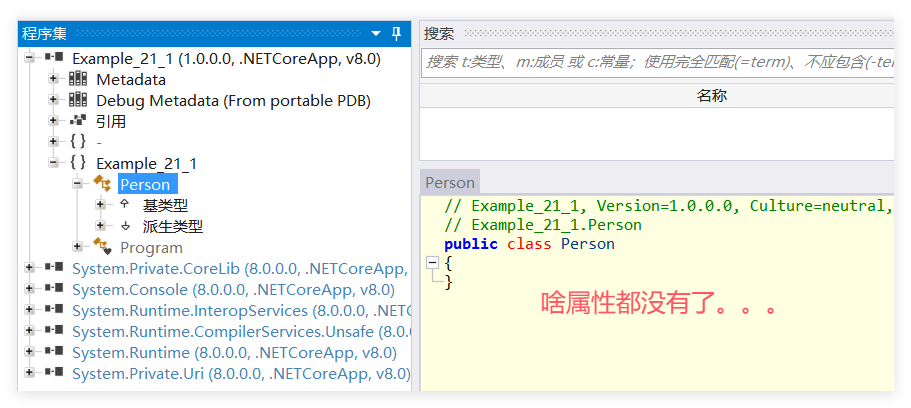
这段代码在 AOT中是提取不出属性的,因为 Invoke(typeof(Person)); 和 type.GetProperties 之间隔了一个 Type type 参数,虽然我们肉眼能知道这个代码的意图,但 ilc 的深度优先它不知道你需要 Person中的什么,所以它只保留了 Person 本身,如果你想直面观测的话,可以这样做:
<PublishAot>true</PublishAot> 改成 <PublishTrimmed>true</PublishTrimmed>截图如下,可以看到 Person 空空如也。
有了这个底子就比较简单了,为了让 Person 保留属性,可以傻乎乎的用 DynamicallyAccessedMembers 来告诉AOT我到底想要什么,比如 PublicProperties 就是所有的属性,当然也可以设置为 ALL。
        static void Invoke([DynamicallyAccessedMembers(DynamicallyAccessedMemberTypes.PublicProperties)] Type type)
        {
            var props = type.GetProperties();

            foreach (var prop in props)
            {
                Console.WriteLine(prop);
            }
        }
如果要想侵入性更小的话,可以使用 TrimmerRootDescriptor 这种外来的 xml 进行更高级别的定制,比如我不想要 Gender 字段 ,具体参考官方链接:https://github.com/dotnet/runtime/blob/main/docs/tools/illink/data-formats.md#xml-examples
<Project Sdk="Microsoft.NET.Sdk">
	<PropertyGroup>
		<OutputType>Exe</OutputType>
		<TargetFramework>net8.0</TargetFramework>
		<ImplicitUsings>enable</ImplicitUsings>
		<Nullable>enable</Nullable>
		<PublishAot>true</PublishAot>
		<InvariantGlobalization>true</InvariantGlobalization>
		<IlcGenerateMapFile>true</IlcGenerateMapFile>
	</PropertyGroup>
	<ItemGroup>
		<TrimmerRootDescriptor Include="link.xml" />
	</ItemGroup>
</Project>
然后就是 xml 配置。
<?xml version="1.0" encoding="utf-8" ?>
<linker>
	<assembly fullname="Example_21_1">
		<type fullname="Example_21_1.Person">
			<property signature="System.Int32 Age" />
			<property signature="System.String Name" />
			<property signature="System.DateTime BirthDate" />
		</type>
	</assembly>
</linker>
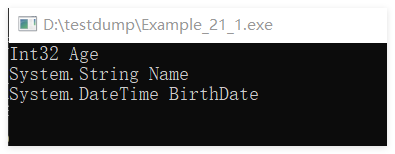
从下图看,一切都是那么完美。
在将程序发布成AOT的过程中,总会遇到这样或者那样的坑,这篇算是提供点理论基础给后来者吧,同时 Runtime Directives 这种无侵入的实例化方式,很值得关注哈。

 官方公众号
官方公众号