ETJava Beta | Java
 注册
登录
注册
登录
注册
登录
注册
登录
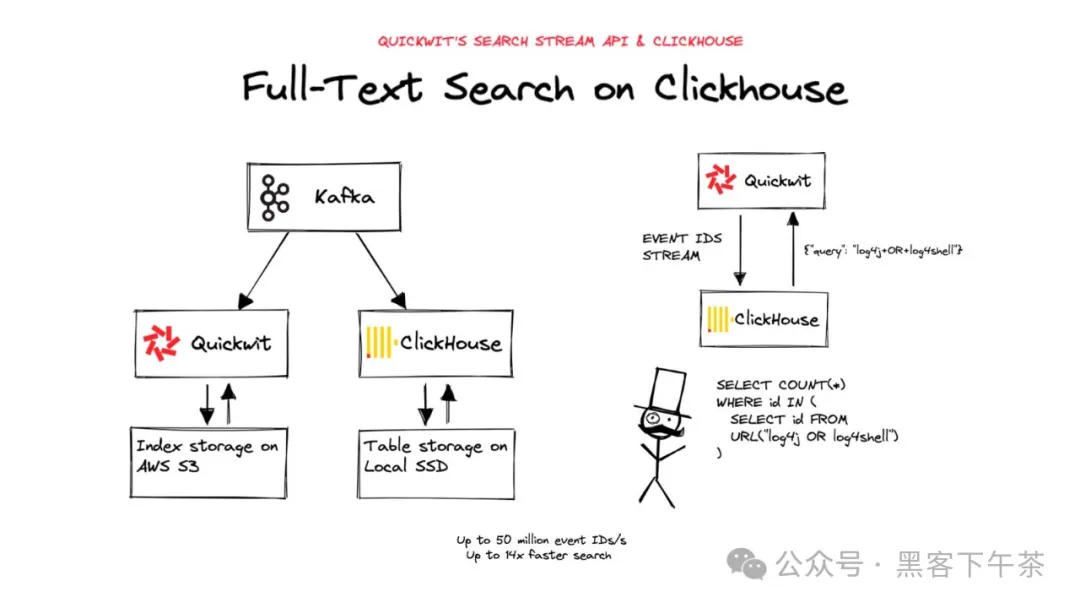
本指南将帮助您使用 Quickwit 的搜索流功能为知名的 OLAP 数据库 ClickHouse 添加全文搜索。Quickwit 暴露了一个 REST 端点,可以极快地(每秒最多 5000 万条)流式传输匹配搜索查询的 ID 或其他属性,ClickHouse 可以轻松地使用它们进行连接查询。
我们将采用 GitHub 存档数据集,该数据集收集了超过 30 亿条 GitHub 事件:PullRequestEvent、IssuesEvent 等。您可以深入阅读 ClickHouse 制作的这个 优秀分析,以更好地理解数据集。我们从中获得了大量灵感,并非常感谢他们分享这些内容。
curl -L https://install.quickwit.io | sh
cd quickwit-v*/
./quickwit run
在 [启动 Quickwit] 之后,我们需要创建一个配置好的索引以接收这些事件。首先让我们看一下要导入的数据。以下是一个事件示例:
{
  "id": 11410577343,
  "event_type": "PullRequestEvent",
  "actor_login": "renovate[bot]",
  "repo_name": "dmtrKovalenko/reason-date-fns",
  "created_at": 1580515200000,
  "action": "closed",
  "number": 44,
  "title": "Update dependency rollup to ^1.31.0",
  "labels": [],
  "ref": null,
  "additions": 5,
  "deletions": 5,
  "commit_id": null,
  "body":"This PR contains the following updates..."
}
我们不需要索引上面描述的所有字段,因为对于我们的全文搜索教程来说,title 和 body 是我们感兴趣的字段。
id 对于在 ClickHouse 中执行 JOIN 操作很有帮助,而 created_at 和 event_type 也可能对时间戳修剪和过滤有好处。
version: 0.7
index_id: gh-archive
# 默认情况下,索引将存储在您的数据目录中,
# 但您可以将其存储在 s3 或自定义路径上,如下所示:
# index_uri: s3://my-bucket/gh-archive
# index_uri: file://my-big-ssd-harddrive/
doc_mapping:
  store_source: false
  field_mappings:
    - name: id
      type: u64
      fast: true
    - name: created_at
      type: datetime
      input_formats:
        - unix_timestamp
      output_format: unix_timestamp_secs
      fast_precision: seconds
      fast: true
    - name: event_type
      type: text
      tokenizer: raw
    - name: title
      type: text
      tokenizer: default
      record: position
    - name: body
      type: text
      tokenizer: default
      record: position
  timestamp_field: created_at

search_settings:
  default_search_fields: [title, body]
curl -o gh-archive-index-config.yaml https://raw.githubusercontent.com/quickwit-oss/quickwit/main/config/tutorials/gh-archive/index-config-for-clickhouse.yaml
./quickwit index create --index-config gh-archive-index-config.yaml
数据集是一个压缩的 NDJSON 文件。让我们将其索引。
wget https://quickwit-datasets-public.s3.amazonaws.com/gh-archive/gh-archive-2021-12-text-only.json.gz
gunzip -c gh-archive-2021-12-text-only.json.gz | ./quickwit index ingest --index gh-archive
您可以使用 search 命令并查找 tantivy 单词来检查它是否正常工作:
./quickwit index search --index gh-archive --query "tantivy"
我们现在可以使用搜索流端点获取一些 ID。让我们先用一个简单的查询和 csv 输出格式开始流式传输。
curl "http://127.0.0.1:7280/api/v1/gh-archive/search/stream?query=tantivy&output_format=csv&fast_field=id"
在接下来的部分中,我们将使用 click_house 二进制输出格式来加速查询。
让我们暂时离开 Quickwit 并 安装 ClickHouse。启动一个 ClickHouse 服务器。
安装完成后,启动一个客户端并执行以下 SQL 语句:
CREATE DATABASE "gh-archive";
USE "gh-archive";


CREATE TABLE github_events
(
    id UInt64,
    event_type Enum('CommitCommentEvent' = 1, 'CreateEvent' = 2, 'DeleteEvent' = 3, 'ForkEvent' = 4,
                    'GollumEvent' = 5, 'IssueCommentEvent' = 6, 'IssuesEvent' = 7, 'MemberEvent' = 8,
                    'PublicEvent' = 9, 'PullRequestEvent' = 10, 'PullRequestReviewCommentEvent' = 11,
                    'PushEvent' = 12, 'ReleaseEvent' = 13, 'SponsorshipEvent' = 14, 'WatchEvent' = 15,
                    'GistEvent' = 16, 'FollowEvent' = 17, 'DownloadEvent' = 18, 'PullRequestReviewEvent' = 19,
                    'ForkApplyEvent' = 20, 'Event' = 21, 'TeamAddEvent' = 22),
    actor_login LowCardinality(String),
    repo_name LowCardinality(String),
    created_at Int64,
    action Enum('none' = 0, 'created' = 1, 'added' = 2, 'edited' = 3, 'deleted' = 4, 'opened' = 5, 'closed' = 6, 'reopened' = 7, 'assigned' = 8, 'unassigned' = 9,
                'labeled' = 10, 'unlabeled' = 11, 'review_requested' = 12, 'review_request_removed' = 13, 'synchronize' = 14, 'started' = 15, 'published' = 16, 'update' = 17, 'create' = 18, 'fork' = 19, 'merged' = 20),
    comment_id UInt64,
    body String,
    ref LowCardinality(String),
    number UInt32,
    title String,
    labels Array(LowCardinality(String)),
    additions UInt32,
    deletions UInt32,
    commit_id String
) ENGINE = MergeTree ORDER BY (event_type, repo_name, created_at);
我们创建了第二个数据集 gh-archive-2021-12.json.gz,其中收集了所有事件,即使是没有文本的事件。因此最好将其插入 ClickHouse,但如果您没有时间,可以使用 Quickwit 使用的数据集 gh-archive-2021-12-text-only.json.gz。
wget https://quickwit-datasets-public.s3.amazonaws.com/gh-archive/gh-archive-2021-12.json.gz
gunzip -c gh-archive-2021-12.json.gz | clickhouse-client -d gh-archive --query="INSERT INTO github_events FORMAT JSONEachRow"
让我们检查一下是否正常工作:
# Top repositories by stars
SELECT repo_name, count() AS stars
FROM github_events
GROUP BY repo_name
ORDER BY stars DESC LIMIT 5

┌─repo_name─────────────────────────────────┬─stars─┐
│ test-organization-kkjeer/app-test-2       │ 16697 │
│ test-organization-kkjeer/bot-validation-2 │ 15326 │
│ microsoft/winget-pkgs                     │ 14099 │
│ conda-forge/releases                      │ 13332 │
│ NixOS/nixpkgs                             │ 12860 │
└───────────────────────────────────────────┴───────┘
ClickHouse 有一个名为 URL 表引擎 的有趣功能,可以从远程 HTTP/HTTPS 服务器查询数据。
这正是我们所需要的:通过创建指向 Quickwit 搜索流端点的表,我们可以从 ClickHouse 获取匹配查询的 ID。
SELECT count(*) FROM url('http://127.0.0.1:7280/api/v1/gh-archive/search/stream?query=log4j+OR+log4shell&fast_field=id&output_format=click_house_row_binary', RowBinary, 'id UInt64')

┌─count()─┐
│  217469 │
└─────────┘

1 row in set. Elapsed: 0.068 sec. Processed 217.47 thousand rows, 1.74 MB (3.19 million rows/s., 25.55 MB/s.)
我们在 0.068 秒内获取了 217,469 个 u64 ID。这是每秒 319 万行,还不错。如果快速字段已经被缓存,还可以提高吞吐量。
让我们再做一个更有趣的查询示例,匹配 log4j 或 log4shell 并按天统计事件数:
SELECT
    count(*),
    toDate(fromUnixTimestamp64Milli(created_at)) AS date
FROM github_events
WHERE id IN (
    SELECT id
    FROM url('http://127.0.0.1:7280/api/v1/gh-archive/search/stream?query=log4j+OR+log4shell&fast_field=id&output_format=click_house_row_binary', RowBinary, 'id UInt64')
)
GROUP BY date

Query id: 10cb0d5a-7817-424e-8248-820fa2c425b8

┌─count()─┬───────date─┐
│      96 │ 2021-12-01 │
│      66 │ 2021-12-02 │
│      70 │ 2021-12-03 │
│      62 │ 2021-12-04 │
│      67 │ 2021-12-05 │
│     167 │ 2021-12-06 │
│     140 │ 2021-12-07 │
│     104 │ 2021-12-08 │
│     157 │ 2021-12-09 │
│   88110 │ 2021-12-10 │
│    2937 │ 2021-12-11 │
│    1533 │ 2021-12-12 │
│    5935 │ 2021-12-13 │
│  118025 │ 2021-12-14 │
└─────────┴────────────┘

14 rows in set. Elapsed: 0.124 sec. Processed 8.35 million rows, 123.10 MB (67.42 million rows/s., 993.55 MB/s.)
我们可以看到 2021-12-10 和 2021-12-14 有两个峰值。
我们仅通过这个小部分的 GitHub 存档数据集初步了解了从 ClickHouse 进行全文搜索的功能。
您可以从我们的公共 S3 存储桶下载完整数据集进行尝试。
我们提供了从 2015 年到 2021 年的每月压缩 ndjson 文件。以下是 2015-01 的链接:
搜索流端点功能强大,可以在多 TB 数据集上在不到 2 秒的时间内向 ClickHouse 流式传输 1 亿个 ID。
您可以放心地在更大的数据集上使用搜索流功能。
 官方公众号
官方公众号